DXF vs DWG: What's the Difference and Which One to Send
DXF vs DWG in practice: DWG is AutoCAD’s binary native format, DXF is the documented exchange format. When to send which, how to convert between them, and exactly what gets lost.
 CADCraft AI Editorial
The difference in one line: DWG is AutoCAD's native, binary, undocumented format. DXF is the documented exchange format that almost every CAD, CAM and vector program can read. Send DWG when the other person uses AutoCAD and needs the drawing back exactly as it was. Send DXF when you don't know what they use, when the file goes to a laser cutter or CNC machine, or when it needs to open in a browser tool such as the CADCraft online editor, which reads DXF only.
cadcraft.org is an independent guide, not the official site.
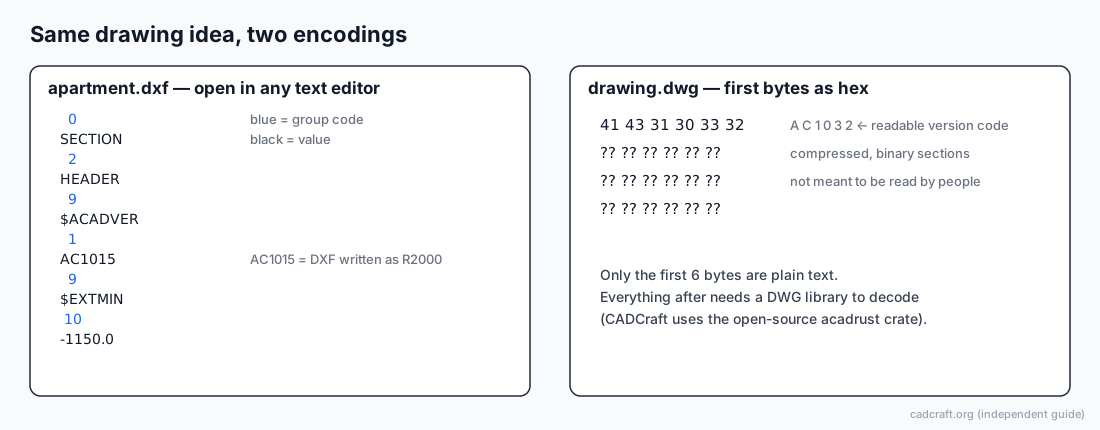
Left: the real first lines of the CADCraft sample apartment.dxf. Right: a DWG is unreadable beyond its version code.
How to choose in 30 seconds
- Ask what the recipient runs. AutoCAD or a DWG-based program, and they'll edit the file: send DWG in a version they can open. Anything else, or "not sure": send DXF.
- Ask for a version if it goes to a machine. Laser, plasma and router software often reads only simple DXF, and many shops ask for R12. Find this out before you export, not after a rejected job.
- Check for 3D or exotic objects. If the drawing has 3D solids, surfaces or third-party objects, DXF may carry them as raw data that other programs ignore. Flatten or explode what the recipient doesn't need.
- Send a PDF alongside. Whatever the format, a PDF of the same sheet lets the recipient check that what they opened matches what you meant.
How to convert between DXF and DWG with CADCraft
Both directions need the desktop app (download). The online version can't read or write DWG.
DWG → DXF
- File ▸ Open… and pick the
.dwg(R13 through the 2018 format). - File ▸ Save As…, choose DXF, and pick a version from 2000 to 2018.
- Keep the original DWG. The DXF contains only what CADCraft read.
DXF → DWG
- File ▸ Open… and pick the
.dxf. - File ▸ Save As…, choose DWG, and pick a version from 2000 to 2018 (2018 is the default).
From a script, cadcraft-cli convert handles DWG/DXF to SVG or PNG. To produce a DXF or DWG headlessly, open and save in one run with cadcraft-cli run input.dwg --save output.dxf. If you rely on this in a pipeline, check the flags against the official README for your version.
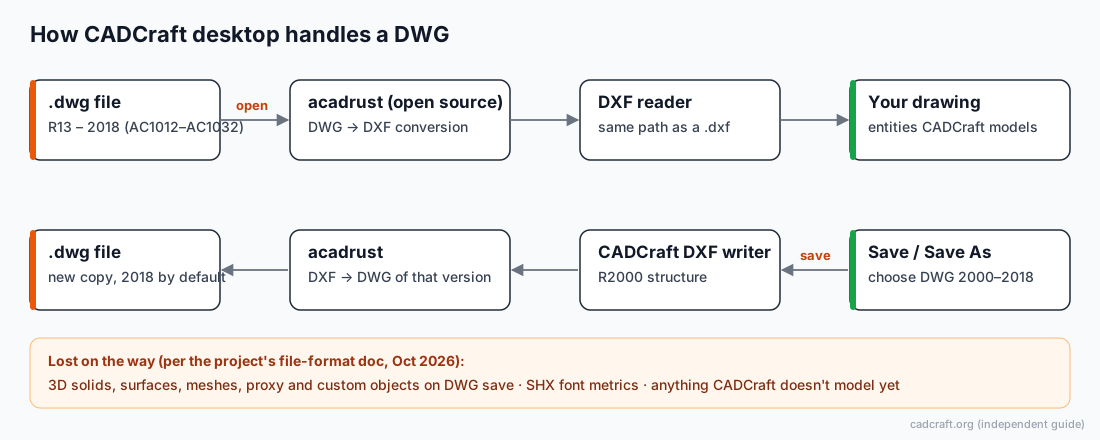
Why this diagram matters: in CADCraft, DWG is a wrapper around DXF. Opening a DWG converts it to DXF with the open-source acadrust library. Saving writes CADCraft's own DXF (R2000 structure) and converts that to the DWG version you picked. Anything that doesn't survive the DXF path doesn't survive the DWG path either, and DWG save loses a few more things (see below).
DXF vs DWG compared
| DWG | DXF | |
|---|---|---|
| Encoding | Binary | ASCII text (most common) or binary |
| Specification | Not published by Autodesk; other programs rely on reverse-engineered libraries | Autodesk publishes a DXF reference |
| Readable in a text editor | No, only the 6-byte version code (e.g. AC1032) | Yes (ASCII): group code on one line, value on the next |
| Typical file size | Smaller (compressed) | Larger for the same drawing; binary DXF is smaller than ASCII |
| Current version | 2018 format (AC1032), still written by AutoCAD 2027 | Versioned the same way, R12 through 2018 |
| Who reads it | AutoCAD and DWG-licensed programs; open-source tools via libraries, with gaps | Nearly every CAD, CAM, GIS and vector tool |
| Best for | Round trips between AutoCAD users | Exchange with unknown software, CNC/laser, web tools |
| CADCraft desktop | Opens R13–2018, saves 2000–2018 | Reads R12–2018 (binary from R13), writes 2000–2018 |
| CADCraft online | Not supported | Reads and saves DXF |
What actually changes when you convert (in CADCraft)
These come from the project's own file-format document (reviewed October 2026), not from testing a single file. They're the specifics most comparisons leave out.
- Unmodeled objects. In DXF, 3D solids, surfaces, meshes, proxy entities and other objects CADCraft can't edit are kept as raw data and written back as read. In DWG save, the conversion library drops them. So DXF is the safer format for carrying a drawing through CADCraft.
- Header variables. AutoCAD writes about 280 drawing settings into a file; CADCraft writes 36. Settings outside that set go back to defaults after a save.
- Fonts. SHX fonts aren't read. Text keeps its content, but CADCraft draws it with its own stroke font or a TrueType stand-in, so widths can differ.
- Multileaders. A multileader with several landings is folded into one.
- Polyface meshes are flattened to 3D polylines.
- Viewport layer overrides. Per-viewport frozen layers survive in DXF. In DWG, the converter doesn't yet write AutoCAD's standard field for them; they survive a CADCraft round trip only through extra data.
- Text encoding. Pre-2007 DXF files in Chinese, Japanese or Korean code pages are decoded on read. On write, CADCraft stores non-ASCII characters as
\U+escapes, which AutoCAD reads correctly. - Old DXF. CADCraft reads ASCII R12 DXF but can't write R12, and can't read R12 binary DXF.
Troubleshooting
"The shop says my DXF won't import." Their software probably wants R12 or a simpler subset. CADCraft can't write R12. Ask whether DXF 2000 works; if it doesn't, export from a tool that writes R12. Before exporting, explode splines and multiline text, which simple CAM importers often skip.
"My DXF opened in another program with missing hatches or dimensions." The receiving program may draw dimensions from their saved block geometry or ignore some entity types. Send a PDF with the DXF so the recipient can compare.
"I converted DWG → DXF → DWG and the file got smaller." Something was probably dropped: 3D objects, proxy objects, or settings beyond the 36 header variables. Compare object counts with cadcraft-cli info on both files.
"The online editor won't take my file." If it's a .dwg, the online version shows a notice that DWG files can't be opened online yet. Convert to DXF on the desktop first. If it's a DXF and the canvas stays blank, run zoom to extents (zoom, Enter, e, Enter).
FAQ
Is DXF lower quality than DWG?
No. Both store vector geometry at full precision. The difference is coverage: DWG can carry every object AutoCAD creates, while what survives in a DXF depends on what the program that writes it, and the one that reads it, understand.
Should I send DXF or DWG to a laser cutter or CNC shop?
Usually DXF, and often a specific old version such as R12, because many CAM programs read only simple DXF. Ask the shop which version they want. CADCraft writes DXF 2000 to 2018, not R12.
Why does the CADCraft online editor accept DXF but not DWG?
The web build of CADCraft reads DXF only. DWG goes through a separate conversion library in the desktop app. Open the DWG on the desktop, save it as DXF, and the online editor can open it.
Can I open a DXF file in a text editor?
Yes, if it is an ASCII DXF. It is a list of group codes and values, two lines per item. Binary DXF files exist too; they are smaller but not human-readable.
Related
- CAD file formats explained: DWG, DXF, STEP, STL, PDF and when to use each
- How to open a DWG file without AutoCAD
- Open the CADCraft online editor (DXF)
- Download the desktop app (DWG and DXF)