CAD File Formats Explained: Which One You Have and How to Open It
A practical guide to CAD file formats: DWG, DXF, DWT, STEP, IGES, STL, 3MF, DGN, PDF, SVG and the side files like .bak and .shx. What each is for, what opens it, and what to ask for.
 CADCraft AI Editorial
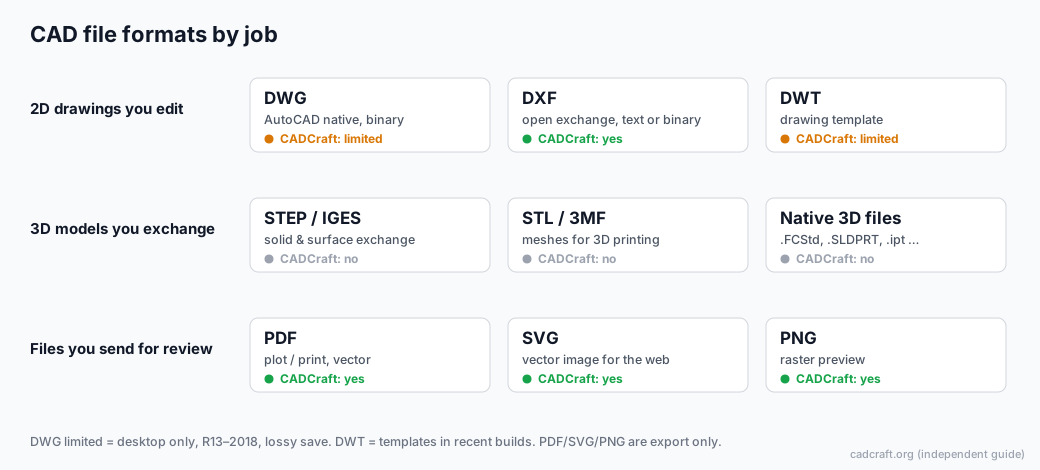
Quick answer: look at the file extension and match it to the job.
- 2D drawing you'll edit:
.dwg(AutoCAD native) or.dxf(open exchange). - 3D part from another CAD program:
.step/.stp, or.iges/.igsfor older work. - 3D printing:
.stlor.3mf. - Review only:
.pdf.
To open DWG and DXF for free, use the CADCraft desktop app. DXF alone also opens in the online editor. For STEP and STL you need a 3D tool such as FreeCAD; CADCraft doesn't open them.
cadcraft.org is an independent guide, not the official site.
Identify a CAD file you've been sent
- Show file extensions. On Windows: File Explorer ▸ View ▸ Show ▸ File name extensions. On macOS: Finder ▸ Settings ▸ Advanced ▸ Show all filename extensions. Many "unknown file" problems are a hidden
.dwgor.bak. - Find the row in the table below. It tells you what the format is for and what opens it.
- For DWG, read the version. The first six bytes are a plain-text code such as
AC1032(the 2018 format). On macOS or Linux:head -c 6 file.dwg. The DWG guide has a full code table and a PowerShell version. - For DXF, peek inside. Open it in a text editor. If you see lines like
SECTIONand$ACADVER, it's ASCII DXF, and the value after$ACADVERis its version. If it's unreadable, it's binary DXF. - Open it in the right tool, and keep the original before you save anything.
CAD file formats at a glance
| Extension | What it is | Used for | Open it with (free) | CADCraft |
|---|---|---|---|---|
.dwg | AutoCAD native drawing, binary | 2D drafting, AutoCAD exchange | CADCraft desktop, DWG viewers | Desktop: opens R13–2018, saves 2000–2018 |
.dxf | Drawing Exchange Format, documented, ASCII or binary | Exchange with any CAD/CAM tool, laser and CNC | CADCraft desktop and online, LibreCAD, most CAD tools | Reads R12–2018, writes 2000–2018 |
.dwt | AutoCAD drawing template | Starting new drawings with set layers and styles | AutoCAD-compatible tools | File ▸ New from Template… in the menu |
.dwf / .dwfx | Autodesk review/publish format | Sending drawings for markup | Autodesk viewers | No |
.dgn | MicroStation (Bentley) drawing | Infrastructure, civil, rail | MicroStation, some converters | No |
.step / .stp | ISO 10303 neutral 3D solid | Part and assembly exchange between 3D CAD programs | FreeCAD | No |
.iges / .igs | Older neutral 3D surfaces/curves | Legacy surface exchange | FreeCAD | No |
.stl | Triangle mesh, no units or colour | 3D printing | Slicers, FreeCAD, OpenSCAD (import) | No |
.3mf | Mesh with units, colours, print settings | 3D printing | Slicers | No |
.sldprt, .ipt, .f3d, .FCStd | Native files of SolidWorks, Inventor, Fusion, FreeCAD | Editing in their own program | Mostly the program itself (.FCStd in FreeCAD) | No |
.scad | OpenSCAD source code (text) | Parametric parts defined in code | OpenSCAD | No |
.pdf | Plotted sheet, vector | Review, printing, archive | Any PDF reader | Export: File ▸ Export to PDF…, PLOT |
.svg | Vector image | Web, docs, vector editors | Browsers, Inkscape | Export (and cadcraft-cli convert) |
.png | Raster image | Previews, issue trackers | Anything | Export (2400×1600 from the CLI) |
Side files you'll find next to drawings
These aren't drawings, but people send them by accident, or need them and don't know it:
| Extension | What it is | What to do |
|---|---|---|
.bak | AutoCAD backup of the previous save | Copy it, rename the copy to .dwg, open it. This is often how a "corrupted" drawing gets rescued |
.sv$ | AutoCAD autosave | Same trick: copy and rename to .dwg |
.dwl, .dwl2 | AutoCAD lock files | Safe to delete when nobody has the drawing open |
.shx | Compiled AutoCAD font | CADCraft doesn't read SHX; text falls back to its stroke font or a TrueType font you set with FONTALT |
.lin, .pat | Linetype and hatch pattern definitions | CADCraft loads user .lin/.pat files, but skips shape (SHX) elements inside linetypes |
.ctb, .stb | Plot style tables | Not read by CADCraft; it uses its own JSON plot styles |
.lsp | AutoLISP routine | CADCraft loads .lsp with APPLOAD; Visual LISP vlax- functions and DCL dialogs aren't supported |
The CADCraft details in both tables come from the project's README and file-format document (October 2026). Builds move quickly, so check the release notes for the version you install.
Open, save and export in CADCraft
The desktop app and the online editor share the same menus. Everything file-related is under File:
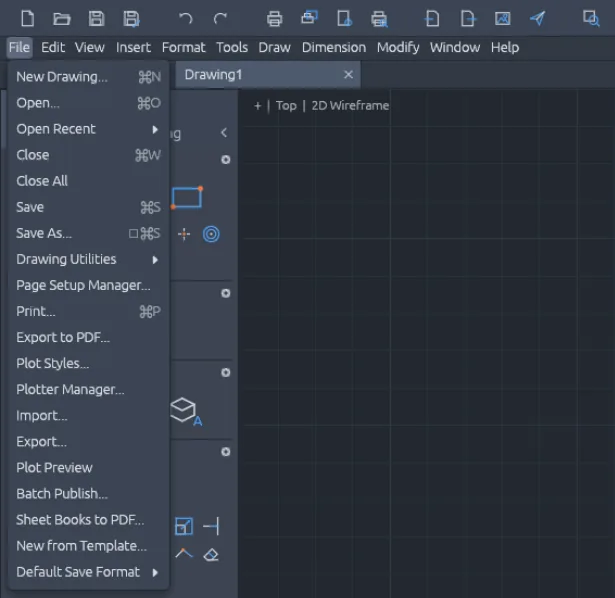
The File menu in the CADCraft web build hosted at cadcraft.org/online.
- Open… (Ctrl+O / ⌘O): DWG and DXF on the desktop, DXF only online.
- Save As…: choose DXF or DWG and a version from 2000 to 2018 (desktop). Online, files are saved as DXF and downloaded to your computer.
- Export to PDF… and Print…/PLOT: vector PDF, including paper-space layouts.
- Export…: SVG and PNG.
What you lose on save. Entities CADCraft doesn't model yet aren't kept, and DWG save also drops 3D solids, surfaces and proxy objects. DXF save keeps more of them as raw data. The DXF vs DWG article lists what changes and why.
On the free plan, online drawings stay in your browser. CADCraft Online Pro ($4.9/month or $29/year) adds cloud drawings, version history and share links. You don't need it to open or export files.
Troubleshooting
"The file has no extension." Email clients sometimes strip it. Read the first bytes: AC10 followed by two digits means DWG; text starting with 0 and SECTION means DXF; ISO-10303-21 means STEP; solid at the start, or an unreadable binary file of triangles, usually means STL.
"It opens but everything is tiny or missing." Zoom to extents: type zoom, Enter, e, Enter. Geometry far from the origin, or one stray point, makes a drawing look empty.
"The supplier sent STEP, but I need a 2D drawing." Open the STEP in a 3D tool such as FreeCAD, make a 2D projection or drawing page there, and export it as DXF. CADCraft can then open the DXF.
"Text is in the wrong font or boxes appear." The drawing uses SHX fonts or characters your system fonts don't cover. Install a wide-coverage font such as Noto Sans CJK and set it with FONTALT or FONTFALLBACK.
"The online editor says DWG files can't be opened." That's expected: the web version reads DXF only. Convert on the desktop first.
FAQ
What is the most common CAD file format?
For 2D drawings it is DWG, AutoCAD’s native format, with DXF as the exchange version most other programs read. For 3D exchange between different CAD programs, STEP is the usual neutral choice; for 3D printing it is STL or 3MF.
Which CAD format should I ask a client or supplier for?
For 2D drawings you will edit: DWG if you use AutoCAD or a DWG-capable tool, otherwise DXF. For 3D parts: STEP. For review only: PDF. Ask for the version too, for example DWG 2018 or DXF 2000.
Can CADCraft open STEP, STL or DGN files?
No. CADCraft is a 2D-focused drafting application. It opens DWG (desktop, R13–2018) and DXF, and exports PDF, SVG and PNG. For STEP and STL, use a 3D tool such as FreeCAD.
What is a .bak file next to my DWG?
It is AutoCAD’s backup of the previous save. Copy it, rename the copy’s extension from .bak to .dwg, and open it like any drawing. Lock files (.dwl, .dwl2) can be deleted once nobody has the drawing open.
Which format works in the CADCraft online editor?
DXF only. The online editor at cadcraft.org/online reads and saves DXF. Convert DWG to DXF in the desktop app first.
Related
- How to open a DWG file without AutoCAD: step by step, with version codes
- DXF vs DWG: which to send, and what a conversion changes
- Open source CAD: which free tool handles which format
- CADCraft tutorials: save, open and export, lesson 8
- Download CADCraft · Use CADCraft online