How to Open a DWG File Without AutoCAD
Open a DWG file for free: check its version code, open it in the CADCraft desktop app (DWG R13–2018), convert it to PNG or SVG from the command line, or save it as DXF for the browser.
 CADCraft AI Editorial
Short answer: install the free CADCraft desktop app from the download page, then use File ▸ Open… and pick the .dwg. The desktop app opens DWG from R13 up to the 2018 format, and that range includes files saved by AutoCAD 2018 through 2027. If you only need a picture, run cadcraft-cli convert drawing.dwg drawing.png. If you want to keep working in the browser, save a DXF copy first. The online editor does not read DWG.
cadcraft.org is an independent guide, not the official site. CADCraft is made by the ArtCraft team: see getartcraft.com/apps/cadcraft.
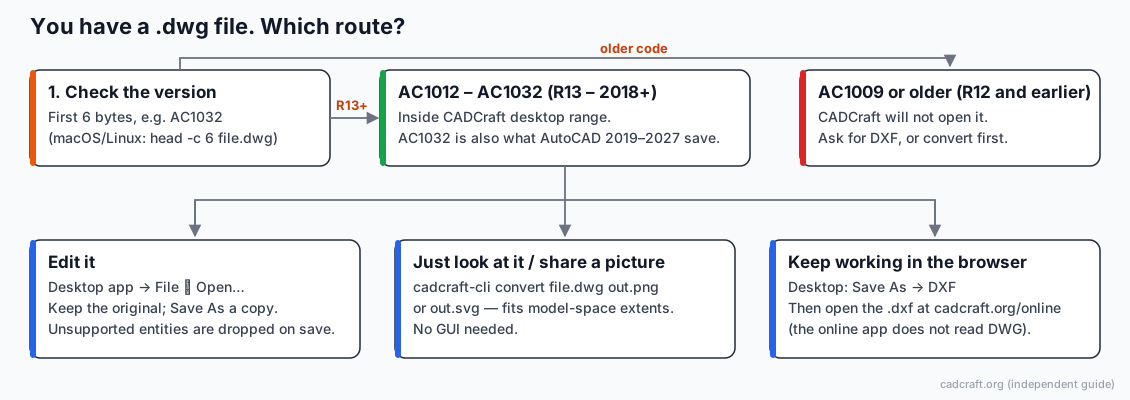
Step 1: Find out which DWG version you have
Most "this file won't open" problems come down to the version. A DWG file begins with a six-character version code in plain text, so you can read it without any CAD software.
On macOS or Linux:
head -c 6 drawing.dwg; echo
On Windows, in PowerShell 7:
-join [char[]](Get-Content .\drawing.dwg -AsByteStream -TotalCount 6)
In the older Windows PowerShell 5.1, replace -AsByteStream with -Encoding Byte.
| Code | DWG format | Saved by | Opens in CADCraft desktop? |
|---|---|---|---|
| AC1009 or lower | R12 and earlier | AutoCAD R12 and older | No |
| AC1012 | R13 | AutoCAD R13 | Listed as supported, not yet tested by the project |
| AC1014 | R14 | AutoCAD R14 | Listed as supported, not yet tested by the project |
| AC1015 | 2000 | AutoCAD 2000–2002 | Yes |
| AC1018 | 2004 | AutoCAD 2004–2006 | Yes |
| AC1021 | 2007 | AutoCAD 2007–2009 | Yes |
| AC1024 | 2010 | AutoCAD 2010–2012 | Yes |
| AC1027 | 2013 | AutoCAD 2013–2017 | Yes |
| AC1032 | 2018 | AutoCAD 2018 through 2027 | Yes |
The last row matters. Autodesk hasn't changed the DWG format since 2018, so a drawing from AutoCAD 2026 is still AC1032. "Opens DWG up to 2018" therefore covers new files too. The R13/R14 rows and the testing notes come from the project's own file-format document (October 2026).
Step 2: Open the DWG in the desktop app
- Download the installer for your system from the download page. Windows has a 64-bit MSI installer, macOS a universal DMG (Apple silicon and Intel), and Linux a Flatpak, AppImage,
.debor.rpm. The links point to the official GitHub releases. - Start CADCraft and choose File ▸ Open… (Ctrl+O, or ⌘O on a Mac).
- Pick the
.dwg. Under the hood the desktop app converts the DWG to DXF with the open-source acadrust library and reads that DXF. - If the drawing seems empty, type
zoomat the command line, press Enter, then typeeand press Enter again. This zooms to extents. Geometry far from the origin often looks like a blank screen.
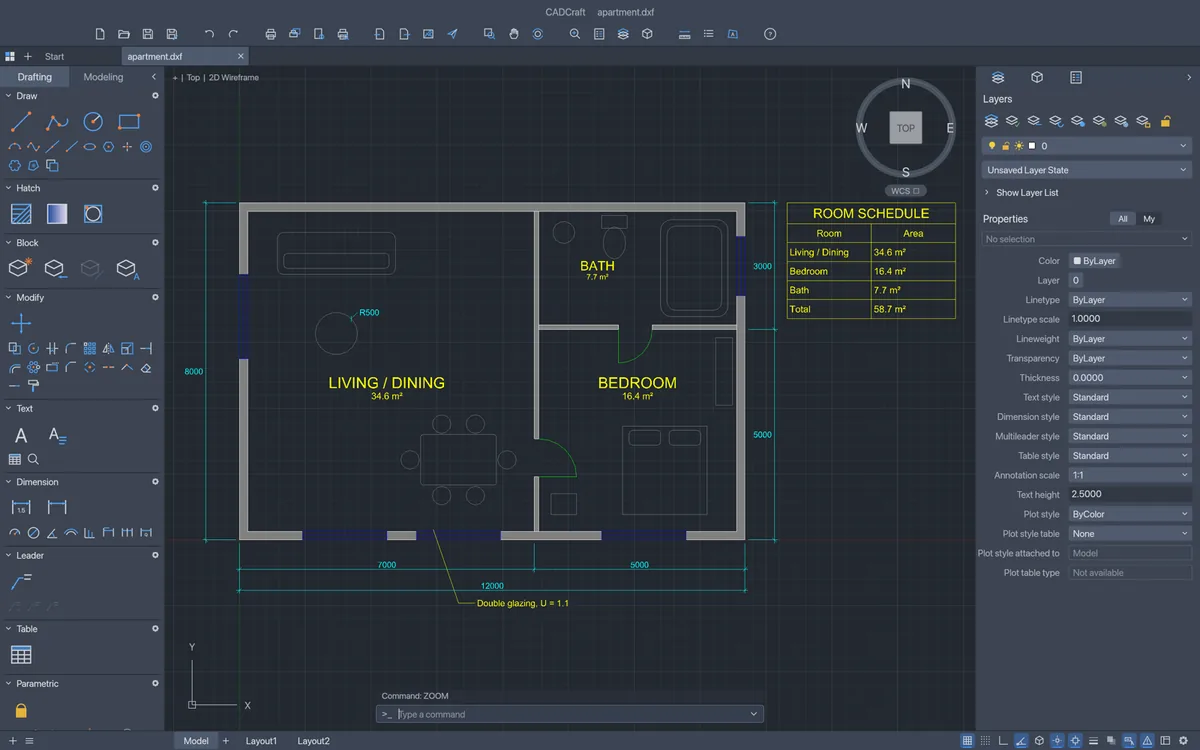
The desktop app with the project's sample apartment plan open. Screenshot: CADCraft contributors, MIT OR Apache-2.0.
Before you press Save
Opening a DWG is safe. Saving one back is where things get lost. According to the project's file-format document:
- Entities CADCraft doesn't model yet are not kept when you save.
- DWG save drops 3D solids, bodies, surfaces, meshes and proxy objects.
- SHX fonts aren't read. Text in an SHX style is drawn with CADCraft's own stroke font, so line lengths and wrapping can differ from what the sender sees.
- Polyface meshes are flattened to 3D polylines.
So use File ▸ Save As… with a new file name, and keep the original untouched. You can save DWG in any version from 2000 to 2018 (2018 is the default). Pick an older version if the person receiving the file runs old software.
Step 3 (optional): Convert without opening anything
If you only need to see the drawing, or to send a preview to someone who has no CAD software, the headless cadcraft-cli tool is quicker than the GUI. It ships with the desktop downloads; on macOS it comes as a separate universal CLI zip.
cadcraft-cli info drawing.dwg
cadcraft-cli convert drawing.dwg drawing.png
cadcraft-cli convert drawing.dwg drawing.svg
convert frames the whole model-space extents, and PNG exports are 2400×1600. That isn't always the view you want: a stray object far away can shrink the rest of the drawing to a dot. To frame a specific area in drawing units, give the lower-left corner first:
cadcraft-cli convert drawing.dwg detail.png --window 0,0,20000,15000
Because this runs without a window, it also works in scripts, for example to render every DWG in a folder for a review.
Step 4 (optional): Keep working in the browser
The online editor runs the same CADCraft app in your browser through WebAssembly, but it reads DXF only. If you pick a DWG there, this notice appears instead:
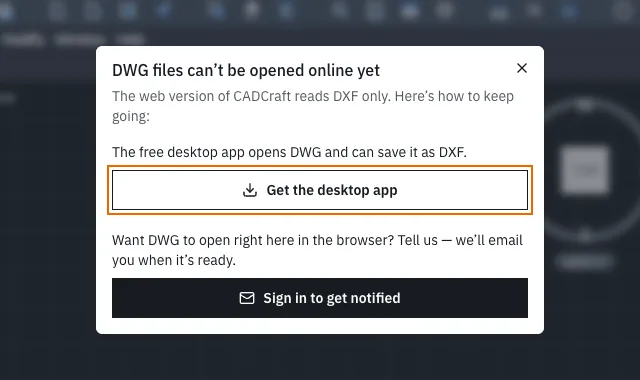
What cadcraft.org/online shows when you choose a .dwg file.
The workaround takes about a minute:
- In the desktop app, open the DWG and choose File ▸ Save As….
- Save it as DXF.
- Go to the online editor, click into the canvas, press Ctrl+O and pick the
.dxf.
On the free plan the drawing stays in your browser: auto-save keeps recent drawings on that device, and Save downloads a file. The optional CADCraft Online Pro plan ($4.9/month or $29/year) adds cloud drawings, version history and share links. You don't need it to open or edit anything.
Other free ways to open a DWG
CADCraft isn't the only option, and for some jobs it isn't the best one:
| Option | Platforms | Edit? | Good for | Watch out for |
|---|---|---|---|---|
| CADCraft desktop | Windows, macOS, Linux, FreeBSD | Yes (2D) | Opening, light editing, scripting, batch conversion | Pre-alpha; lossy save; no DWG before R13 |
cadcraft-cli convert | Same as desktop | No | PNG/SVG previews, automation | Frames model-space extents unless you pass --window |
| Autodesk DWG TrueView | Windows | No (view, print, convert versions) | Exact AutoCAD rendering, checking a file before you reply | Windows only; check Autodesk's current terms |
| Autodesk Viewer (web) | Browser | No | Quick look on any computer | You upload the file to Autodesk's servers |
| LibreCAD | Windows, macOS, Linux | Yes (2D) | DXF-first 2D drafting | DWG support has historically been partial; check the release you install |
| ODA File Converter | Windows, macOS, Linux | No | Converting DWG to DXF or between DWG versions in bulk | Check the Open Design Alliance's current download terms |
If the drawing has to come back to an AutoCAD user exactly as they sent it, open it in a viewer that uses Autodesk's own rendering. Edit it in CADCraft only if you accept that some objects may change.
Troubleshooting
The file won't open at all. Check the version code from Step 1. AC1009 or lower is an R12-or-earlier DWG, and CADCraft doesn't read those. Ask the sender for a DXF, or convert it to a newer DWG version with a converter first.
It opens, but text looks different. The drawing probably uses SHX fonts, which CADCraft doesn't read. If you have a TrueType font with the right characters installed, set it as the stand-in: SETVAR FONTALT followed by the font name, for example Noto Sans CJK TC. This matters most for Chinese, Japanese and Korean drawings.
A large DWG takes minutes or fails. The project has a user report of a 10 MB DWG failing after about two minutes. Limits now stop runaway conversions early, but speed on big files is still a known problem. Try cadcraft-cli info first to see whether the file reads at all, or ask the sender to purge unused objects before sending.
The desktop app flashes and quits on Windows. The project's README describes a driver crash on some AMD systems. Start it from PowerShell with $env:WGPU_BACKEND = "vulkan" set, then run cadcraft.exe.
The online editor shows a blank canvas. That's a rendering problem, not a file problem. On the online page, switch from Auto (WebGPU) to Force WebGL2 or CPU mode.
FAQ
Can I open a DWG file online in CADCraft?
No. The online version at cadcraft.org/online reads DXF only. Open the DWG in the free desktop app, use File ▸ Save As… to save a DXF copy, and open that DXF in the browser.
Which DWG versions does CADCraft open?
The desktop app opens DWG R13 through the 2018 format (version codes AC1012 to AC1032). AutoCAD 2018 through 2027 all save the 2018 format by default, so files from current AutoCAD releases fall inside that range. R12 and older DWG files (AC1009 and earlier) do not open.
Will saving a DWG in CADCraft change my drawing?
It can. CADCraft drops entities it does not model yet when it saves, and its DWG save also drops 3D solids, surfaces, meshes and proxy objects. Always save to a new file name and keep the original.
How do I turn a DWG into a PDF or image without opening a CAD program?
Use the headless tool that ships with the desktop downloads: cadcraft-cli convert drawing.dwg drawing.png (or .svg). It fits the model-space extents by default; add --window x0,y0,x1,y1 to frame a specific area.
Related
- CAD file formats explained: which format to ask for, and what opens what
- DXF vs DWG: why the browser takes DXF and what each format keeps
- Download CADCraft for Windows, macOS and Linux
- CADCraft vs AutoCAD: an honest comparison, including DWG fidelity