
CADCraft Review: We Tested DWG, DXF and PDF Output
A hands-on CADCraft v0.18.0 review. We opened a DWG, saved a DXF and checked a PDF plot, then ran a round-trip report to see which data changed.
Verdict: CADCraft is worth testing for 2D drafting, reviewing drawings and sending DXF or PDF copies. Our sample kept its visible entity inventory through a DWG-to-DXF conversion, but the comparison found header changes. For a job that requires editable DWG delivery, check a real drawing from that job in the recipient's CAD software first.
What we tested
On November 19, 2026, we ran the official v0.18.0 CLI release for macOS on Apple silicon. We verified the archive's SHA-256 hash before running it. The input was CADCraft's built-in mechanical bracket, which includes dimensions, hatches, line types and text. We generated a DWG with CADCraft so anyone can reproduce the starting file.
This is one controlled drawing and one release. The run did not test DWGs authored in other CAD apps, customer drawings, 3D solids or proxies. We used the desktop CLI for the results below.
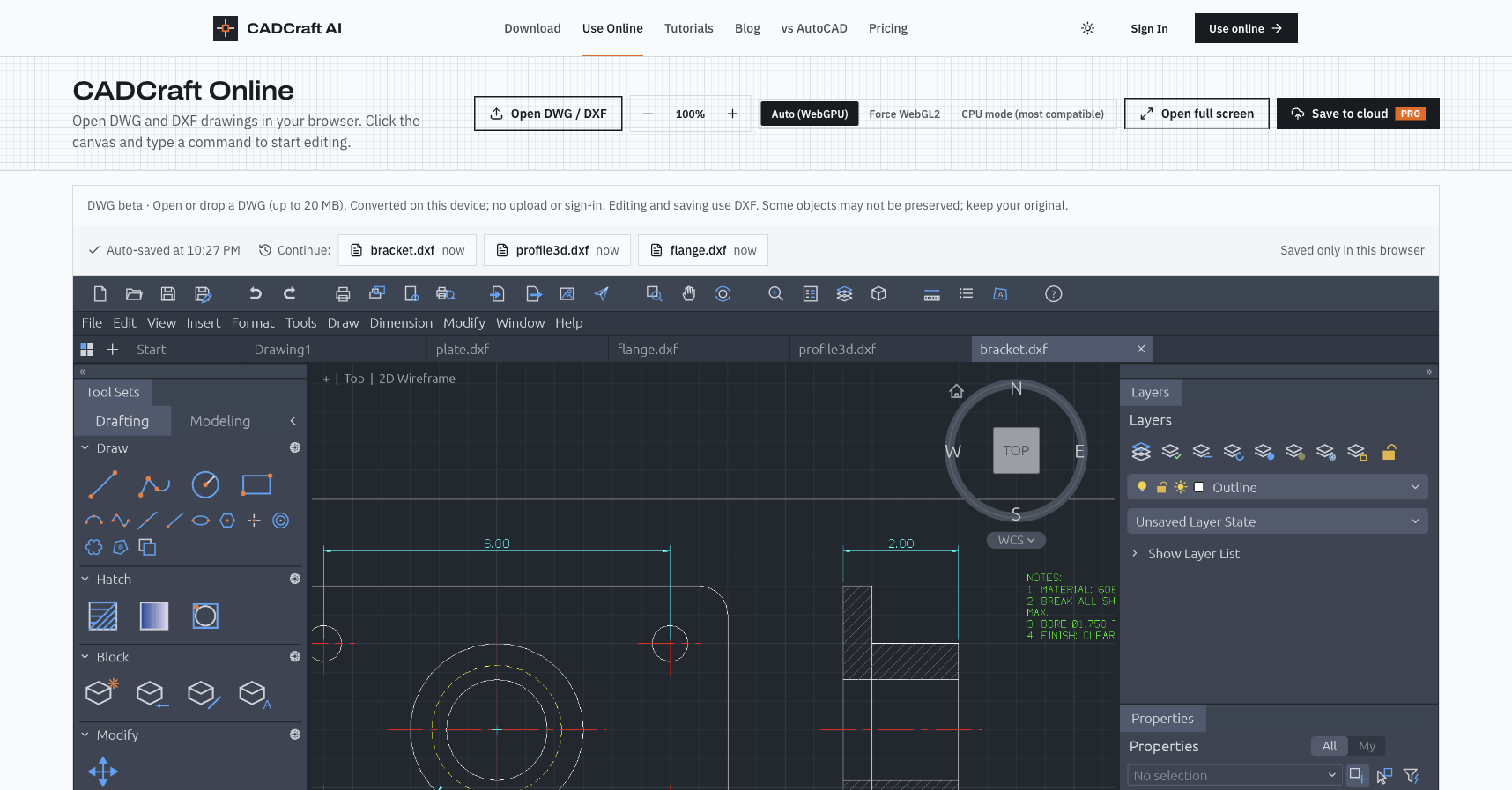
The same bracket in the browser during our earlier v0.18.0 check.
Results
| Step | Result | What to check on your drawing |
|---|---|---|
| Open the generated DWG | The CLI read 46 entities and nine layers. Its drawing bounds matched the source DXF. | Check that layer names, dimensions and the drawing extents look right. |
| Save and reopen a DXF copy | All 46 entities and the counts by type matched. The round-trip report flagged 40 removed and 9 added header values. | Compare the report as well as the preview. Geometry counts alone miss drawing settings. |
| Save and reopen a DWG copy | The round-trip tool reported zero compared items lost, added or changed on this sample. | Test with files from the recipient's software, including any custom objects or attachments. |
| Plot a PDF from the DWG | The CLI produced a single-page model-space PDF. | Verify sheets, fonts and plot scale before sending any production PDF. |
The retained entities included seven circles, six dimensions, four hatches, 16 lines, six polylines, six text entities and one multiline text entity. The DXF comparison differences were in the header, including values for the coordinate system and display options. A drawing that looks the same can still carry different settings.
Run the same test
Install the CADCraft CLI and run the commands in a new writable folder. You can also start with the bracket DXF.
>cadcraft-cli sample bracket bracket.dxf>cadcraft-cli convert bracket.dxf bracket.dwg>cadcraft-cli info bracket.dwg>cadcraft-cli convert bracket.dwg bracket-copy.dxf>cadcraft-cli info bracket-copy.dxf>cadcraft-cli convert bracket.dwg bracket.pdf>cadcraft-cli roundtrip bracket.dwg --out check-report
Open check-report/report.md after the run. Look separately at entity changes, header changes and failed saves. If you work in paper space, use a drawing with the layouts and title blocks you deliver and check exported pages individually.
Who should try it?
- 2D drafters and reviewers. Start with a simple bracket or floor plan, check dimensions and layers, and send a DXF or PDF copy after inspection.
- People automating file checks. Use
infoto capture an inventory androundtripto compare saves in a repeatable script. - Teams exchanging native DWG. Keep original files and validate both directions with a representative job. Recreate the recipient's fonts, layouts and plot settings in the test.
Where to get CADCraft
Use the ArtCraft team's product page or the official repository's release assets. Match the filename and published checksum. This site is an independent guide and hosts an online build.
Try the online editor · Get the desktop app · Compare CADCraft with AutoCAD