DWG to PDF Without Losing Lineweights
Convert DWG to PDF with the right pen weights: map your CTB/STB plot styles, fix missing fonts, plot every layout into one file, and batch-convert a folder with cadcraft-cli.
 CADCraft AI Editorial
Short answer: open the DWG in the free CADCraft desktop app (download), choose File ▸ Print… (Ctrl+P, ⌘P on a Mac), set Printer/plotter to CADCraft PDF, tick Plot object lineweights, pick a Plot style table, then plot. For a whole folder, skip the GUI and run cadcraft-cli convert drawing.dwg drawing.pdf in a loop (Step 4). The desktop app opens DWG R13–2018. The PDF is vector, and TrueType text stays searchable.
cadcraft.org is an independent guide, not the official site. CADCraft is made by the ArtCraft team: see getartcraft.com/apps/cadcraft. Everything below was checked against cadcraft-cli 0.8.0.
Step 1: Open the DWG and check its layouts
- Install the desktop app from the download page.
- File ▸ Open… and pick the
.dwg. If it refuses to open, check the six-character version code first. How to open a DWG file shows how. - Look at the layout tabs. A PDF of Model fits the model-space extents onto one page. A PDF of a layout prints that sheet at its page-setup scale, with its viewports.
If you have the CLI, cadcraft-cli info drawing.dwg lists the layouts as JSON before you open anything. A drawing created from scratch still has the empty Layout1 and Layout2. Keep that in mind for Step 3.
Step 2: Set lineweights and the plot style table
This is the step that decides whether your 0.50 mm walls come out as 0.50 mm.
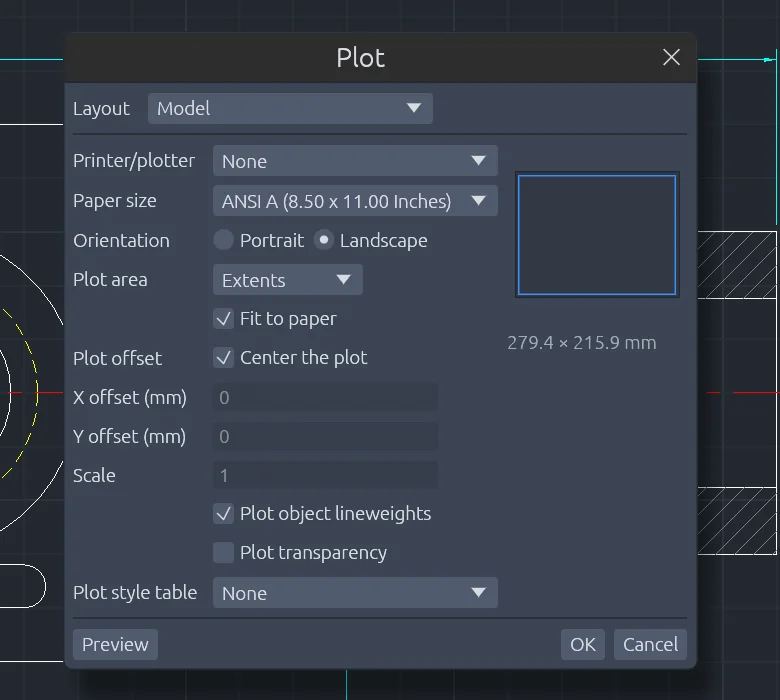
The Plot dialog (File ▸ Print…) in the web build of CADCraft 0.8.0, with its defaults for a model-space plot of an imperial drawing.
In File ▸ Print… (the Plot dialog):
- Printer/plotter:
CADCraft PDF.CADCraft PNGandCADCraft SVGalso appear here; PNG is raster. - Paper size: ISO A0–A6 and B0–B5, ANSI A–E, ARCH A–E and E1, or Letter/Legal. Without a choice, a model-space plot uses ANSI A (8.5 × 11 in) landscape for imperial drawings and A4 landscape for metric ones.
- Plot object lineweights: on. Off, every line is written as a 0-width hairline.
- Plot style table:
default.ctbkeeps object colours,monochrome.ctbprints every colour black, andgrayscale.ctbprints colours as grey.Noneplots object colours.
Objects whose lineweight is Default print at 0.25 mm. Lines wider than 0.25 mm on paper get the end and join shape that the plot style sets.
Your AutoCAD CTB will not load. Rebuild it.
CADCraft does not read binary .ctb or .stb files. The project says it has found no public specification of that format. Its tables are its own UTF-8 JSON files. So "monochrome, red pen = 0.50 mm, everything else 0.35 mm" has to be set up once:
- File ▸ Plot Styles… opens the Plot Style Manager.
- Click New CTB (colour-dependent: 255 styles,
Color_1toColor_255) or New STB (named styles,Normalfirst). - Edit the pens you need. Each style has Color, Grayscale, Screening, Linetype and Lineweight.
- Tick Keep an editable copy of this table in the drawing so it travels with the DXF or DWG, then Use for this layout.
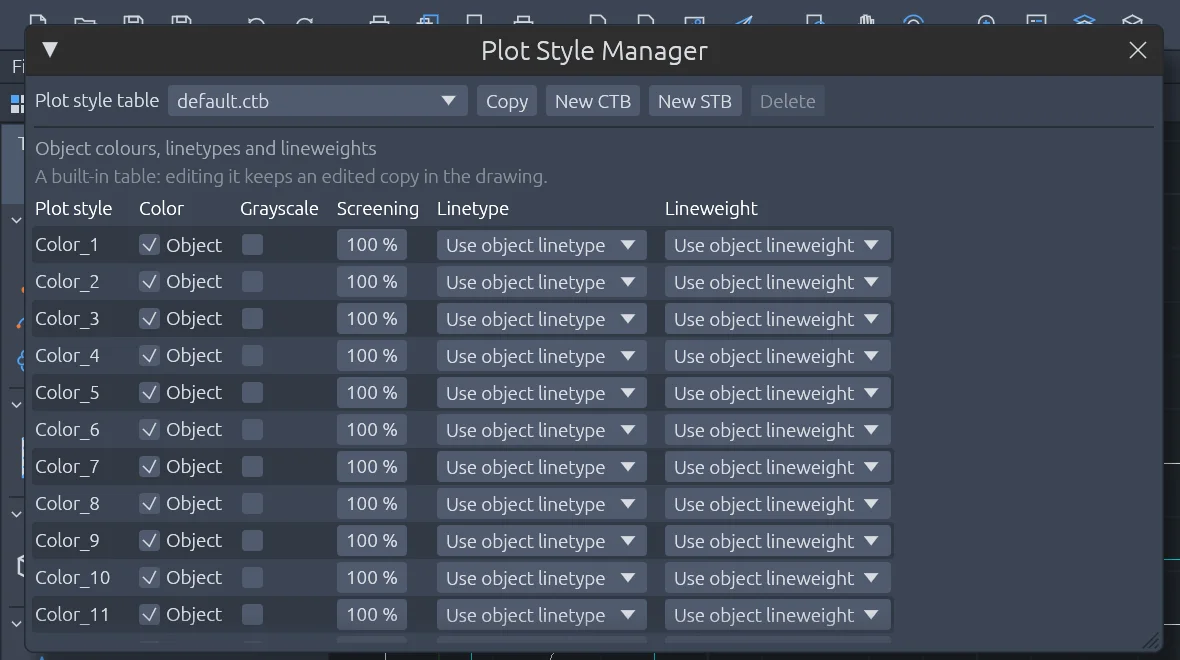
File ▸ Plot Styles… opens the Plot Style Manager. Each Color_n row is one pen of a colour-dependent table.
| AutoCAD plot-style setting | CADCraft field | Note |
|---|---|---|
| Color | color (#rrggbb) | Colour 7 prints black |
| Grayscale | grayscale | Luminance with Rec. 709 weights |
| Screening | screening (0–100 %) | Mixes toward white paper |
| Linetype | linetype | Continuous draws solid |
| Lineweight | lineweight | Typed in mm (0–2.11) in commands, stored in 1/100 mm in the file |
| Line end / join style | end, join | Applies to lines wider than 0.25 mm |
| Fill style | fill | CADCraft's own patterns, 1 mm repeat |
| Dither, pen number, virtual pen | not in CADCraft's table format | Ignored |
A colour-dependent table chooses by the object's index colour; a true colour uses the nearest index colour. A named table chooses by the object's PlotStyle property, and a missing name prints as Normal.
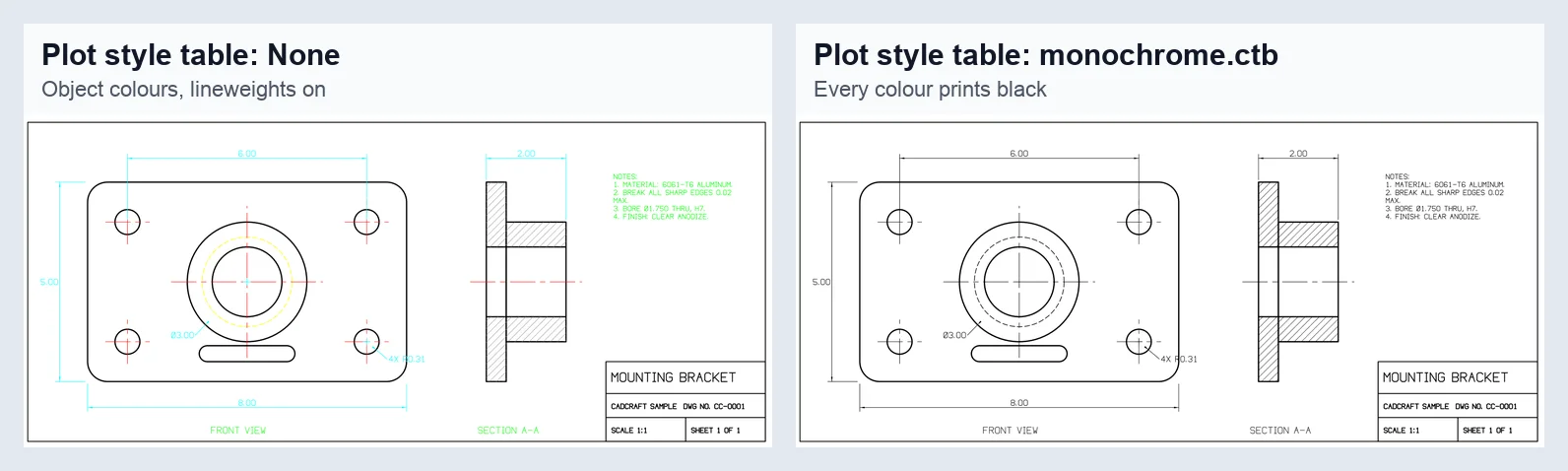
Same drawing, same plot settings, two tables. Plotted with cadcraft-cli 0.8.0 to the CADCraft PNG device at 300 dpi.
The trap: if the page setup or your command names a table CADCraft can't find (for example office.ctb from the sender's office), the plot goes ahead without a warning and prints object colours. We plotted the same drawing with "plotStyleTable":"missing.ctb" and with no table, and the two PDFs had identical colours and line widths. After you rebuild the table under the same name, the plot uses it. In our test, Color_1 set to black at 0.5 mm came out as a 1.417 pt stroke, which is 0.5 mm.
Step 3: Plot every layout into one PDF (or one PDF each)
| What you want | GUI | Command (typed, or --cmd in the CLI) |
|---|---|---|
| Current layout, one page | File ▸ Print… or File ▸ Export to PDF… | exportpdf {"path":"out.pdf"} |
| All sheets in one file | — | exportpdf {"layouts":"all","path":"set.pdf"} |
| Chosen sheets in one file | — | exportpdf {"layouts":["A1 Plan","A2 Elev"],"path":"set.pdf"} |
| One PDF per sheet | File ▸ Batch Publish… | publish {"path":"job.pdf"} → job-Model.pdf, job-Layout1.pdf… |
| Frames drawn in model space | File ▸ Sheet Books to PDF… | pdfbook (closed polylines of the frame height become pages) |
Notes from running these on 0.8.0:
"all"means Model (if it has objects) plus every layout in tab order, including empty ones. Our test drawing produced three pages, two of them blank. Name the layouts if you have placeholders.- One PDF holds at most 256 sheets.
- Each page is labelled with its layout name, and each layer becomes a PDF layer that a viewer can switch off. Layers that are off are left out (add
"offLayers":trueto include them as hidden PDF layers). Frozen layers are never plotted. - A wrong layout name stops the plot instead of skipping that sheet:
invalid parameters for `exportpdf`: no layout `Sheet9`
Step 4: Batch-convert a folder with cadcraft-cli
cadcraft-cli ships with the desktop downloads; on macOS it is a separate universal zip on the release page. The quick version plots model space for every file:
for f in *.dwg; do cadcraft-cli convert "$f" "${f%.dwg}.pdf"; done
Get-ChildItem *.dwg | ForEach-Object { cadcraft-cli convert $_.FullName ($_.FullName -replace '\.dwg$', '.pdf') }
convert always plots model space and fits the extents. A stray object far from the drawing shrinks everything else, so frame the part you want with --window x0,y0,x1,y1 (drawing units, lower-left corner first).
To plot layouts with a plot style table for each file, use run with exportpdf:
for f in *.dwg; do
  cadcraft-cli run "$f" --cmd "exportpdf {\"layouts\":\"all\",\"plotStyleTable\":\"monochrome.ctb\",\"path\":\"${f%.dwg}-sheets.pdf\"}"
done
Each run prints a line such as {"bytes":11374,"layout":"Model","pages":3,"path":"a-sheets.pdf"}. Check the pages count against the number of sheets you expected. That's the quickest way to catch the blank-layout problem from Step 3.
Vector or raster? Can you search the text?
| Output | Vector? | Text selectable and searchable? |
|---|---|---|
PLOT / EXPORTPDF / convert … .pdf | Yes | TrueType/OpenType text: yes. SHX-style text: no |
Same, with "text":"geometry" | Yes | No. All text is outlines, like PDFSHX |
CADCraft PNG device or .png export | No | No |
CADCraft SVG device or .svg export | Yes | Not covered here |
We checked this by decompressing the PDF. A label in Arial was written as real text with an embedded ArialMT subset and a ToUnicode map, so a PDF viewer can search it. The same words in a romans.shx style were written as stroked lines. CADCraft doesn't read SHX fonts at all: it draws that text with its own single-stroke font.
Troubleshooting
The lines are all the same thin weight. Either Plot object lineweights is off, or every object is at the Default lineweight (0.25 mm). If the sender's weights live in their CTB, rebuild it (Step 2).
Colours came out instead of black. The table name in the page setup isn't one CADCraft knows, so it was skipped without a warning. Choose monochrome.ctb, or create the table under that name.
Text runs longer or wraps differently than in the sender's PDF. That's the SHX substitution. CADCraft's stroke font has different widths. Set a TrueType stand-in with SETVAR FONTALT followed by a font name, or CADCRAFT_FONTALT=Arial for the CLI. In our test, that also made the text searchable. For Chinese, Japanese or Korean drawings, use a CJK font such as Noto Sans CJK TC.
Model-space PDF ignores the paper margins. This is a documented limitation in 0.8.0: model-space PDF plots fit the drawing inside default margins rather than the paper's own margins. PNG plots do apply them. Plot from a layout if the margins matter.
Transparency looks solid. Object transparency is plotted only when Plot transparency is ticked. CADCraft can't save that setting in DXF or DWG, so it's off again after you reopen the file.
A big DWG takes minutes. Opening large DWG files is a known slow spot. Run cadcraft-cli info first to confirm the file reads at all.
FAQ
Is a PDF made from a DWG in CADCraft vector or raster?
Vector. PLOT, EXPORTPDF and cadcraft-cli convert all write a vector PDF: lines are stroked paths, line widths come from lineweights, and drawing layers become PDF layers. Only the CADCraft PNG plotter device writes a raster image (300 dpi by default).
Can I select and search the text in the PDF?
Text in a TrueType or OpenType font is written as real text with a Unicode map, so it can be selected and searched. Text in an SHX style is drawn with CADCraft’s stroke font and becomes lines, which cannot be searched. Setting FONTALT to a TrueType font such as Arial makes that text searchable too.
Can CADCraft use my AutoCAD .ctb file?
No. Binary .ctb and .stb files are not read, because no public specification exists. Recreate the pens you need in File ▸ Plot Styles… (Plot Style Manager ▸ New CTB) and save the table under the same name. A table name CADCraft cannot find is ignored without a warning, and the PDF prints object colours.
Can I convert DWG to PDF in the browser?
Not with CADCraft. The online version at cadcraft.org/online reads DXF only, never DWG. Use the free desktop app or the cadcraft-cli tool that ships with it.
Related
- How to open a DWG file without AutoCAD: version codes and the desktop app
- How to convert DWG to DXF: which DXF version to pick and what gets lost
- DXF vs DWG: which file to send when the PDF isn't enough