AutoCAD Shortcuts: The Complete Cheat Sheet
AutoCAD keyboard shortcuts by category (draw, modify, layers, dimensions, blocks, view, object snaps, Ctrl and F-keys), with a column showing which ones work the same in free CADCraft.
 CADCraft AI Editorial
Short answer: in AutoCAD, type the alias at the command line and press Enter or Space: L for LINE, C for CIRCLE, TR for TRIM, O for OFFSET, H for HATCH, DLI for a linear dimension. Press Enter on an empty line to repeat the last command, and Esc to cancel. The tables below list the shortcuts by category, in the order you'd use them. The last column says whether each one works the same in the free CADCraft desktop app or online editor, checked against CADCraft 0.8.0's built-in command catalogue.
cadcraft.org is an independent guide, not the official site. CADCraft is an open-source project by the ArtCraft team and isn't affiliated with Autodesk.
How to read the CADCraft column: "Same" means the same keys start the same command. "Differs" says what happens instead. "No" means CADCraft 0.8.0 has no such shortcut or command. On a Mac, CADCraft uses ⌘ wherever this page says Ctrl.
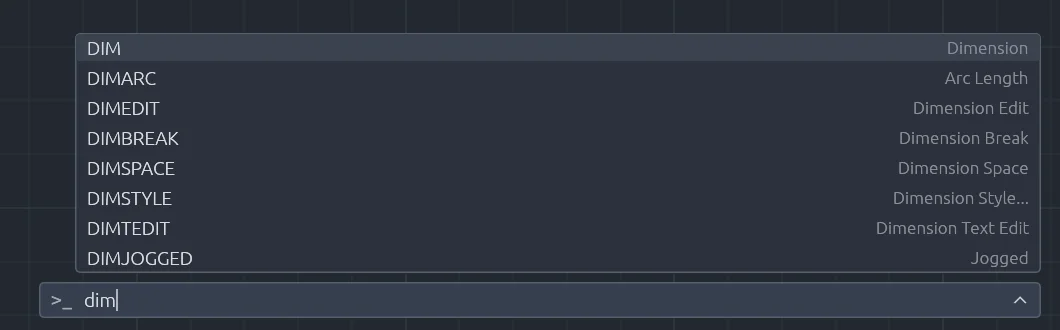
Type the first letters at the command line and CADCraft lists the matching commands, as AutoCAD’s AutoComplete does. Web build of CADCraft 0.8.0.
Draw
| Shortcut | Command | What it does | In CADCraft |
|---|---|---|---|
L | LINE | Line segments | Same |
PL | PLINE | Polyline with arcs and widths | Same |
C | CIRCLE | Circle (centre, 2P, 3P, TTR) | Same |
A | ARC | Arc | Same |
REC | RECTANG | Rectangle, with fillet/chamfer | Same (RECTANGLE too) |
POL | POLYGON | Regular polygon | Same |
EL | ELLIPSE | Ellipse or elliptical arc | Same |
SPL | SPLINE | Spline | Same |
XL | XLINE | Infinite construction line | Same |
DO | DONUT | Filled ring | Same |
PO | POINT | Point | Same |
DT | TEXT | Single-line text | Same |
T / MT | MTEXT | Paragraph text | Same |
H | HATCH | Hatch or solid fill | Same (BH too) |
GD | GRADIENT | Gradient fill | Same |
BO | BOUNDARY | Polyline from a closed area | Same |
REG | REGION | Region from closed objects | Same |
DIV / ME | DIVIDE / MEASURE | Points along an object | Same |
ML | MLINE | Multiline | Same |
Modify
| Shortcut | Command | What it does | In CADCraft |
|---|---|---|---|
E | ERASE | Delete objects | Same; the Delete key erases the selection |
M | MOVE | Move | Same |
CO / CP | COPY | Copy | Same |
RO | ROTATE | Rotate | Same |
SC | SCALE | Scale | Same |
MI | MIRROR | Mirror | Same |
S | STRETCH | Stretch with a crossing window | Same |
O | OFFSET | Parallel copy at a distance | Same |
TR | TRIM | Trim to cutting edges | Same |
EX | EXTEND | Extend to boundary edges | Same |
F | FILLET | Round a corner | Same |
CHA | CHAMFER | Bevel a corner | Same |
X | EXPLODE | Break a block or polyline apart | Same |
BR | BREAK | Break an object | Same |
J | JOIN | Join into one object | Same |
AR | ARRAY | Rectangular, polar or path array | Same |
PE | PEDIT | Edit a polyline | Same |
LEN | LENGTHEN | Change a length | Same |
AL | ALIGN | Move and rotate onto points | Same |
MA | MATCHPROP | Copy properties to other objects | Same (PAINTER too) |
ED | TEXTEDIT | Edit text | Same (DDEDIT too) |
DR | DRAWORDER | Bring to front, send to back | Same |
G | GROUP | Make a group | Same |
Layers and properties
| Shortcut | Command | What it does | In CADCraft |
|---|---|---|---|
LA | LAYER | Layer Properties Manager | Same |
-LA | -LAYER | Layer options at the command line | Same |
LAYISO / LAYUNISO | LAYISO | Isolate / restore layers | Same |
LAYOFF, LAYFRZ, LAYLCK, LAYULK, LAYON, LAYTHW | — | Layer tools by picking objects | Same |
LAYMCUR | LAYMCUR | Make the picked object's layer current | Same |
LAYMCH | LAYMCH | Move objects to another object's layer | Same |
LAYERP | LAYERP | Undo the last layer change | Same |
PR / CH | PROPERTIES | Properties palette | Same (PROPS too) |
COL | COLOR | Current colour | Same |
LT | LINETYPE | Linetype manager | Same |
LW | LWEIGHT | Lineweight settings | Same |
LTS | LTSCALE | Global linetype scale | Same |
Dimensions and annotation
| Shortcut | Command | What it does | In CADCraft |
|---|---|---|---|
DLI | DIMLINEAR | Horizontal/vertical dimension | Same |
DAL | DIMALIGNED | Aligned dimension | Same |
DAN | DIMANGULAR | Angle | Same |
DRA | DIMRADIUS | Radius | Same |
DDI | DIMDIAMETER | Diameter | Same |
DAR | DIMARC | Arc length | Same |
DOR | DIMORDINATE | Ordinate | Same |
DCO | DIMCONTINUE | Chain dimensions | Same |
DBA | DIMBASELINE | Baseline dimensions | Same |
DJO | DIMJOGGED | Jogged radius | Same (JOG too) |
D | DIMSTYLE | Dimension Style Manager | Same |
DOV | DIMOVERRIDE | Override a dimension variable | Same |
DED | DIMEDIT | Edit dimension text/oblique | Same |
MLD | MLEADER | Multileader | Same |
LE | QLEADER | Quick leader | No. Use LEAD (LEADER) or MLD |
ST | STYLE | Text styles | Same |
TB | TABLE | Insert a table | Same |
TOL | TOLERANCE | Geometric tolerance frame | Same |
Blocks and references
| Shortcut | Command | What it does | In CADCraft |
|---|---|---|---|
B | BLOCK | Define a block | Same |
I | INSERT | Insert a block | Same |
W | WBLOCK | Write a block to a file | Same |
BE | BEDIT | Block Editor | Same |
ATT | ATTDEF | Define an attribute | Same |
ATE | ATTEDIT | Edit attribute values | Same |
XA | XATTACH | Attach a DWG reference | Same |
XR | XREF | External references palette | Same |
PU | PURGE | Remove unused definitions | Same |
View and navigation
| Shortcut | What it does | In CADCraft |
|---|---|---|
Z Enter E Enter | Zoom to extents | Same |
Z Enter W | Zoom window | Same |
Z Enter P | Zoom previous | Same |
P | Pan | Same |
| Mouse wheel / middle-drag | Zoom / pan | Same; pinch works on touchpads |
| Double-click wheel | Zoom extents | Not documented in 0.8.0; use Z E |
RE / REA | Regen / regen all | Same |
V | Named views | Same |
3DO | Orbit | Same (ORBIT too) |
MS / PS | Model space through a viewport / paper space | Same |
Object snaps (type at a point prompt)
| Type | Snaps to | In CADCraft |
|---|---|---|
END | Endpoint | Same |
MID | Midpoint | Same |
CEN | Centre | Same |
GCEN | Geometric centre | Same |
NOD | Node (point object) | Same |
QUA | Quadrant | Same |
INT | Intersection | Same |
APP | Apparent intersection | Same |
EXT | Extension | Same |
INS | Insertion point | Same |
PER | Perpendicular | Same |
TAN | Tangent | Same |
NEA | Nearest | Same |
PAR | Parallel | Same |
NON | No snap for this pick | Same |
FROM | Base point plus offset | Same |
M2P / MTP | Midpoint between two points | Same |
TT / TK | Temporary tracking point / tracking | Same |
In CADCraft, any three-letter-or-longer start of the snap name works (END, ENDP, endpoint), and overrides nest (FROM then M2P). Point filters such as .X and .XY work too.
Ctrl and function keys
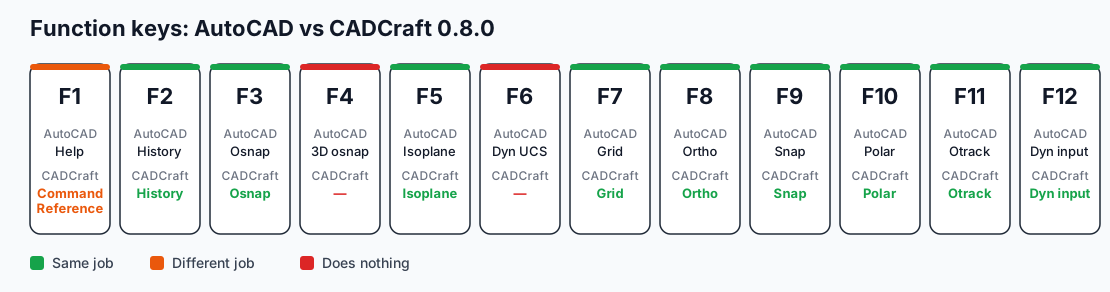
The function-key row at a glance. Ctrl shortcuts are in the table below.
| Keys | AutoCAD | In CADCraft |
|---|---|---|
| Ctrl+N / O / S | New / Open / Save | Same |
| Ctrl+Shift+S | Save As | Same |
| Ctrl+P | Plot | Same (Print… / Plot dialog) |
| Ctrl+Z / Ctrl+Y | Undo / Redo | Same; Ctrl+Shift+Z also redoes |
| Ctrl+A | Select all | Same |
| Ctrl+C / X / V | Copy / Cut / Paste | Same |
| Ctrl+Shift+C | Copy with base point | Same |
| Ctrl+Shift+V | Paste as block | Same |
| Ctrl+Shift+A | Group selection on/off | Same |
| Ctrl+1 | Properties palette | Same (Properties Inspector) |
| Ctrl+2 | DesignCenter | No |
| Ctrl+3 | Tool Palettes | Differs: shows CADCraft's Tool Sets |
| Ctrl+9 | Command line on/off | Same |
| Ctrl+0 | Clean screen | No |
| Ctrl+E | Next isoplane | Same |
| F1 | Help | Differs: opens the list of commands |
| F2 | Command history | Same |
| F3 | Object snap on/off | Same |
| F4 | 3D object snap | No |
| F5 | Next isoplane | Same |
| F6 | Dynamic UCS | No |
| F7 | Grid | Same |
| F8 | Ortho | Same |
| F9 | Snap | Same |
| F10 | Polar tracking | Same |
| F11 | Object snap tracking | Same |
| F12 | Dynamic input | Same |
Habits that carry over, and two that don't
These work the same: Enter or Space ends a command and repeats the last one. Right-click repeats too. You can type @dx,dy for relative, @d<a for polar, and #x,y for absolute coordinates, and you can type a distance while the rubber band points the way. Commands typed while another runs (transparent commands) work.
These don't:
- UCS. CADCraft 0.8.0 has no UCS command, so drawings that rely on a rotated UCS can't be set up the AutoCAD way. Rotate the geometry or use polar input.
- CUI customisations. Your company's
.cuixribbon and keyboard shortcuts won't load. Command aliases are different: CADCraft loads user alias files and has ALIASEDIT, so you can add the odd alias your fingers expect.
If a shortcut does something unexpected, press F1 in CADCraft. It lists every command with its aliases and keys, so you don't have to remember this page.
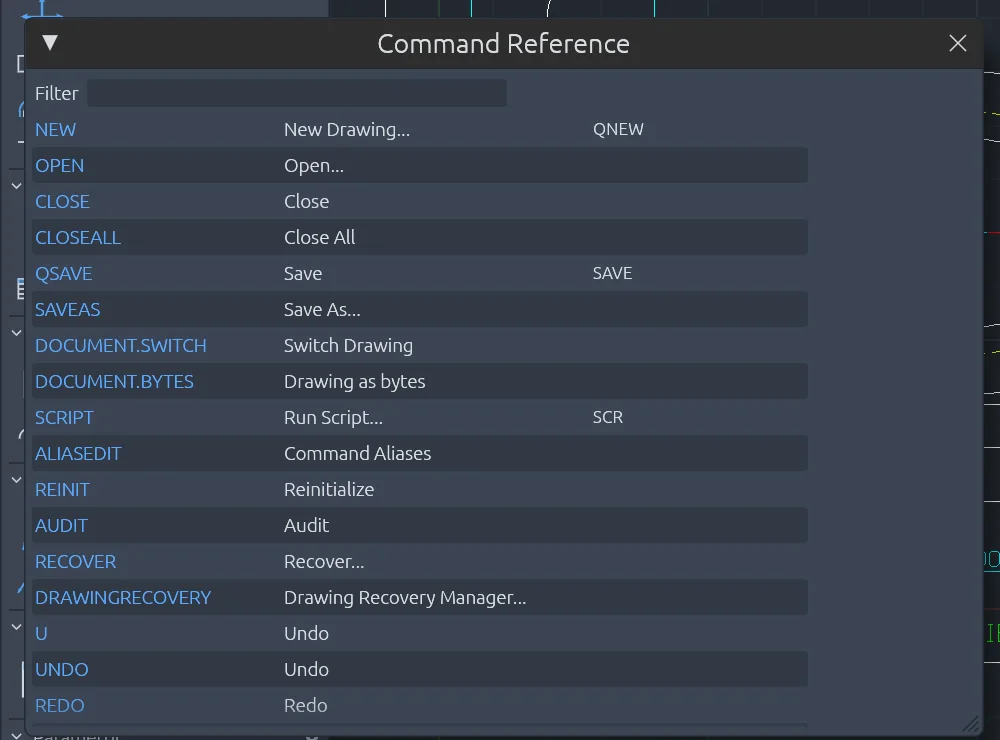
F1 in CADCraft: every command with its label and aliases, and a filter box at the top.
FAQ
What are the most used AutoCAD shortcuts?
L (LINE), PL (PLINE), C (CIRCLE), REC (RECTANG), M (MOVE), CO (COPY), TR (TRIM), O (OFFSET), E (ERASE), H (HATCH), DLI (DIMLINEAR), LA (LAYER), Z then E (zoom extents), F3 (object snap on/off) and F8 (ortho). Type the alias at the command line and press Enter or Space.
Do AutoCAD shortcuts work in CADCraft?
Most of the command aliases do: L, PL, C, A, REC, M, CO, TR, EX, O, F, X, H, DLI, B, I, LA, Z and others start the same commands. The function keys F3 and F5 to F12 do the same jobs. A few differ: F1 opens CADCraft’s command list instead of Help, and F4, F6, Ctrl+2 and Ctrl+0 do nothing.
Can I change or add shortcuts in CADCraft?
Yes for command aliases: CADCraft loads user alias files and has the ALIASEDIT command. It does not read AutoCAD CUI or CUIx files, so ribbon and menu customisations do not carry over.
Is Ctrl or Cmd used on a Mac?
In CADCraft the Ctrl shortcuts use the Command key (⌘) on macOS, for example ⌘S to save and ⌘1 for the Properties Inspector. The function keys are the same on every system.
Related
- AutoCAD commands cheat sheet: the full command names, with the 20 to learn first
- CADCraft vs AutoCAD from the command line
- Open-source CAD compared: if you're choosing a free AutoCAD alternative