CAD in Rust: How an Open-Source AutoCAD-Style App Is Built
A look inside CADCraft, a 2D CAD program written in pure Rust: the crate layers, egui and wgpu, the never-crash rules, DXF and DWG, WebAssembly, and measured speed on a 100,000-line drawing. Plus the other Rust CAD projects.
 CADCraft AI Editorial
Short answer: yes, you can build a real CAD application in Rust, and CADCraft is one: an open-source 2D CAD program with an AutoCAD-style command line, written in pure Rust, about 214,000 lines across 12 library crates and three apps. The same code builds a desktop app for Windows, macOS, Linux and FreeBSD, a command-line tool, and a WebAssembly version that runs in a browser. On a 100,000-line DXF it opens the file in about a third of a second.
This page is for people who searched "CAD in Rust" or "AutoCAD in Rust" and want to know how it's put together, what Rust buys a CAD program, and what it doesn't.
cadcraft.org is an independent guide, not the official site. CADCraft is made by the ArtCraft team (getartcraft.com/apps/cadcraft); the code is at github.com/storytold/cadcraft under MIT OR Apache-2.0. Everything below was read from or measured on version 0.13.0 (commit 3929d94, 27 October 2026).
The architecture: seven layers, enforced by a tool
CADCraft is a Cargo workspace. Each crate sits on a layer and may only depend on layers below it. A build task, cargo xtask layers, fails the build if anything breaks that rule.
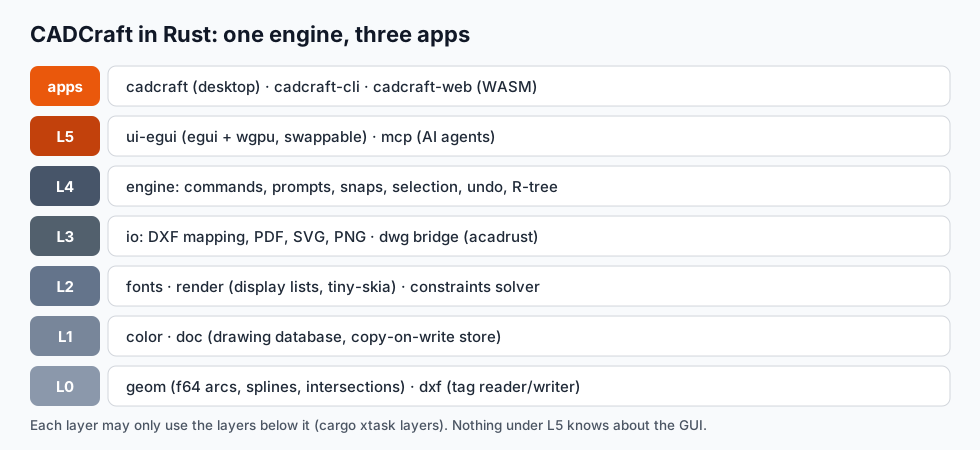
From the bottom up:
geom: f64 vectors and matrices, lines, arcs and polyline bulges, ellipses, rational B-splines, intersections, offsets, and the planar region tracing that HATCH and BOUNDARY need.dxf: a standalone DXF tag reader and writer (ASCII and binary), with limits on tag counts so a hostile file can't exhaust memory.doc: the drawing database. Header variables, symbol tables (layers, linetypes, text and dimension styles), blocks, model space and layouts, in a copy-on-write entity store. Undo is a whole-drawing snapshot, which is cheap because unchanged chunks are shared.render: turns a space into a display list once per change: polylines, triangles and points, each tagged with the entity handle. A CPU rasteriser (tiny-skia) reuses it for PNG export and plot preview.constraints: CADCraft's own parametric solver (damped Gauss–Newton / Levenberg–Marquardt) for geometric and dimensional constraints.io: DXF to and from the document, PDF plotting, SVG and PNG export. A smalldwgcrate bridges DWG by converting it to DXF bytes with the open-sourceacadrustcrate.engine: the heart. Sessions, the command registry, the command-line parser and prompt state machines, object snaps, selection, grips, associativity, system variables, undo, and an R-tree spatial index.ui-eguiandmcp: the GUI and the server AI agents talk to. Both are thin clients ofengine.
The point of the layering is that the GUI is replaceable. The engine doesn't know egui exists, which is why the same commands run headless in cadcraft-cli, in the desktop app, in the browser, and over MCP.
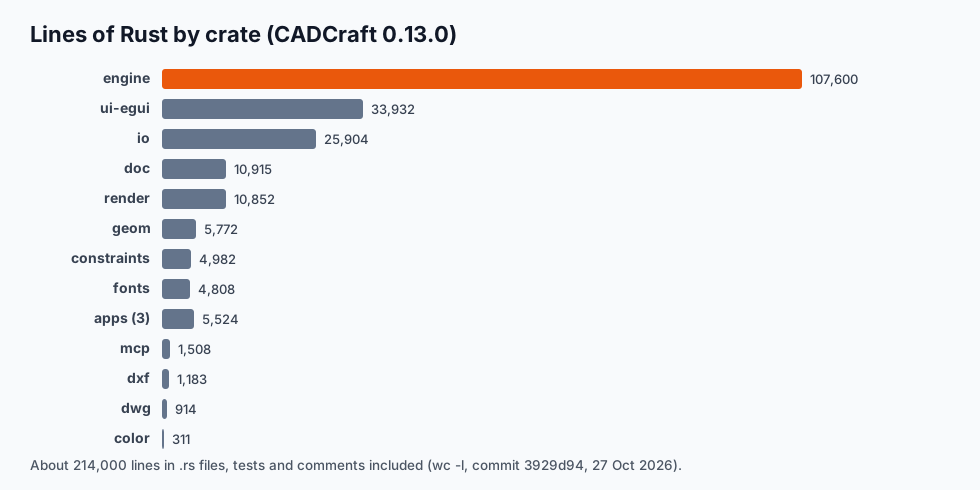
Half the code is the engine. That's typical for CAD: the hard part isn't drawing lines, it's the hundreds of commands and their prompts.
Everything is a command
Every user-visible action is a CommandSpec: an id (AutoCAD's command name in lower case, so line, dimlinear, arraypolar), a label, a menu path, aliases, a documented JSON parameter form, and an optional interactive prompt machine. cadcraft-cli commands lists 444 of them in 0.13.0.
This one design decision does a lot of work:
- The command line, menus, toolbar, scripts, CLI and MCP all call the same code. A bug fixed for typed input is fixed for AI agents too.
- Programmatic calls never open dialogs.
execute {"command": "circle", "params": {...}}runs with defaults and returns JSON. - Rust's enums and pattern matching fit prompt machines well. "Specify center point or [3P/2P/Ttr]" is a state with a few typed transitions, and the compiler checks every case is handled.
The never-crash rules
"Don't lose people's drawings" is the project's first rule, and it's written into the compiler settings:
unsafe_code = "forbid"for the whole workspace.- Every production crate denies
unwrap,expect,panic!,todo!,unimplemented!andunreachable!through Clippy. Errors areResultvalues passed up with?. - Input is treated as hostile. DXF and DWG files, command-line text and MCP parameters are read with checked indexing and checked arithmetic, and allocations sized by input are capped. Nested block references have a maximum depth, so a file with a block that contains itself can't recurse forever.
- A last-resort guard. Every command step runs under
catch_unwind; if a panic slips through anyway, the drawing is restored and you get an error instead of a crash. - Every crash fix comes with a regression test, with names like
hostile_dxf_does_not_panic.
This is where Rust earns its keep. In C++ these are conventions that slip under deadline pressure. Here, most of them are compile errors.
GUI: egui on wgpu
The desktop app uses egui, an immediate-mode GUI, on wgpu for GPU rendering. On Windows it initialises DirectX 12 by default (some OpenGL drivers crashed before the window appeared, so OpenGL is off unless you ask for it). The drawing canvas uploads the display list to the GPU in batches; panning and zooming don't rebuild geometry.
There's no Electron and no web view. All icons are drawn in code, and the hatch patterns, linetypes and the single-stroke drafting font are the project's own, so no third-party CAD assets ship in the binary.
One codebase, native and WebAssembly
The browser version at cadcraft.org/online is the same Rust code compiled to wasm32. "Never break wasm" is a project rule, and the CI task builds the wasm target on every change. Two things differ in the browser: DWG isn't available (the DWG bridge is native only), and there's no file system, so files come in through the file picker and leave as downloads.
The WebAssembly binary served on this site is 22.5 MB (8.4 MB gzipped). That's a lot for a web page and small for a CAD program.
How fast is it?
Measured on an Apple M3 Max with the release build of cadcraft-cli 0.13.0. Each figure is wall-clock time from /usr/bin/time for the whole process, start to exit:
| Task | Time |
|---|---|
info on the sample apartment DXF (58 objects, 49 KB) | < 0.01 s |
convert the apartment DXF to a 2400 × 1600 PNG | 0.07 s |
info on a 100,000-line DXF (15.5 MB): read, parse, summarise | 0.33 s |
convert the 100,000-line DXF to SVG | 0.36 s |
convert the 100,000-line DXF to a 2400 × 1600 PNG | 0.60 s |
| Draw the 100,000 lines by typing them into the command line from a script | 37.9 s |
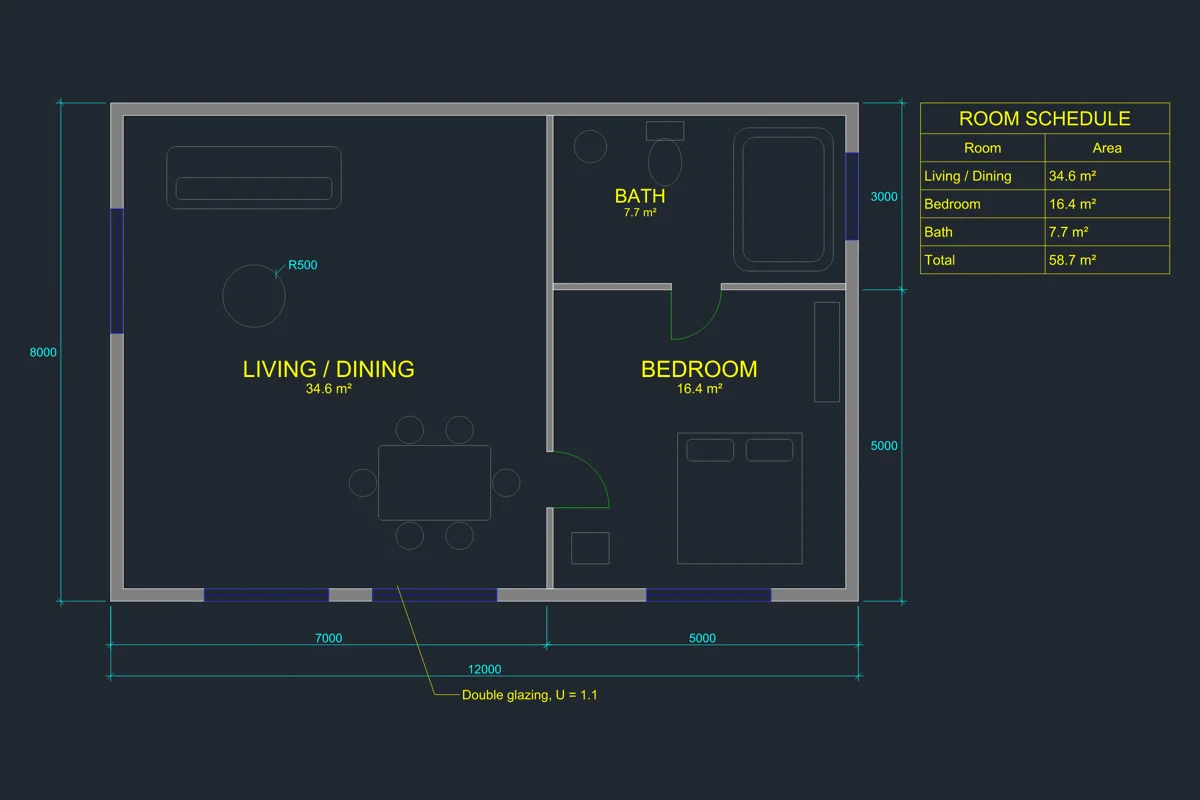
The sample drawing that ships with CADCraft, rendered headless by cadcraft-cli convert. The whole drawing was built from CADCraft commands.
The last row is the honest one. File reading and rendering are fast. Running 100,000 commands through the interactive command-line path (parsing text, running prompt machines, recording undo) is much slower per object. For bulk geometry, generate a DXF or use the JSON execute form rather than typing commands.
Try it yourself
git clone https://github.com/storytold/cadcraft
cd cadcraft
cargo run --release -p cadcraft -- --sample      # desktop app with the sample drawing
cargo build --release -p cadcraft-cli            # the headless CLI
./target/release/cadcraft-cli convert examples/apartment.dxf apartment.svg
It needs Rust 1.95 or newer. Or skip the build: the download page has signed installers, and the online version needs nothing at all.
Other CAD projects in Rust
CADCraft isn't the only one. Each does something different:
| Project | What it is | Good for |
|---|---|---|
| CADCraft | A full 2D drafting application with an AutoCAD-style workflow | Drawing, DXF/DWG, agents over MCP, the browser |
| Fornjot | A code-first boundary-representation (B-rep) CAD kernel | Experimenting with 3D models defined in Rust code |
| truck | A B-rep kernel library (shapes, meshing, STEP output) | Building your own 3D CAD tooling in Rust |
dxf crate | A library to read and write DXF files | Converting or generating DXF in your own program |
acadrust | A library that reads and writes DWG (used by CADCraft) | DWG support in Rust programs |
If you want to use CAD, CADCraft is the one with a user interface. If you want to build CAD, the kernels and file-format crates are where to start.
What Rust doesn't solve
- Feature parity takes time. CADCraft's roadmap measures 50% of AutoCAD's menu items as live commands and rates it about 38% ready for real work. Rust makes code safer, not shorter.
- DWG is still hard. DWG goes through a DXF bridge, and anything CADCraft doesn't model yet is dropped on save. See DXF vs DWG.
- No 3D solids yet. The model is 2D first. A 3D kernel is the biggest item on the roadmap.
FAQ
Is there an AutoCAD alternative written in Rust?
Yes. CADCraft is an open-source 2D CAD application in pure Rust with an AutoCAD-style command line, snaps, layers, dimensions, hatches, blocks and layouts. It runs on Windows, macOS, Linux and FreeBSD and in the browser via WebAssembly. It is pre-alpha: its roadmap rates it about 38% ready for real work.
Why write CAD software in Rust?
For memory safety without a garbage collector, predictable performance on large drawings, one codebase that compiles to native binaries and WebAssembly, and a strong type system for the many file formats and edge cases CAD has to handle. CADCraft also forbids unsafe code and panics in production crates.
What GUI library does CADCraft use?
egui, an immediate-mode Rust GUI, drawn on the GPU with wgpu (DirectX 12 by default on Windows). The GUI lives in one crate, ui-egui; nothing below it depends on egui or wgpu, so the front end can be replaced.
Does CADCraft have a 3D kernel?
Not yet. Geometry is f64 2D with some 3D entity types, and 3D solids are on the roadmap. For 3D CAD in Rust today, look at Fornjot (a code-first B-rep kernel) or truck (a B-rep kernel library).
Related
- Open source CAD compared: FreeCAD, LibreCAD, QCAD, OpenSCAD, SolveSpace and CADCraft
- CADCraft vs AutoCAD from the command line: scripting and the CLI
- Text to CAD: what the MCP server lets an AI agent do