Text to CAD: What Actually Works Today
Text to CAD in practice: the three routes that work (prompt to parametric script, to a 2D drawing, to a 3D mesh), what each gets wrong, a real prompt with its real output, and a runnable MCP example.
 CADCraft AI Editorial
Short answer: in 2026, text to CAD works if a language model writes instructions that a real CAD engine runs. It doesn't work if a model has to imagine the shape. Three routes are usable today:
- Text → parametric script (OpenSCAD, CadQuery, build123d) for 3D parts.
- Text → 2D drawing, with an AI agent typing commands into a CAD program such as CADCraft over MCP.
- Text → 3D mesh from generative models, for visuals only.
Put every dimension in the prompt, and make the agent measure what it drew before you trust it. The runnable example below does exactly that.
cadcraft.org is an independent guide, not the official site. CADCraft is the ArtCraft team's open-source CAD program (getartcraft.com/apps/cadcraft). The example on this page was run with cadcraft-cli 0.8.0.
The three routes, compared
| Route | What the model outputs | You get | Good at | Reliably gets wrong |
|---|---|---|---|---|
| Prompt → parametric script | OpenSCAD / CadQuery / build123d code | A solid you can export as STL or STEP (STEP with CadQuery/build123d) | Brackets, enclosures, spacers, anything built from boxes, cylinders and holes | Fillet order and failing booleans, wrong axis, features that need sketch constraints |
| Prompt → 2D drawing | CAD commands (lines, circles, dimensions) | A DXF/DWG drawing, a PDF sheet | Plates, flanges, floor-plan outlines, panels, dimensioned sketches | Which dimensions a fabricator needs; radius vs diameter; anything picked by clicking |
| Prompt → 3D mesh | A triangle mesh (from a generative model) | GLB/OBJ for renders and games | Organic shapes, concept visuals | Every exact size. There are no dimensions, so you can't use it for manufacturing |
The pattern holds across all three: the model is good at turning explicit numbers into syntax and bad at deciding the numbers. "A 120 × 80 mm plate with four 6 mm holes 10 mm from each corner" works. "A strong mounting bracket for a 2 kg motor" gives you a guess dressed up as a drawing.
A real prompt and its real output
This is the 2D route, run end to end for this article.
The prompt:
Draw a 120 × 80 mm mounting plate in millimetres. A 30 mm diameter hole in the centre. Four 6 mm diameter holes, 10 mm in from each corner. Outline on layer OUTLINE, holes on layer HOLES in red, dimensions on layer DIMS. Dimension the overall width and height and the centre hole.
The commands the model (Claude, the model that writes this site's articles) produced:
-layer m OUTLINE c 7 OUTLINE

rectang 0,0 120,80
-layer m HOLES c 1 HOLES

circle 60,40 d 30
circle 10,10 d 6
circle 110,10 d 6
circle 110,70 d 6
circle 10,70 d 6
-layer m DIMS c 4 DIMS

dimlinear 0,0 120,0 60,-12
dimlinear 0,0 0,80 -12,40
dimdiameter 75,40 85,55
What CADCraft reported back (query_entities and inspect_drawing): five circles on HOLES, centred at (60, 40) Ø30 and at (10, 10), (110, 10), (110, 70), (10, 70) Ø6. Counts were Circle 5, Dimension 3, Polyline 1, on layers OUTLINE, HOLES and DIMS. Saved as a 23,503-byte DXF (2018 format) and a PDF.
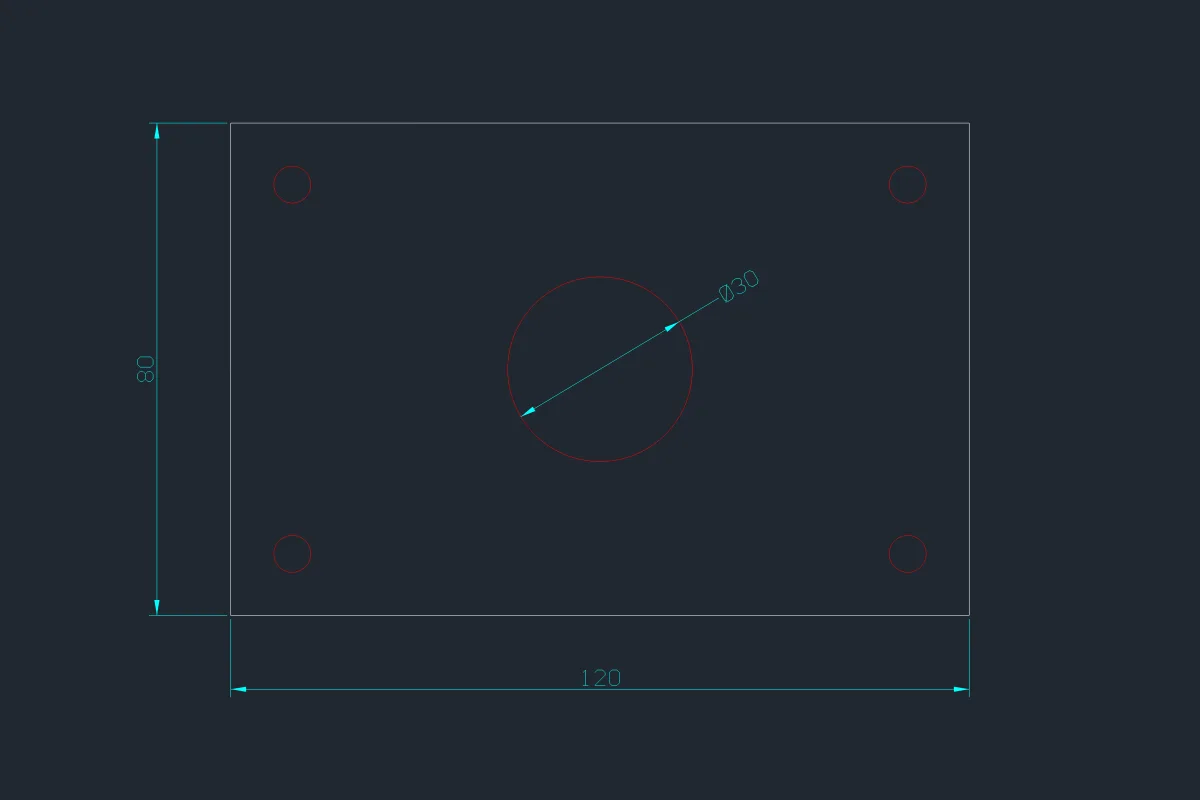
What's wrong with it, and it's typical: the drawing does exactly what the prompt said and no more. The positions of the corner holes aren't dimensioned, and their size isn't called out either. A machinist would have to measure them off the drawing. The prompt never asked for those dimensions, so the model didn't add them. Text to CAD inherits the gaps in your prompt.
What a model will get wrong, with the evidence
These are failures we produced on purpose with CADCraft 0.8.0, so you know what to check for.
| Mistake | What happens | How to catch it |
|---|---|---|
"6 mm hole" written as circle 10,10 6 | CIRCLE takes a radius by default, so you get a 12 mm hole. query_entities reported "radius":6.0 | Ask for diameters with d, then check 2 × radius |
An impossible value, e.g. circle 60,40 0 | Refused with Value must be positive and nonzero., but CIRCLE keeps waiting at its prompt, so the next line the model sends is read as a radius | Check the reply's running field; send cancel (Escape) |
| A command that needs picked objects | execute with fillet and only a radius fails: invalid parameters for `fillet`: `h1` is required | Query handles first, then pass them |
| Inch vs millimetre | An imperial drawing reads 120 as 120 inches | Start with new_drawing {"metric": true} |
| Missing manufacturing intent | Tolerances, threads, finishes and datums aren't drawn unless asked for | A human review; nothing automatic replaces it |
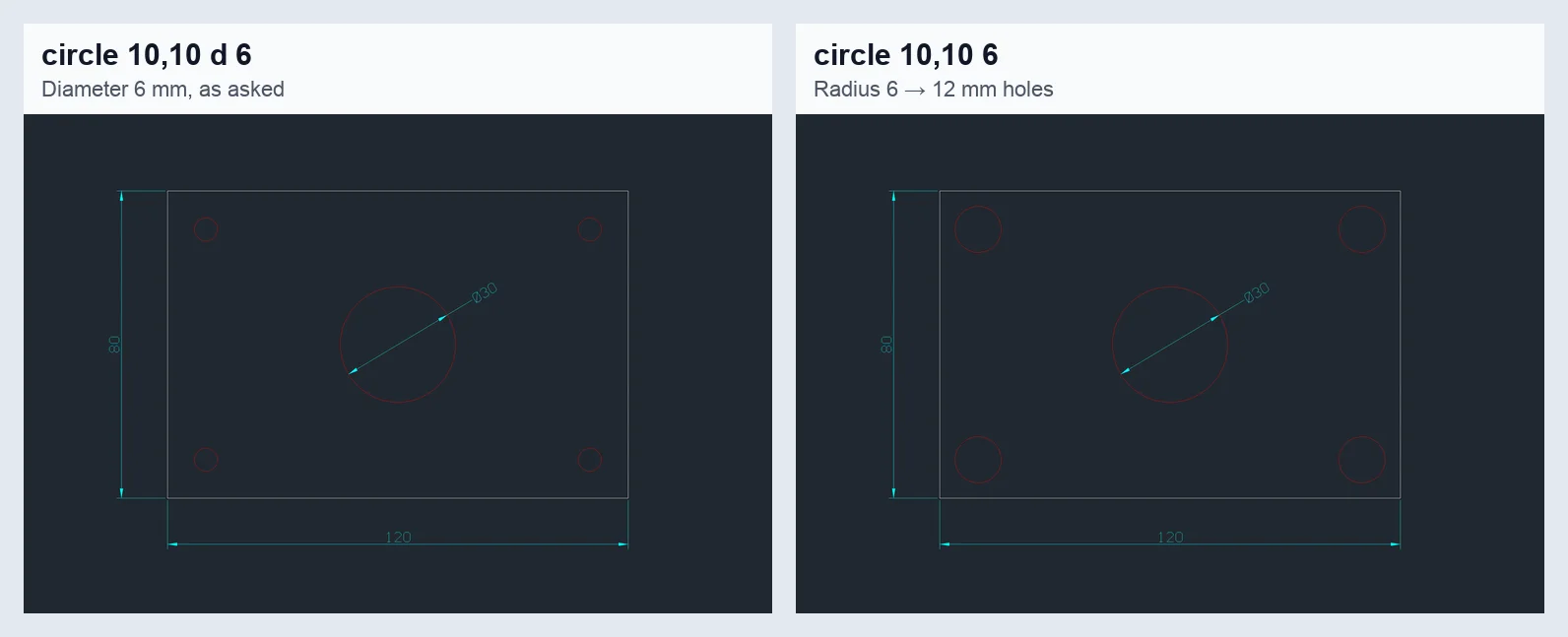
One missing letter. Both drawings came from the same script; on the right the d was dropped from the four corner-hole lines.
How CADCraft's MCP server and JSON channel fit in
CADCraft doesn't include a language model. It gives an agent hands and eyes: every menu item, tool and prompt is a command that can be typed or called with JSON. The MCP server exposes 12 tools in 0.8.0: command_line, script, execute, list_commands, inspect_drawing, query_entities, render, find_text, new_drawing, open, save and cancel. render returns a PNG the model can look at, and save to a .pdf, .svg or .png path exports.
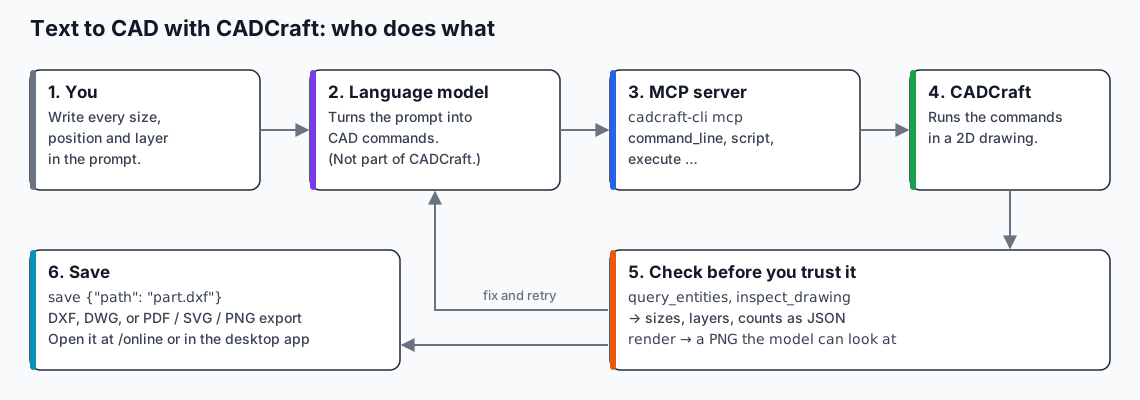
Where each piece sits. The checking step is the one people skip.
Connect it to an MCP client. Install the desktop download, which includes cadcraft-cli (on macOS it's a separate zip on the release page). Then add it to your client. For Claude Code:
claude mcp add cadcraft -- cadcraft-cli mcp
For clients configured with JSON (Claude Desktop and others):
{ "mcpServers": { "cadcraft": { "command": "cadcraft-cli", "args": ["mcp"] } } }
That runs headless, with no window. To watch the agent draw in the app, start the desktop app with --control 7979 and use "args": ["mcp", "--connect", "127.0.0.1:7979"].
The minimal runnable example, without any AI client. This Python script speaks MCP to cadcraft-cli directly, sends the commands above, checks the holes and saves the files. It ran as shown with cadcraft-cli 0.8.0 on its PATH:
import json, subprocess

# The drawing steps an LLM produced from a plain-English request.
SCRIPT = """-layer m OUTLINE c 7 OUTLINE

rectang 0,0 120,80
-layer m HOLES c 1 HOLES

circle 60,40 d 30
circle 10,10 d 6
circle 110,10 d 6
circle 110,70 d 6
circle 10,70 d 6
-layer m DIMS c 4 DIMS

dimlinear 0,0 120,0 60,-12
dimlinear 0,0 0,80 -12,40
dimdiameter 75,40 85,55
"""

srv = subprocess.Popen(["cadcraft-cli", "mcp"], stdin=subprocess.PIPE,
                       stdout=subprocess.PIPE, text=True)
def rpc(i, method, params):
    srv.stdin.write(json.dumps({"jsonrpc": "2.0", "id": i, "method": method,
                                "params": params}) + "\n")
    srv.stdin.flush()
    return json.loads(srv.stdout.readline())["result"]
def tool(i, name, args):
    return rpc(i, "tools/call", {"name": name, "arguments": args})

rpc(1, "initialize", {"protocolVersion": "2025-06-18", "capabilities": {},
                      "clientInfo": {"name": "text-to-cad", "version": "0"}})
srv.stdin.write('{"jsonrpc":"2.0","method":"notifications/initialized"}\n')
tool(2, "new_drawing", {"metric": True})
tool(3, "script", {"text": SCRIPT})
holes = json.loads(tool(4, "query_entities", {"type": "Circle"})["content"][0]["text"])
for e in holes["entities"]:
    print(e["layer"], e["geometry"]["center"], "dia", 2 * e["geometry"]["radius"])
print(tool(5, "save", {"path": "plate.dxf"})["content"][0]["text"])
print(tool(6, "save", {"path": "plate.pdf"})["content"][0]["text"])
srv.stdin.close()
The empty line after each -layer command is an Enter, which ends the LAYER prompt. Swap SCRIPT for whatever your model writes. The query_entities check is the part not to skip.
The JSON control channel is the lower-level interface behind the bridged MCP mode. Start the desktop app with --control 7979. It then accepts one JSON request per line on 127.0.0.1:7979, for example:
{ "id": 1, "method": "cmdline.input", "params": { "text": "circle 0,0 5" } }
According to the project's control-protocol document, each reply is one JSON line with ok. A line that was typed but refused still returns "ok": true with an error field, so an agent must check error, not just ok. Use this channel when you're writing your own agent loop instead of using an MCP client.
Where this leaves text to CAD
Use AI for the typing, not the deciding. Write the prompt like a drawing request to a junior drafter: every size, every position, every layer, and the dimensions you want shown. Let the agent draw, then make it prove the result with query_entities and render. You can open the DXF in the online editor or the desktop app to finish by hand. If someone downstream needs DWG or a PDF, DXF vs DWG explains which to send.
FAQ
Can AI generate a CAD drawing from a text description?
Yes, for simple, fully specified 2D parts and parametric 3D parts. A language model writes drawing commands or code, and a CAD program or kernel executes them. It works when every size and position is in the prompt. It fails when the model has to guess dimensions, tolerances or design intent.
Is text to CAD the same as text to 3D?
No. Text-to-3D generators produce meshes for visuals, without dimensions or editable features. Text to CAD should produce geometry with exact sizes: a parametric script, a solid model or a dimensioned drawing that you can edit and manufacture from.
How does CADCraft fit into text to CAD?
CADCraft is a free 2D CAD program that an AI agent can drive. Its MCP server (cadcraft-cli mcp) gives the agent tools to type commands, run JSON commands, inspect and query the drawing, and render it to PNG. The agent can check its own work and save DXF, DWG or PDF. CADCraft does not include a language model itself.
Can CADCraft generate 3D models from text?
No. CADCraft is a 2D drafting application; 3D modelling is future work in the project’s own roadmap. For 3D parts from text, use the parametric-script route (an LLM writing OpenSCAD, CadQuery or build123d code).
Related
- CADCraft vs AutoCAD from the command line: the CLI and scripting workflow in more depth
- Open-source CAD compared: including tools with 3D and scripting
- AutoCAD commands cheat sheet: the commands an agent types