Open Source DWG Editor: Which Free Tools Can Save DWG
Most free CAD programs open DWG but save only DXF. Which open-source editors can actually save DWG (CADCraft, LibreCAD, QCAD, FreeCAD, LibreDWG, ODA File Converter), what each loses, and a real test editing a DWG and saving it at every version from 2000 to 2018.
 CADCraft AI Editorial
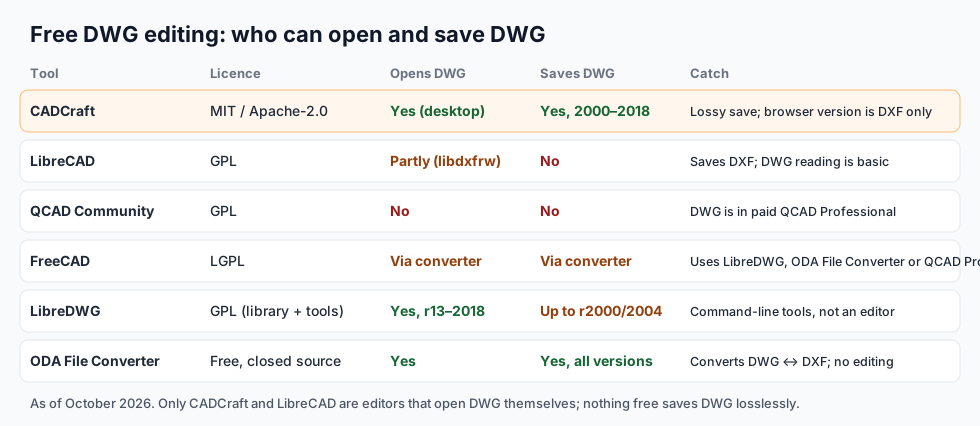
Short answer: plenty of free CAD programs open DWG; very few save it. As of October 2026:
- CADCraft (MIT OR Apache-2.0) opens DWG and saves DWG 2000 to 2018 in its desktop app. It's the only open-source CAD editor in this list that writes DWG itself.
- LibreCAD opens some DWG files, but saves DXF.
- QCAD Community Edition has no DWG; it's in the paid QCAD Professional.
- FreeCAD reads and writes DWG through an external converter you install.
- LibreDWG is an open-source library and command-line tools; it writes DWG only up to about R2000/2004.
- ODA File Converter is free but closed source; it converts DWG to DXF and back.
None of them saves DWG losslessly. If the receiver accepts DXF, send DXF.
cadcraft.org is an independent guide, not affiliated with Autodesk or the Open Design Alliance. CADCraft is the ArtCraft team's open-source CAD program (getartcraft.com/apps/cadcraft). The test below used CADCraft 0.14.0 (28 October 2026).
Why "open source DWG" is hard
DWG is AutoCAD's native format. Autodesk has never published a full specification. What open-source projects work from is the Open Design Alliance's public description of the format, which is a reverse-engineered document, plus a lot of testing. Reading DWG well enough to draw it is achievable; writing a DWG that AutoCAD accepts as if it made it is much harder, because AutoCAD checks internal structures (object maps, handles, class tables, CRCs) that a reader can ignore.
That's why the usual open-source pattern is "open DWG, save DXF". DXF vs DWG explains what the two formats are and why DXF is the safe exchange format.
The tools, one by one
CADCraft: opens and saves DWG
CADCraft's desktop app opens DWG and saves it at version 2000, 2004, 2007, 2010, 2013 or 2018 (2018 by default). It does this through acadrust, an open-source Rust DWG/DXF library (MPL-2.0), used unmodified: DWG is converted to DXF in memory on open and back on save. The browser version is DXF only.
How good is it? The project's own file-format notes are frank:
- Everything CADCraft doesn't model is dropped on save: custom objects, proxy entities, ACIS solids and other application data.
- Its DWG output has never been checked in AutoCAD, and there's no test corpus of real third-party DWGs yet.
- DWG files older than R13 don't open, R13 and R14 are untested, and it can't save R14.
- A user reported a 10 MB DWG taking about two minutes to fail; limits now stop runaway conversions early.
So it's a real DWG editor for ordinary 2D drawings, not a guaranteed round trip.
LibreCAD: opens DWG, saves DXF
LibreCAD (GPL) reads DWG through its libdxfrw library and saves DXF (R12 to 2007). Its DWG reading is limited, and its own forum describes DWG support as rudimentary, so some files won't open. It's a fine choice when you only need to look at a DWG, make a change and hand over a DXF.
QCAD: DWG is paid
QCAD Community Edition (GPL) works in DXF. DWG reading and writing is in QCAD Professional, a paid add-on built on the ODA's libraries.
FreeCAD: DWG through a converter
FreeCAD (LGPL) doesn't parse DWG itself. In Preferences ▸ Import-Export ▸ DWG you pick a converter it calls behind the scenes: LibreDWG, the ODA File Converter, or QCAD Pro's tool. With one installed, FreeCAD can import a DWG and export one. FreeCAD is a 3D-first program, so for pure 2D drafting it's heavier than the others.
LibreDWG: a library, not an editor
GNU LibreDWG (GPL) is the C library many people mean by "open source DWG". Its command-line tools (dwg2dxf, dxf2dwg, dwgread, dwgwrite) convert files. It reads DWG from R13 to 2018, but by its own manual it writes DWG only up to R2000 by default, with R2004 partly working. Useful for scripts and servers; there's no drawing window.
ODA File Converter: free, not open source
The Open Design Alliance's File Converter is a free download that converts DWG and DXF between every version, in batches. It's closed source, and it doesn't edit anything. Many people pair it with an open-source editor: DWG to DXF, edit, DXF back to DWG. DWG to DXF walks through that route.
Test: edit a DWG and save it at every version
We took CADCraft's built-in sample floor plan, saved it as DWG, then opened that DWG, added a circle and a "REV B" note, and saved it at each DWG version CADCraft writes, with its command-line tool:
cadcraft-cli sample floorplan plan.dxf
cadcraft-cli convert plan.dxf plan.dwg
cadcraft-cli run plan.dwg \
  --cmd 'circle {"center":[300,60],"radius":12}' \
  --cmd 'text {"at":[40,-30],"text":"REV B - edited in CADCraft","height":6}' \
  --cmd 'saveas {"path":"edit-2013.dwg","version":2013}'
Each file was then reopened with cadcraft-cli info and its objects counted. The first six bytes of every file carried the right version code, from AC1015 (2000) to AC1032 (2018):
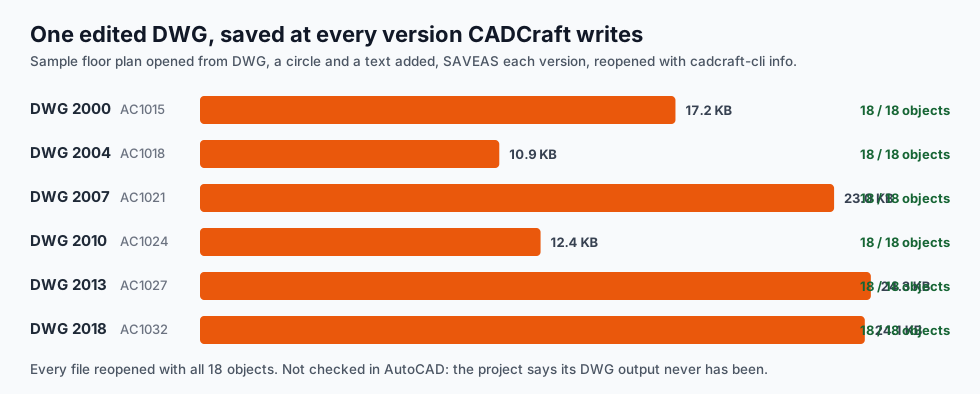
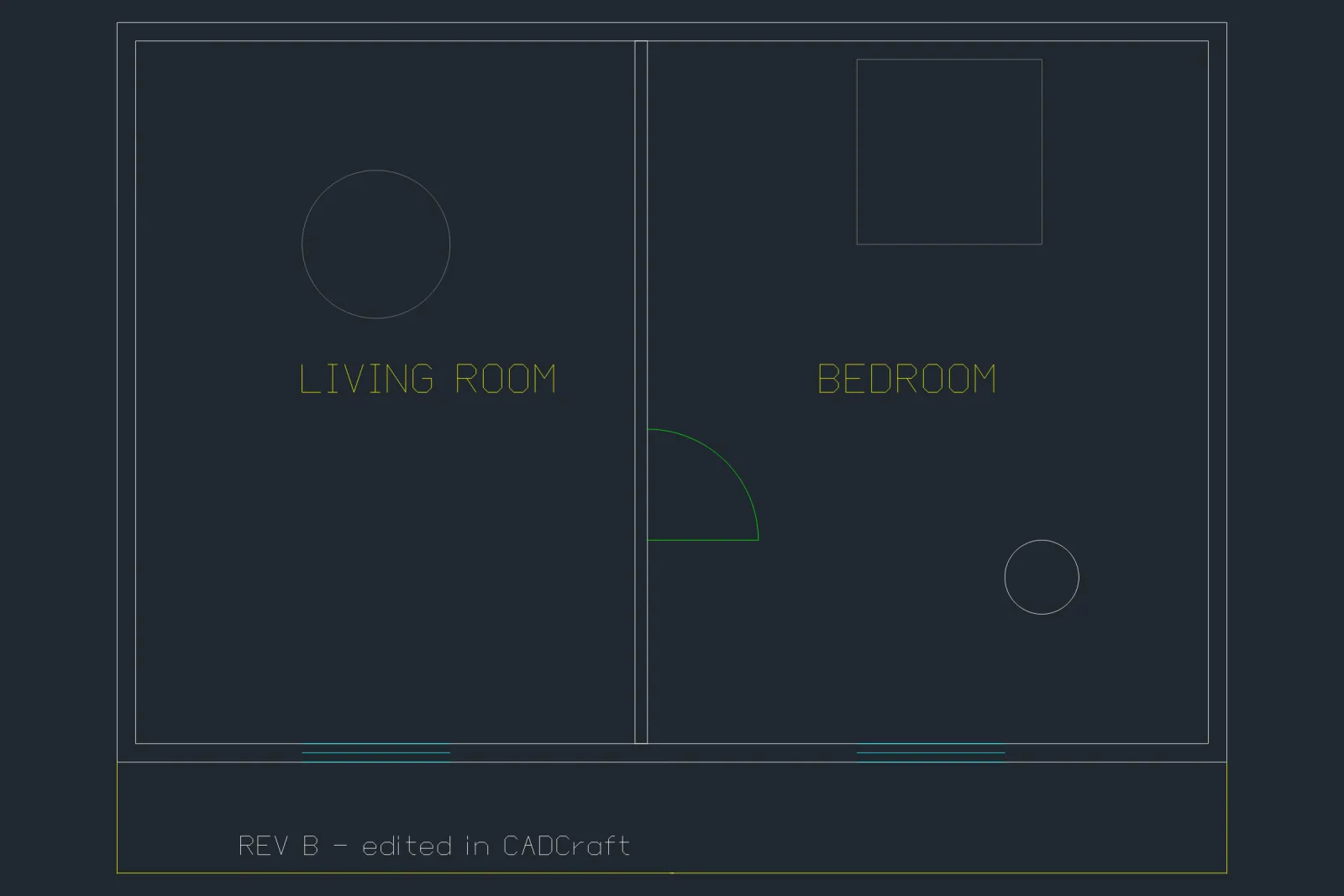
All 18 objects (16 original plus the 2 added) came back at every version, with the same layers, text styles and linetypes. A larger file behaved too: a 10,000-circle drawing converted from DXF (1.2 MB) to DWG (164 KB) in 0.09 s and reopened in 0.05 s, on an Apple M3 Max.
What this test doesn't prove: these are drawings CADCraft made, with simple objects. A real DWG from AutoCAD with dynamic blocks, Civil 3D objects, annotative scales or xrefs is a much harder test. Try your own files before you rely on any free editor for DWG.
How to edit a DWG for free without surprises
- Keep the original. Save under a new name; never overwrite the only copy.
- Ask what the receiver needs. If DXF or PDF is acceptable, send that.
- Check what you lost. Compare object counts or layer lists before and after. In CADCraft,
cadcraft-cli info file.dwgprints both as JSON. - Save to the receiver's version. An office on AutoCAD 2013 can't open a 2018 DWG; pick the older version on save.
- Open the result in the receiver's software, or a free viewer, before sending. How to open a DWG file lists the free viewers.
FAQ
Is there an open source DWG editor?
Yes, but few save DWG. CADCraft (MIT OR Apache-2.0) opens DWG and saves DWG 2000 to 2018 in its desktop app. LibreCAD opens some DWG files but saves DXF. FreeCAD edits DWG through an external converter. LibreDWG is a library with command-line tools, not an editor.
Can LibreCAD save as DWG?
No. LibreCAD reads DWG through its libdxfrw library, with limited support, and saves DXF only. Open the DXF in AutoCAD or convert it to DWG with another tool if someone needs a DWG back.
Is there a free DWG editor that saves without losing anything?
Not a free one we know of. Open-source DWG writers rebuild the file from what they understand, so custom objects, proxies and application data can be dropped. Commercial DWG-compatible programs built on the ODA libraries (BricsCAD, DraftSight and others) come closest. Keep the original DWG.
How do I edit a DWG file for free?
Open it in a free editor that reads DWG (CADCraft desktop or LibreCAD), make the change, and save. Save as DWG in CADCraft if the receiver needs DWG, or as DXF if they accept it; DXF is more widely readable. Check the result in the receiver’s software before relying on it.
Related
- DWG to DXF: convert in either direction, with version choice
- DXF vs DWG: what each format keeps
- Open source CAD compared: FreeCAD, LibreCAD, QCAD, OpenSCAD, SolveSpace and CADCraft