CADCraft for Android: Is There an Official APK?
Looking for a CADCraft Android APK? Check the official release platforms, what the browser version offers on a phone, and the limits of mobile CAD editing.
 CADCraft AI Editorial
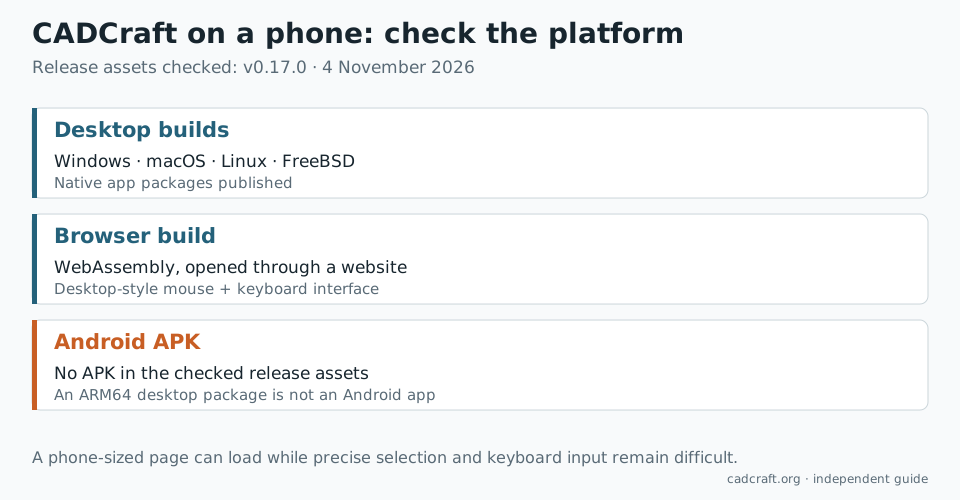
There is no official Android APK in CADCraft's v0.17.0 release, checked on 4 November 2026. The ArtCraft team publishes Windows, macOS, Linux and FreeBSD builds, plus a WebAssembly build. If you searched for “CADCraft APK” or “CADCraft for Android,” the available browser route is worth distinguishing from a native phone application before downloading anything.
You can open the CADCraft online editor on a phone. Its interface, however, is designed around a mouse, keyboard and desktop-sized canvas. A page that loads on Android is not automatically a practical replacement for a mobile CAD app.
cadcraft.org is an independent guide and browser host. The upstream developer is the ArtCraft team. Release-platform claims below refer to its official v0.17.0 assets.
What the official download list actually contains
The current release has installers and archives for desktop operating systems. The web download is a ZIP of website files, not an Android installer.
| Download | Intended environment | Android APK? |
|---|---|---|
Windows .msi or portable ZIP | Windows PCs, with separate processor builds | No |
macOS universal .dmg | Apple silicon and Intel Macs | No |
| Linux AppImage, Flatpak or distribution package | Linux desktops, including some ARM systems | No |
| FreeBSD archive | FreeBSD | No |
cadcraft-web-0.17.0.zip | A web server, accessed through a browser | No |
The release includes a Linux aarch64 build and a Windows arm64 build. Neither is an APK. Matching the processor is only half of choosing software: the operating system and application environment must match too.
If another website offers a “CADCraft APK,” check whether the ArtCraft product page or official repository actually links to it. A matching name or icon alone does not establish that it is the same application. For a later official release, use the latest-assets page rather than assuming this dated list will remain complete.
What happens when you open the browser version on a phone?
The online page loads a WebAssembly application inside a normal web page. In our 390-pixel-wide browser emulation, the editor loaded, but its familiar desktop palettes and command line were scaled into a small area. The page also displayed its mouse-and-keyboard notice.
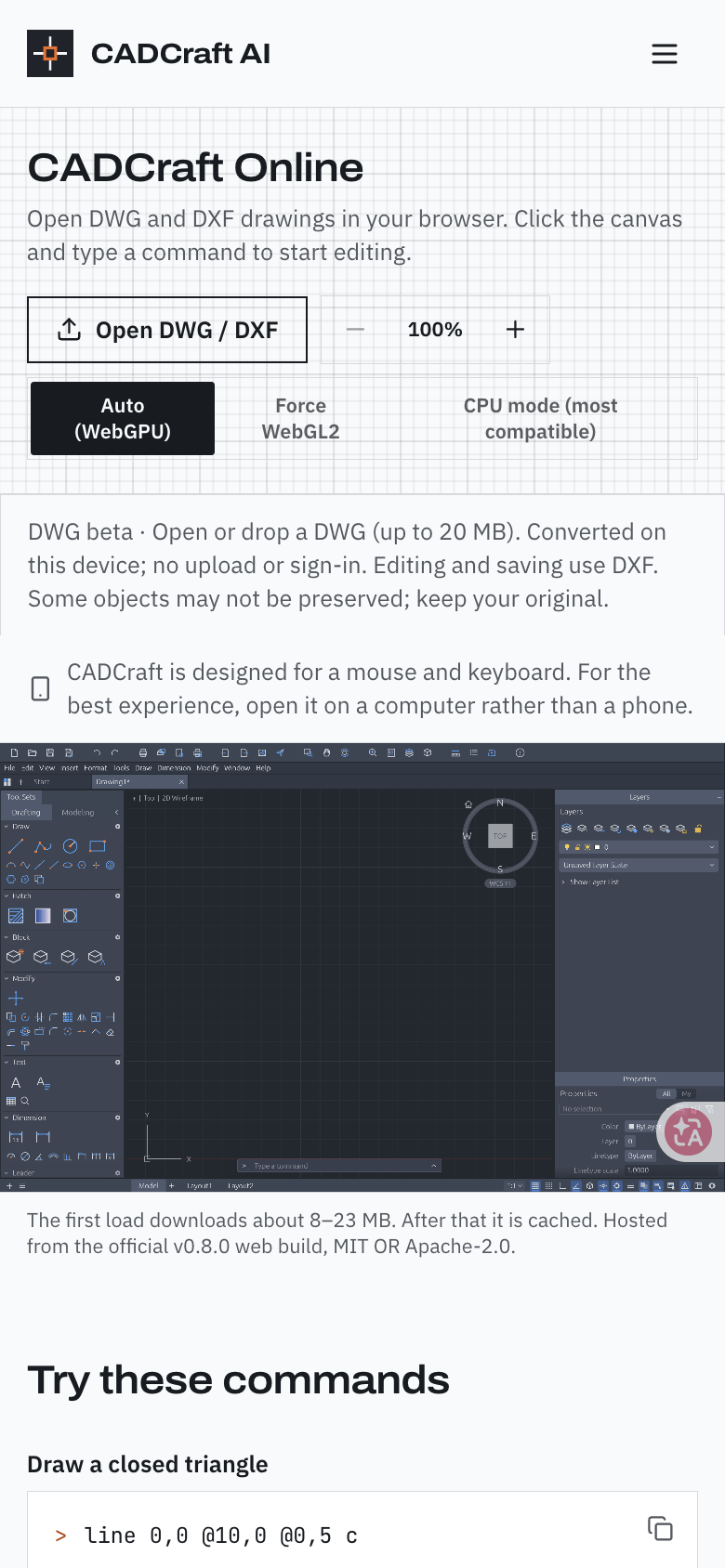
Browser-emulation capture, 4 November 2026. This checks the narrow-screen layout; it is not a physical Android-device or touch-editing test.
There are several separate things to test on your own device:
- Rendering: whether the canvas draws at all with that browser's GPU support.
- Input: whether you can focus the command line, enter coordinates and press Enter reliably.
- Selection: whether a finger or attached pointer can select the intended object.
- File handling: whether Open can access a drawing and Save produces a file you can find and reopen.
Passing the first check does not establish the other three. A tablet with a keyboard and mouse is closer to the interface's intended input than a phone operated with one finger, but it still needs testing with a disposable drawing.
A sensible first test
Start with a small copy of a DXF, not the only copy of a client drawing. Open CADCraft Online, use Open DWG / DXF, and check that you can see the drawing and find the command line.
Try a short editing action, save the result as DXF, then reopen the downloaded file. Confirm that one known length and the objects you changed are still correct. If using the on-screen keyboard hides the command line or prevents an Enter response, stop there and move the edit to a computer.
On a blank canvas, a small command such as circle 5,2 1 is enough to test coordinate entry. You do not need a large building plan to discover that input is uncomfortable.
The site's Open full screen control can help on a larger screen. It changes the available space; it does not add a touch-oriented selection tool or change the engine's file support.
A blank canvas: try the available renderers
The page provides Auto (WebGPU), Force WebGL2 and CPU mode (most compatible). If Auto produces a blank canvas, try another mode before concluding that the file itself is broken.
The standalone editor also recognizes these paths:
/cadcraft-app/?webgl
/cadcraft-app/?cpu
These are alternative rendering routes, not guarantees of Android compatibility. CPU mode can trade graphics compatibility for performance, and none of the modes removes the small-screen input constraints.
Also allow for the initial download: the hosted page currently says approximately 8–23 MB before caching. A reload that appears stuck on a slow mobile connection may still be fetching application files.
DWG, DXF and saving on a phone
The hosted page offers a beta DWG-to-DXF conversion for files up to 20 MB. Conversion runs on the device; editing and saving use DXF. Keep the original DWG because some objects may not survive the conversion. For a detailed compatibility check, use the DWG-opening guide.
On the free route, the site's autosave keeps recent drawings in that browser on that device. It is not a file in your Downloads folder or a copy on your desktop computer. Export a DXF you can locate, and treat that exported file as the handoff between devices. Clearing browser storage can remove browser-local work.
Pro's optional cloud saving is a separate account feature. It does not turn the editor into a native mobile application. Similarly, an Add to Home screen shortcut changes how you launch the website, not what CAD commands it implements.
The hosted editor identifies itself as v0.8.0 at the time of this check. The upstream desktop release is v0.17.0. A feature mentioned in the latest desktop release notes should not be assumed to exist in this older hosted build.
Which route should you use?
For a quick experiment, use the browser and test input and export before doing real work. For precise drafting, repeated selection, layouts or a long session, use a desktop CADCraft build. The GitHub download guide explains which package matches your machine.
For a job that must be completed entirely on a phone, choose a tool whose publisher explicitly documents native Android or mobile-browser editing for that workflow. Verify opening, editing and saving separately: a DWG viewer is enough for inspection but not for changing geometry.
FAQ
Is there an official CADCraft APK for Android?
No Android APK is listed in the official CADCraft v0.17.0 release checked on 4 November 2026. Published builds target desktop operating systems and the web. Check the ArtCraft product page and official GitHub releases for any later Android announcement.
Can I use CADCraft on an Android phone without installing an APK?
You can try the browser editor, but it is a desktop-style CAD interface designed for a mouse and keyboard. Loading the page is not a guarantee that touch input, the on-screen keyboard and file saving will work comfortably on your phone.
Can an Android phone run the Linux ARM64 CADCraft package?
Not as an Android application. ARM64 describes the processor architecture, while Linux desktop and Android use different application packaging and runtime environments. Choose a build for both your operating system and architecture.
Does adding CADCraft to my home screen install the native CAD app?
No. A browser shortcut still opens the website. It does not turn a WebAssembly build into an official Android APK or add mobile-specific CAD tools.
Sources and related guides
- Official CADCraft v0.17.0 release and platform download documentation.
- CADCraft Online: renderer controls, device notice and hosted-version information.
- Free online CAD software: browser and cloud tools compared by task.
- CADCraft 3D support: why mobile access does not imply 3D-printing support.