CADCraft GitHub: Official Repo, Releases, and Source Code
Find the official CADCraft GitHub repository, choose the right release asset, distinguish source archives from installers, and build a pinned version from source.
 CADCraft AI Editorial
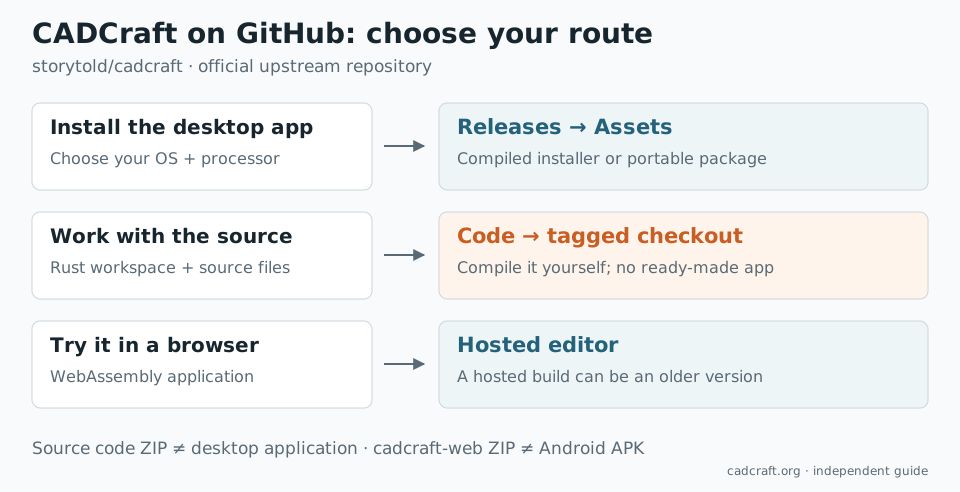
The official CADCraft GitHub repository is storytold/cadcraft. To install the application, open its latest release and choose a file under Assets. The green Code → Download ZIP button downloads the source code, which will not give you a ready-to-run CAD application.
That distinction explains many unsuccessful downloads: the repository, the release page and the browser build are three different destinations.
Checked on 4 November 2026 against the official README and v0.17.0 release, published on 3 November. cadcraft.org is an independent guide; the upstream product is made by the ArtCraft team.
Start at the right repository
Check the owner and project name together: storytold/cadcraft. The README links back to the ArtCraft product page and explains the desktop, command-line and WebAssembly builds.
You may also encounter other repositories from the same organization. Craft Anything is a separate application, and craft-launcher is a launcher. A file named craft-anything-…-windows-x64.msi is not the standalone CADCraft installer. For this application, look for an asset beginning with cadcraft- in CADCraft's own release.
The repository's default branch, main, is ongoing development. A release tag such as v0.17.0 identifies a particular published version. A feature visible in today's source may not exist in an installer downloaded last week.
Choose the asset, not the source archive
Expand Assets below the release notes. In v0.17.0, the relevant packages include:
| Your system | File to look for | What you get |
|---|---|---|
| Windows, 64-bit Intel or AMD | cadcraft-0.17.0-windows-x64.msi | Desktop installer |
| Windows on ARM | cadcraft-0.17.0-windows-arm64.msi | Native ARM desktop installer |
| Windows, 32-bit | cadcraft-0.17.0-windows-x86.msi | 32-bit desktop installer |
| macOS, Apple silicon or Intel | cadcraft-0.17.0-macos-universal.dmg | Universal desktop application |
| Linux, Intel or AMD | cadcraft-0.17.0-linux-x86_64.AppImage | AppImage; other distribution packages are also available |
| Linux, ARM64 | cadcraft-0.17.0-linux-aarch64.AppImage | Linux ARM build |
| FreeBSD, x86_64 | cadcraft-0.17.0-freebsd-x86_64.tar.gz | FreeBSD build |
On Windows, Settings → System → About → System type helps distinguish an x64 PC from an ARM machine. On Linux, uname -m reports the architecture: x86_64 and aarch64 need different files. The macOS universal application includes both supported Mac architectures.
An ARM64 Linux package is still a Linux package. It does not become an Android app because a phone also has an ARM processor. See CADCraft for Android.
The release also contains Windows portable ZIPs, Linux packages, a macOS CLI ZIP, a web ZIP and SHA256SUMS.txt. If you specifically need a portable Windows setup, the portable CAD guide covers where to keep its settings. This page concentrates on identifying the right upstream download.
Three downloads that look similar but do different jobs
Source code (zip) or Source code (tar.gz) is a snapshot of the repository. Expect Rust files, Cargo.toml, crates/ and apps/. There is no requirement for a compiled executable to be inside it.
cadcraft-cli-… is the command-line application. It is useful for conversion, scripts and MCP automation. It is not the graphical drawing window. The terminal workflow explains when to use it.
cadcraft-web-…zip contains a static website and WebAssembly assets. It needs a web server; double-clicking its HTML file is not the supported substitute for an installer. To try CADCraft without hosting anything, open the online editor.
The hosted editor and GitHub's latest release have separate version numbers. At the time of this check, cadcraft.org identifies its bundled editor as v0.8.0, while the latest desktop release is v0.17.0. Reproducing a bug means recording which one you used.
Check that you downloaded the expected file
Download SHA256SUMS.txt from the same release as the package. Calculate the package's SHA-256 hash and compare it with the line for that exact filename:
# Windows PowerShell, in the download folder
Get-FileHash .\cadcraft-0.17.0-windows-x64.msi -Algorithm SHA256
# macOS
shasum -a 256 cadcraft-0.17.0-macos-universal.dmg

# Linux
sha256sum cadcraft-0.17.0-linux-x86_64.AppImage
The values must match completely. A checksum checks the file against the release's published value; checking the repository owner first establishes which publisher supplied that value.
If the application fails to launch, keep the version and platform details. Use the README's platform-specific troubleshooting instructions before installing unrelated dependencies. CADCraft's Windows README, for example, discusses graphics backends; a source archive accidentally downloaded instead of an installer requires a different fix.
Build from source when you actually need the source
Use this route to change CADCraft, investigate a bug, or work with a specific revision. The v0.17.0 workspace requires Rust 1.95 or later, plus Git and the native build requirements for your platform. Those are development dependencies; users of the published installer do not need them.
To check out the version discussed here:
git clone --branch v0.17.0 https://github.com/storytold/cadcraft.git
cd cadcraft
rustc --version
cargo run --release -p cadcraft -- --sample
The last command compiles and opens the sample drawing. A first build downloads dependencies and takes longer than starting a prebuilt application. Check the README at that tag if your compiler or system libraries produce an error.
Checking out a tag normally leaves Git in a detached HEAD state. That is fine for reproducing a release. Create a branch before making changes you intend to keep. Use main deliberately when you need unreleased work, and record its commit hash instead of calling it v0.17.0.
For the crate layout and why the engine can also power a CLI and a browser build, see CAD in Rust. This guide's build commands are upstream instructions, not a claim that every supported platform was compiled during this article's review.
Make a useful GitHub bug report
Search existing issues first. If the problem is new, include:
- The release version or commit, operating system and processor architecture.
- Whether you used the native application, CLI or a hosted browser build.
- The shortest command sequence that reproduces the problem.
- What you expected, what happened, and any error text.
- A small, non-confidential example drawing when file contents matter.
For a desktop crash, the README documents logs/cadcraft.log in the application's settings directory. Review a log or sample before attaching it to a public issue. If the problem happens only inside this site's wrapper, reproduce it in the matching upstream build before assuming the CADCraft engine is responsible.
FAQ
What is the official CADCraft GitHub repository?
The ArtCraft team maintains CADCraft at github.com/storytold/cadcraft. Its README links to getartcraft.com/apps/cadcraft. cadcraft.org is an independent guide and hosts a browser build; it is not the upstream repository.
Why does the CADCraft ZIP from GitHub not contain an application?
The Code button and the Source code archives contain source files, not a compiled desktop app. Open Releases and expand Assets, then select the CADCraft installer or portable package for your operating system and processor.
Do I need Rust to install CADCraft?
No. The published desktop installers and portable packages run without a Rust development environment. Rust is needed only if you compile the source. The v0.17.0 workspace specifies Rust 1.95 or later.
Are the CADCraft web download and the desktop download the same?
No. The cadcraft-web ZIP is a static WebAssembly website that must be served over HTTP or HTTPS. A desktop installer is a native application. The hosted version on cadcraft.org can also be older than the latest GitHub release.
Sources and related guides
- Official CADCraft repository and v0.17.0 release assets.
- v0.17.0 workspace and Rust requirement.
- Portable CAD: running the Windows ZIP with settings on a USB drive.
- CADCraft 3D support: what the downloaded program can do with 3D files.