Portable AutoCAD: Is There One? Free Portable CAD That Is
Autodesk doesn’t make a portable AutoCAD, and “portable AutoCAD” downloads are cracked builds. Here’s what does run from a USB stick: CADCraft’s portable ZIP for Windows, AppImages on Linux and CAD in a browser, with a launcher that keeps settings on the stick.
 CADCraft AI Editorial
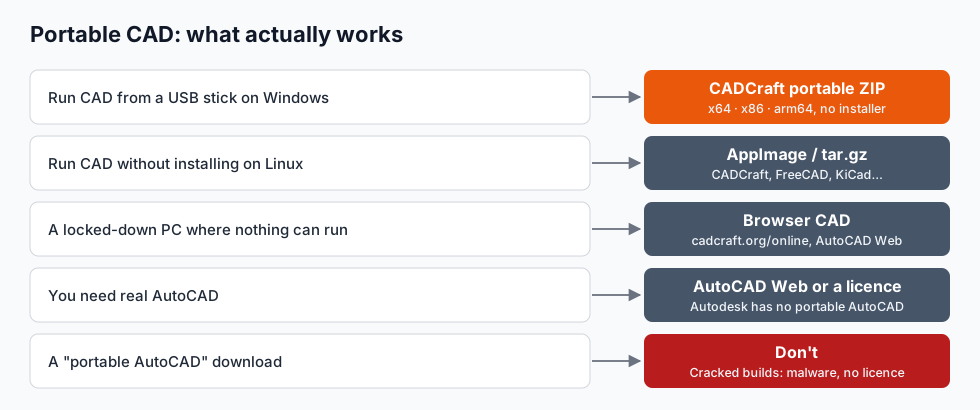
Short answer: there's no official portable AutoCAD. Autodesk only ships AutoCAD as an installed, signed-in program, and every "AutoCAD portable" download is a cracked copy. If you need CAD that runs from a USB stick or without installing:
- Windows: CADCraft's portable ZIP (x64, x86 and arm64). Unzip and run
cadcraft.exe. - Linux: AppImages (CADCraft, FreeCAD, KiCad and others) or a plain
.tar.gz. - A locked-down PC: CAD in the browser, such as CADCraft online, or AutoCAD Web if you have a subscription.
cadcraft.org is an independent guide, not affiliated with Autodesk. CADCraft is the ArtCraft team's open-source CAD program (getartcraft.com/apps/cadcraft). File names and sizes are from the CADCraft 0.14.0 release (28 October 2026).
Why there's no portable AutoCAD
AutoCAD is a large installed application. It writes to the Windows registry, installs shared runtimes and drivers, and checks a named-user licence when you sign in. None of that is designed to travel on a USB stick, and Autodesk has never released a portable edition.
"Portable AutoCAD", "AutoCAD portable installer" and similar downloads are repackaged copies with the licensing removed. Avoid them:
- They're unlicensed. Using one for paid work is software piracy, and companies get audited for it.
- They're a classic malware carrier. A modified installer that asks you to switch off your antivirus is exactly how password stealers and miners spread.
- They break IT policy on work and school computers, which is usually why people want a portable version in the first place.
The legal routes to real AutoCAD without a local install are AutoCAD Web (in the browser, part of an AutoCAD subscription) and the free education licence for students and teachers. If you just need to look at a DWG, a viewer is enough; see how to open a DWG file.
CADCraft's portable ZIP for Windows
CADCraft publishes a portable ZIP next to each Windows installer on its GitHub releases page:
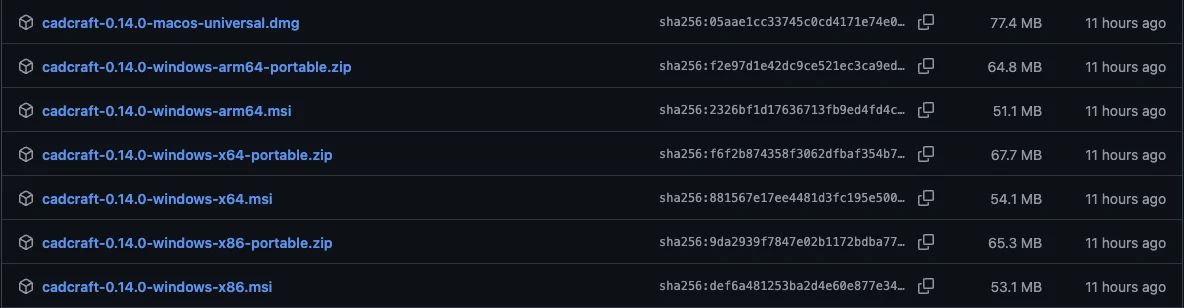
| File | For | Size (as GitHub shows it) |
|---|---|---|
cadcraft-0.14.0-windows-x64-portable.zip | Most Windows PCs (64-bit Intel/AMD) | 67.7 MB |
cadcraft-0.14.0-windows-arm64-portable.zip | Snapdragon and other ARM laptops | 64.8 MB |
cadcraft-0.14.0-windows-x86-portable.zip | Old 32-bit Windows | 65.3 MB |
Inside is cadcraft.exe (the app), cadcraft-cli.exe (the command-line tool and MCP server for AI agents) and the licence files. The executables are code-signed, and they link the C runtime statically, so nothing else has to be installed: no Visual C++ redistributable, no .NET, no admin rights.
What you get is the full program: AutoCAD-style command line and aliases, object snaps, layers, dimensions, hatches, blocks, paper-space layouts, PDF plotting, and DWG (R13 to 2018) and DXF files. It's free and open source (MIT OR Apache-2.0). It's also pre-alpha, rated about 38% ready for real work by its own roadmap, so test it on your kind of drawing first.
Check the download
The release includes SHA256SUMS.txt. In PowerShell:
Get-FileHash .\cadcraft-0.14.0-windows-x64-portable.zip
Compare the hash with the line for that file. Only download from github.com/storytold/cadcraft; check the owner is storytold.
Make it truly portable: keep the settings on the stick
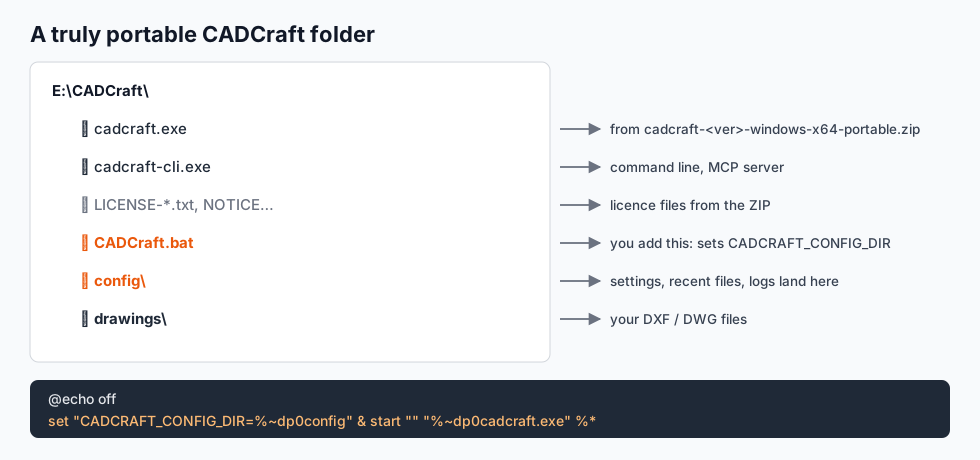
By default CADCraft saves its settings, recent-file list and logs to %APPDATA%\CADCraft on whichever computer it runs on. To keep them on the USB drive, point the CADCRAFT_CONFIG_DIR environment variable at a folder next to the program. A two-line launcher does it:
@echo off
set "CADCRAFT_CONFIG_DIR=%~dp0config" & start "" "%~dp0cadcraft.exe" %*
Save it as CADCraft.bat in the same folder as cadcraft.exe and start CADCraft from it. %~dp0 is the folder the batch file is in, so it works whatever drive letter the stick gets.
Two useful variations:
- Leave nothing behind at all. If
CADCRAFT_CONFIG_DIRis set but empty, CADCraft uses no settings folder: it starts with defaults and doesn't write settings anywhere. - Fonts. CADCraft uses the TrueType fonts installed on the computer it runs on. Text styles that name a font the host PC doesn't have fall back to another font, so drawings with special fonts can look different from machine to machine.
Linux: AppImage and tarballs
AppImages are portable by design: one file, mark it executable, run it. CADCraft ships cadcraft-<ver>-linux-x86_64.AppImage and an aarch64 build, plus .tar.gz archives you can unpack anywhere. FreeCAD and KiCad also publish AppImages, so a Linux stick can carry 2D, 3D and PCB tools together.
chmod +x cadcraft-0.14.0-linux-x86_64.AppImage
./cadcraft-0.14.0-linux-x86_64.AppImage
On macOS there's no real "portable" concept; the CADCraft app in its .dmg is a self-contained bundle you can copy anywhere, including an external drive.
When even a portable app is blocked: CAD in the browser
Many school and office PCs block any .exe that isn't on an approved list, portable or not. Then the browser is the way in:
- CADCraft online is the same program compiled to WebAssembly. No install, no account, and the drawing stays on your computer. It reads and writes DXF only (no DWG) and has no autosave, so save often.
- AutoCAD Web if you or your employer pay for AutoCAD.
- More options, including 3D tools, in free online CAD software.
You can even carry the browser version on the stick: the release's cadcraft-web-0.14.0.zip (10.3 MB) is a static site you can serve from any folder with a local web server.
Portable CAD checklist
- Download from the project's own release page, never a "portable" repack.
- Verify the SHA-256 against the published checksums.
- Keep settings and drawings on the stick (the launcher above).
- Use a fast USB 3 drive. Opening a 70 MB program from a cheap stick is noticeably slower.
- Save DXF if you'll open the drawing elsewhere. Every CAD program reads it.
- Eject properly before pulling the stick out, or the last save may not be written.
FAQ
Is there a portable version of AutoCAD?
No. Autodesk doesn’t offer a portable AutoCAD; it has to be installed and signed in to a licence. Downloads called “AutoCAD portable” are modified, unlicensed copies. For CAD without installing, use a program that ships a portable build (such as CADCraft’s Windows ZIP) or a browser-based tool.
Is portable AutoCAD safe to download?
No. Unofficial portable builds remove licensing checks, which breaks Autodesk’s licence terms, and they are a common way to spread malware and password stealers. On a work or school computer they can also break IT policy. Use a legal portable CAD program instead.
Can I run CAD from a USB drive?
Yes. Unzip CADCraft’s Windows portable ZIP to the drive and run cadcraft.exe; it needs no installer and no Visual C++ redistributable. Add a small launcher that sets CADCRAFT_CONFIG_DIR so its settings also stay on the drive. On Linux, AppImages run from a USB drive too.
Can I use CAD on a computer where I can’t install anything?
Often, yes. A portable ZIP runs without admin rights unless the computer blocks unknown programs. If it does, use CAD in the browser: cadcraft.org/online runs CADCraft with no install and no account, or AutoCAD Web if you have an AutoCAD subscription.
Related
- Free online CAD software: CAD that needs no install at all
- Free AutoCAD alternatives: desktop options by job
- Open source CAD compared: FreeCAD, LibreCAD, QCAD, OpenSCAD, SolveSpace and CADCraft