Free AutoCAD Alternatives: What Each One Costs You
Free AutoCAD alternatives compared honestly: CADCraft, LibreCAD, QCAD, FreeCAD, nanoCAD Free, DWG TrueView and the AutoCAD education licence. Which ones open and save DWG, allow paid work, and feel like AutoCAD.
 CADCraft AI Editorial
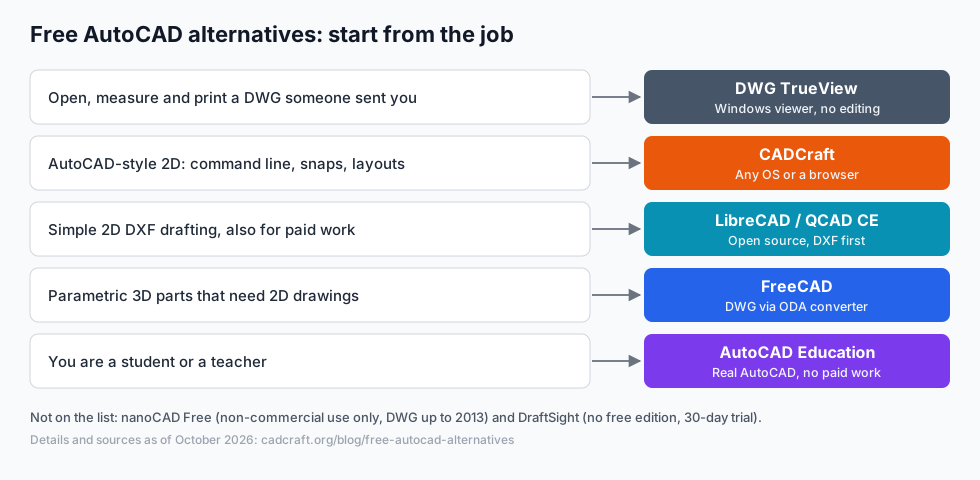
Short answer: there's no free AutoCAD, but there's a free tool for most jobs AutoCAD does. To look at and print a DWG, use Autodesk's own DWG TrueView (Windows). For AutoCAD-style 2D drafting on any computer, try CADCraft (download or online). For simple 2D DXF work you get paid for, LibreCAD or QCAD Community Edition. For 3D parts, FreeCAD. If you're a student or teacher, get the real AutoCAD through Autodesk's education licence.
cadcraft.org is an independent guide to CADCraft, not the official site and not affiliated with Autodesk. Facts about other products come from their own pages as of October 2026; licences and prices change, so check before you rely on them. CADCraft details were checked against its 0.13.0 source.
"Free" means four different things
Before comparing features, sort the candidates by what kind of free they are. It decides whether you may use them for paid work at all.
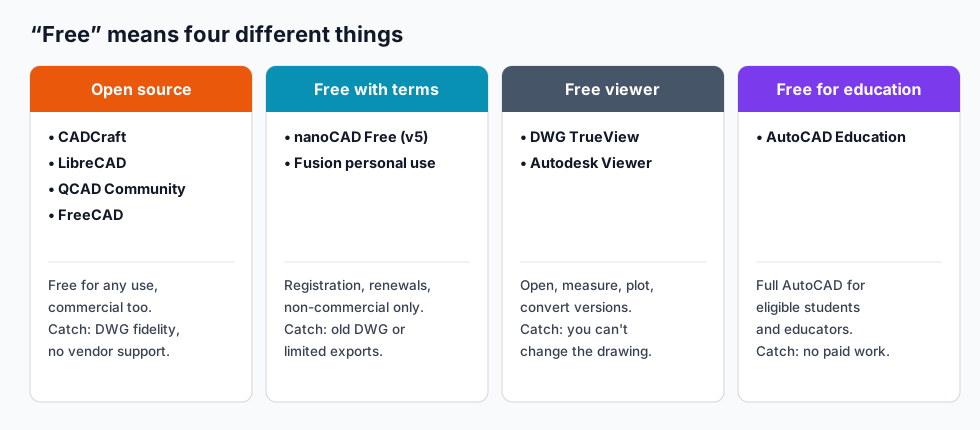
- Open source. Free for any use, including commercial work, with no account. You give up vendor support and full DWG fidelity.
- Free with terms. A commercial vendor gives away a limited edition. nanoCAD Free, for example, is "intended for non-commercial use", needs registration and a yearly (free) renewal, and supports DWG only up to 2013. Fusion's personal-use licence is non-commercial too.
- Free viewers. DWG TrueView and Autodesk Viewer open drawings so you can view, measure and print them. You can't edit.
- Free for education. The real AutoCAD, for eligible students and educators. Work you're paid for isn't allowed.
Two names that used to be on every "free AutoCAD" list no longer belong there. DraftSight has no free edition now, only a 30-day trial of DraftSight Premium. Fusion personal use is free but lost DWG and DXF export in Autodesk's 2020 licence change, and it is a 3D tool anyway.
Comparison table
| Tool | Kind of free | Opens DWG | Saves DWG | Feels like AutoCAD | Runs on |
|---|---|---|---|---|---|
| CADCraft | Open source (MIT/Apache-2.0) | Yes, R13–2018 (desktop app) | Yes, with losses (see below) | Closest: typed commands and aliases, snaps, grips, layouts | Windows, macOS, Linux, FreeBSD, browser |
| LibreCAD | Open source (GPLv2) | Yes, read only | No (DXF) | Partly: has a command line, different workflow | Windows, macOS, Linux |
| QCAD Community Edition | Open source (GPLv3) | No (QCAD Professional, paid) | No | Partly: menus first, command line available | Windows, macOS, Linux |
| FreeCAD | Open source (LGPL) | With the free ODA File Converter | With the same converter | No: a parametric 3D modeller | Windows, macOS, Linux |
| nanoCAD Free (v5) | Free, non-commercial | Up to 2013 | Up to 2013 | Yes: an AutoCAD-style interface | Windows |
| DWG TrueView | Free viewer | Yes | Converts between DWG versions, no editing | It is Autodesk's own viewer | Windows |
| AutoCAD Education | Free for education | Yes | Yes | It is AutoCAD | Windows, macOS |
The open source rows were also compared feature by feature in open source CAD: which free tool fits your work. This page is about replacing AutoCAD, so it adds the free-but-not-open options and asks one question throughout: what will an AutoCAD user miss?
Which one, in five situations
"Someone sent me a DWG and I need to check a dimension or print it." On Windows, DWG TrueView does exactly this and comes from the company that defines the format. On a Mac or Linux, or to batch-convert a folder to PDF or PNG, use CADCraft: the desktop app opens the file, and cadcraft-cli convert plan.dwg plan.pdf does it without a window. How to open a DWG file walks through both.
"I draft in AutoCAD every day and want the same habits for free." CADCraft is built for this: you type L, @5<45, TR, use the same aliases, and work in paper-space layouts with viewports. Try it on real drawings before committing (see the test below), because it's young.
"I make simple 2D DXF drawings for laser cutting or CNC, for clients." LibreCAD and QCAD Community Edition are mature, light and licensed for commercial use. If your clients send DWG, LibreCAD reads it; QCAD needs the paid Professional edition.
"I design parts that get machined or 3D printed." FreeCAD. Model in 3D and make the 2D drawings from the model with its TechDraw workbench. Don't force 3D work into a 2D drafting tool.
"I'm a student." Use the education licence and learn on the real AutoCAD, because that's what job ads ask for. Keep a free tool for anything you sell.
What you give up when you leave AutoCAD
This is the part most lists skip. Here's where CADCraft, the closest in workflow, stands today, from its own project documents:
| AutoCAD feature | CADCraft 0.13.0 |
|---|---|
| DWG round trips | Opens R13–2018. A DWG it saves keeps only what CADCraft models, and the project says those files haven't been checked in AutoCAD. Keep your originals |
| SHX fonts | Not read. Text is drawn with CADCraft's own stroke font, or a TrueType font you set with FONTALT, so text widths differ |
Plot styles (.ctb/.stb) | Plot style tables in CADCraft's own format; AutoCAD's binary .ctb files aren't read. DWG to PDF shows how to rebuild one |
| AutoLISP | .lsp routines load (APPLOAD); no vlax- ActiveX functions, no DCL dialogs, no .fas/.vlx, no ObjectARX plug-ins |
| 3D | None yet. CADCraft draws in 2D plan view; 3DORBIT answers "not available yet" |
| Raster images and PDF underlays | Not shown; ATTACH isn't available yet |
| Readiness | Pre-alpha. The roadmap estimates ≈ 38% "ready for real work" against AutoCAD 2027 |
What it adds that AutoCAD doesn't: a free licence with no account, Linux and FreeBSD builds, a browser version that opens DXF, a command-line tool for batch jobs, and an MCP server so AI agents can draw (see text to CAD).
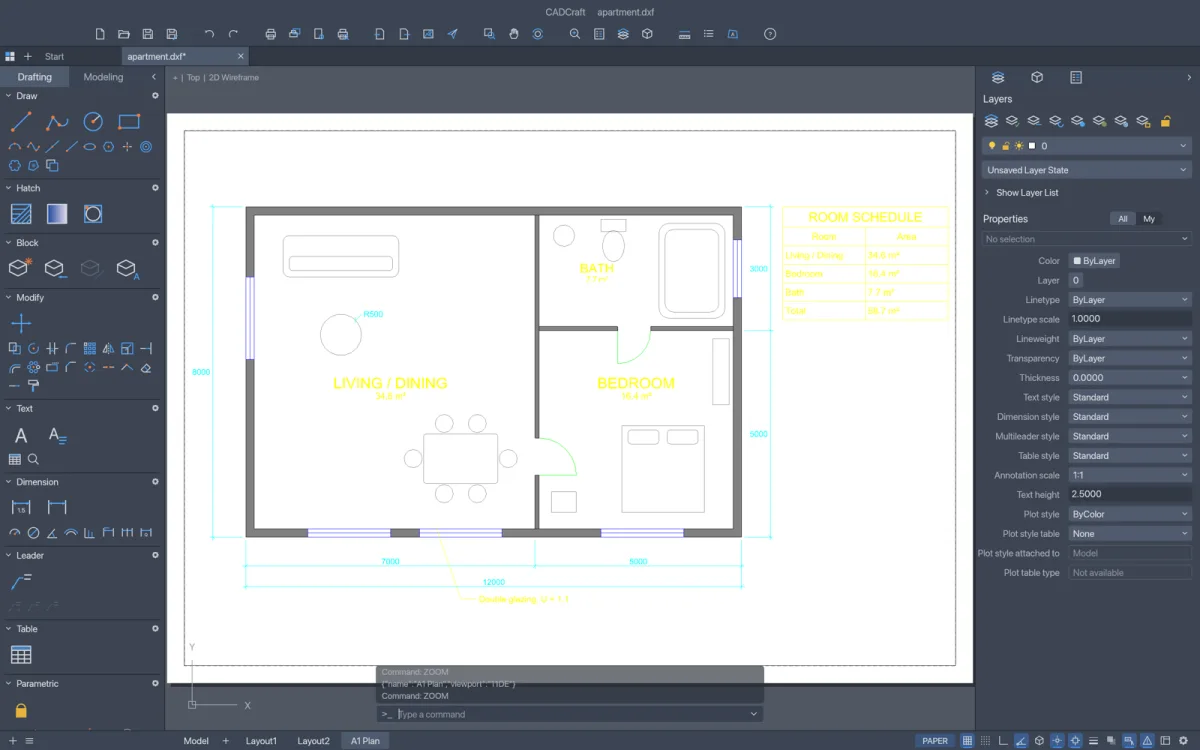
Paper-space layouts with scaled viewports work in CADCraft as in AutoCAD. Screenshot from the CADCraft project (MIT/Apache-2.0).
The other tools have their own versions of this list. LibreCAD has no paper-space layouts. QCAD Community Edition has no DWG. FreeCAD's 2D drafting is a side of its 3D modeller. nanoCAD Free is a 2013-era release that its vendor doesn't promise will run on Windows 10 or 11.
Test any alternative with your own files
An hour of testing beats any comparison table, this one included.
- Pick three real drawings: a simple one, your largest, and one from an outside consultant.
- Open each one and compare it with a PDF plotted from AutoCAD. Look at text, hatches, dimensions and blocks first. With CADCraft,
cadcraft-cli info drawing.dwglists entity counts and anything it skipped, before you even open the window. - Plot a sheet to PDF and check lineweights at 100% zoom.
- Save, reopen in AutoCAD (or ask whoever sends you files to do it), and look for missing objects.
- Run your two most-used LISP routines or scripts, if you have them.
If a drawing that matters fails step 4, keep AutoCAD (or DWG TrueView) for exchange and use the free tool for the work around it. Many people end up doing exactly that.
FAQ
Is there a completely free version of AutoCAD?
Not for general use. Autodesk gives AutoCAD free to eligible students and educators through its education licence, which may not be used for paid work. Everyone else gets a free trial. Autodesk’s free DWG TrueView opens, measures, plots and converts DWG files but cannot edit them.
Which free AutoCAD alternative is closest to AutoCAD?
For 2D drafting with the same habits (typed commands and aliases, object snaps, layers, paper-space layouts), CADCraft is the closest of the free options. It is open source and also runs in a browser. It is pre-alpha software: its own roadmap rates it about 38% ready for real work, so test it on your own drawings first.
Can I use a free AutoCAD alternative for commercial work?
Open source tools can be used commercially: CADCraft (MIT or Apache-2.0), LibreCAD (GPLv2), QCAD Community Edition (GPLv3) and FreeCAD (LGPL). nanoCAD Free is non-commercial only, and the AutoCAD education licence excludes paid work.
Which free alternative can save DWG files?
CADCraft’s desktop app opens DWG R13–2018 and can save DWG, though its project says a saved DWG keeps only what CADCraft models and has not been checked in AutoCAD. LibreCAD reads DWG but saves DXF. QCAD Community Edition doesn’t read DWG; that is in the paid QCAD Professional. nanoCAD Free saves DWG up to the 2013 format.
Related
- Open source CAD: which free tool fits your work
- AutoCAD commands cheat sheet: what works the same in CADCraft
- How to open a DWG file