How to Open a DXF File: 5 Free Ways
How to open a DXF file: tell ASCII from binary, read its version code, pick one of five free ways to open it, and fix corrupt files, version errors and missing SHX fonts.
 CADCraft AI Editorial
Short answer: open cadcraft.org/online, click into the drawing area, press Ctrl+O (⌘O on a Mac) and pick the .dxf. It opens in the browser with no install and no account. The online editor reads DXF R12 (ASCII) and R13–2018, ASCII or binary. If it won't open, find out whether the file is ASCII or binary and which version it is (Step 1), then use the fix for that case in the troubleshooting section. For big drawings or batch work, the free desktop app reads the same DXF versions.
cadcraft.org is an independent guide, not the official site. CADCraft is made by the ArtCraft team: see getartcraft.com/apps/cadcraft. The commands and messages below were checked with cadcraft-cli 0.8.0.
Step 1: Is it ASCII or binary, and which version?
You can answer both questions without CAD software.
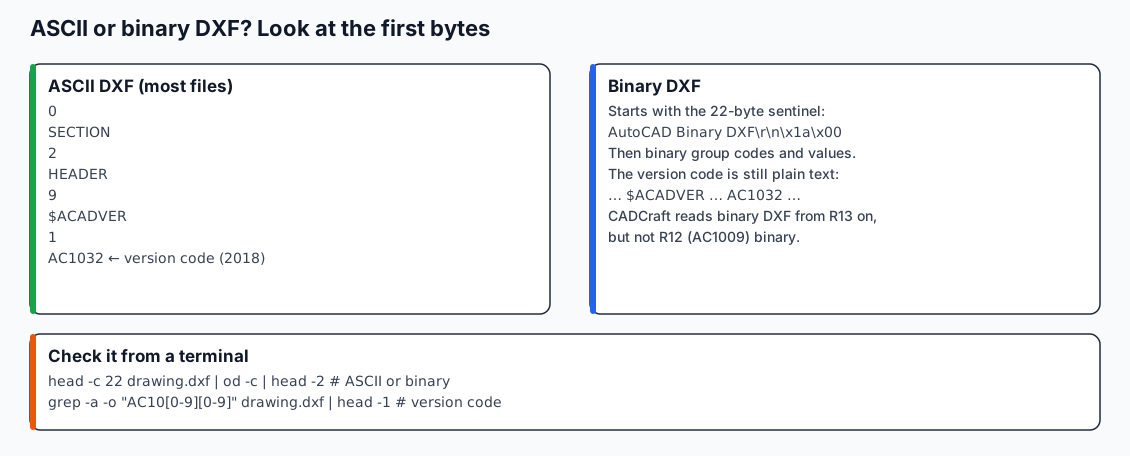
What to look for in the first bytes. The ASCII lines are the real start of a DXF saved by CADCraft.
ASCII or binary. Look at the first line.
head -c 22 drawing.dxf | od -c | head -2
Get-Content .\drawing.dxf -TotalCount 1
- An ASCII DXF starts with a group code, usually
0, and the next line isSECTION. Some writers put a999comment line first. - A binary DXF starts with the 22-byte sentinel
AutoCAD Binary DXF, then a carriage return, line feed,0x1Aand a zero byte. The rest isn't readable text.
Version. Both kinds store the version code as plain text in the header, after $ACADVER:
grep -a -o 'AC10[0-9][0-9]' drawing.dxf | head -1
(Select-String -Path .\drawing.dxf -Pattern 'AC10\d\d' -List).Matches.Value
| Code | DXF version | Opens in CADCraft (online and desktop)? |
|---|---|---|
| AC1009 | R12 | ASCII: yes. Binary: no |
| AC1012 | R13 | Yes |
| AC1014 | R14 | Yes |
| AC1015 | 2000 | Yes |
| AC1018 | 2004 | Yes |
| AC1021 | 2007 | Yes |
| AC1024 | 2010 | Yes |
| AC1027 | 2013 | Yes |
| AC1032 | 2018 (still current) | Yes |
| none | header-less DXF | Yes, if the ENTITIES section is valid |
The last row is common with files from CAM software and scripts. They often write only an ENTITIES section. CADCraft opened our hand-written two-line test file with no header at all.
Step 2: Pick one of the five ways to open it
| Way | Install? | Can edit? | Best for | Watch out for |
|---|---|---|---|---|
| 1. CADCraft online (/online) | No | Yes (2D) | Quick look or edit on any computer | DXF only, never DWG; first load downloads about 8–23 MB |
| 2. Other free desktop CAD (LibreCAD, QCAD and similar) | Yes | Yes (2D) | DXF-first 2D drafting | Each program's DXF coverage differs; check its release notes |
| 3. CADCraft desktop (download) | Yes | Yes (2D) | Large files, the command line, scripting | Early development; saving drops objects it doesn't model |
| 4. Import into another program (Inkscape, a CAM or laser tool, FreeCAD) | Yes | In that program | Turning the drawing into cut paths or artwork | An import isn't an open: dimensions, hatches and blocks may arrive as plain shapes or not at all |
| 5. Convert to PDF and only view it | CLI, once | No | Phones, clients, printing | You review a picture; nobody can edit it |
Way 1, the online editor, step by step:
- Go to the online editor and wait for the first load (it's cached after that).
- Click into the canvas so it has keyboard focus.
- Press Ctrl+O or use File ▸ Open…, and pick the
.dxf. - Type
zoom, Enter,e, Enter to zoom to extents if the screen looks empty.
On the free plan the file isn't uploaded anywhere. Auto-save keeps recent drawings in that browser, and Save downloads a file. The optional CADCraft Online Pro plan ($4.9/month or $29/year) adds cloud drawings, version history and share links. You don't need it to open anything.
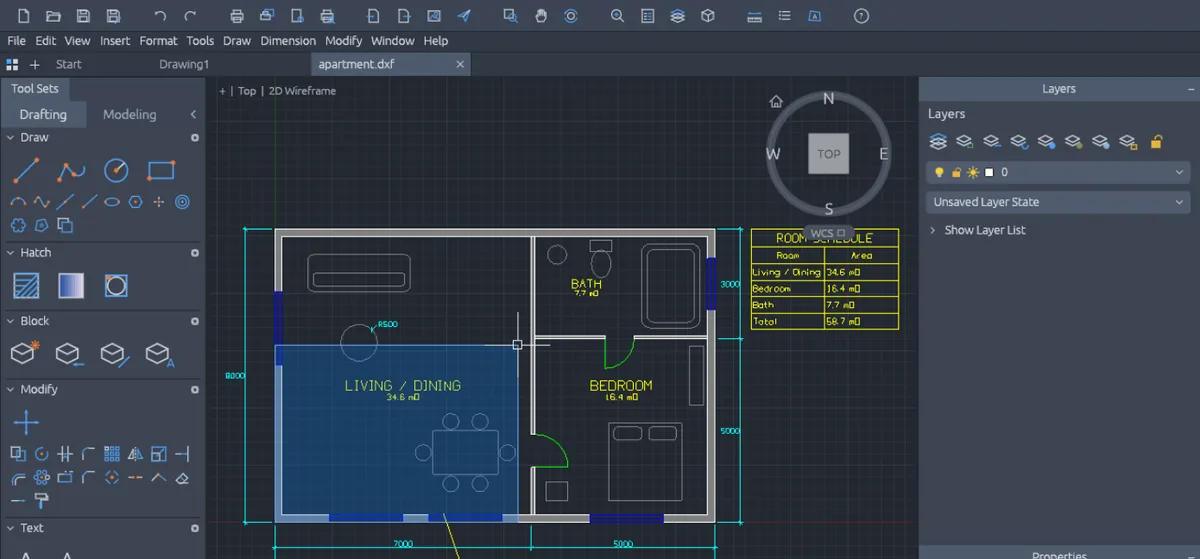
Way 5, view-only: with the desktop download's command-line tool,
cadcraft-cli convert drawing.dxf drawing.pdf
writes a vector PDF of model space, fitted to the extents. Use .png for an image instead. Add --window x0,y0,x1,y1 (drawing units, lower-left first) if a stray far-away object shrinks the drawing to a dot. DWG to PDF without losing lineweights covers layouts and pen settings.
Troubleshooting: why a DXF won't open
The file is damaged
CADCraft tells you where an ASCII file breaks. A file that isn't DXF at all fails on line 1:
invalid parameters for `open`: line 1: bad group code `hello world not a cad file`
A corrupted group code deeper in the file names the line:
invalid parameters for `open`: line 2085: bad group code `abc`
Open the file in a text editor, go to that line, and you'll usually find a cut-off download or a hand edit. A truncated binary DXF fails with unexpected end of file.
The dangerous case is a truncated ASCII DXF. We cut a 16-object file in the middle of its ENTITIES section. It opened without any error, showed 5 objects and reported nothing as skipped. If a drawing looks incomplete, ask for the file again. Before trusting it, compare cadcraft-cli info drawing.dxf (the entityCount and counts fields) with what the sender expects.
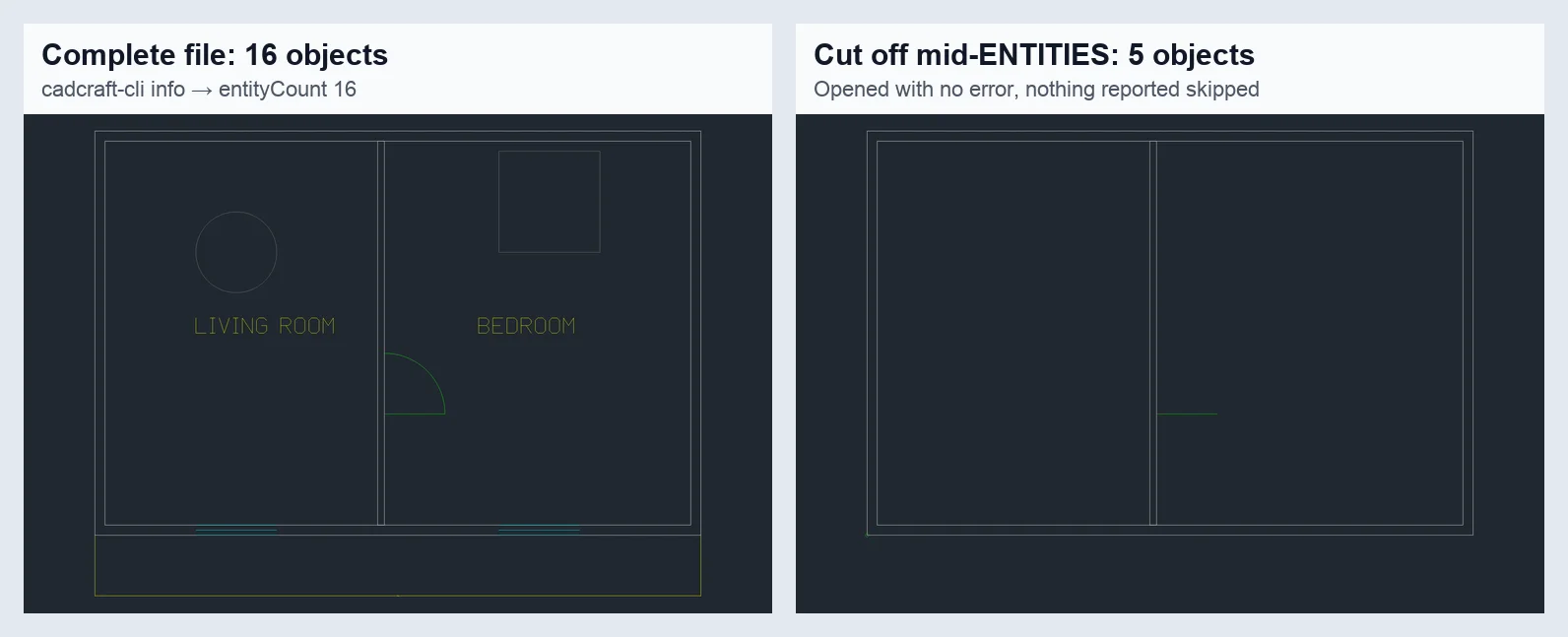
Rendered with cadcraft-cli 0.8.0. The right-hand file opened without an error message, which is why counting objects matters.
"Version too new" or "unsupported version"
No DXF is newer than AC1032. AutoCAD has written the 2018 format since 2018, including AutoCAD 2027. When a program says a DXF is too new, it's usually an older tool, often CAM or laser software that reads only R12. Re-save at a lower version for it. CADCraft writes 2000–2018 but not R12. Asking for 12 returns:
invalid parameters for `saveas`: unknown version `12` (use 2000, 2004, 2007, 2010, 2013, 2018)
If the machine needs R12, export from software that writes it.
The reverse problem exists too: CADCraft can't read an R12 binary DXF. Its binary reader expects the two-byte group codes that R13 introduced. Ask for an ASCII copy.
Missing SHX fonts
DXF files name their fonts but don't contain them. Drawings from AutoCAD often use SHX fonts such as romans.shx. CADCraft doesn't read SHX files at all. It draws that text with its own single-stroke font, so widths and line breaks differ from the sender's screen. The font name stays in the file: we round-tripped a romans.shx style through DWG and back to DXF, and the name survived. So the recipient's software still uses the right font.
To get closer to the original look, set a TrueType stand-in:
SETVAR FONTALT Arial
For Chinese, Japanese or Korean text, use a CJK font such as Noto Sans CJK TC. Otherwise those characters fall back to whatever wide-coverage font is installed. Restart CADCraft after installing a new font: the font folders are scanned once at startup.
It's actually a DWG
A file renamed to .dxf whose first six bytes are AC1032 (or another AC10xx code) and the rest binary is a DWG. The online editor doesn't read DWG. Open it in the desktop app, or follow How to convert DWG to DXF.
Can you open a DXF file on a phone?
The CADCraft online editor is designed for a mouse and keyboard, and the online page itself recommends a computer. Command-line drafting with an on-screen keyboard is slow even when the page loads. The reliable phone route is Way 5: convert the drawing to PDF on a computer and send yourself the PDF. Any phone PDF viewer can zoom into vector lines, and TrueType text in it stays searchable.
FAQ
How do I open a DXF file without installing anything?
Go to cadcraft.org/online, click into the canvas, press Ctrl+O (⌘O on a Mac) and pick the .dxf. The online editor runs CADCraft in the browser and reads DXF R12 (ASCII) and R13–2018. On the free plan the file stays on your computer; nothing is uploaded.
Is a DXF file text or binary?
Either. Most DXF files are ASCII text: the first line is a group code such as " 0", followed by SECTION. A binary DXF starts with the words "AutoCAD Binary DXF". CADCraft reads binary DXF from R13 onward, but not R12 binary.
Can I open a DXF file on my phone?
The CADCraft online editor is built for a mouse and keyboard, and this site recommends opening it on a computer. To view a drawing on a phone, convert it to PDF or PNG on a computer first (cadcraft-cli convert drawing.dxf drawing.pdf) and send yourself that file.
Why does my DXF open as a blank screen?
Usually the geometry is far from the origin or very small. Type zoom, press Enter, then e and Enter to zoom to extents. If the CADCraft online editor shows nothing at all, not even the grid, switch the renderer to Force WebGL2 or CPU mode on the online page.
Related
- DXF vs DWG: what each format keeps and which one to send
- CAD file formats explained: what opens what
- How to open a DWG file: when the file turns out to be DWG