AutoCAD AI for Free: What Works Without a Subscription
What AI is actually built into AutoCAD 2027, what it needs, and four free ways to use AI for CAD instead: chat models that write scripts, an AI agent driving open-source CADCraft, and text-to-CAD tools. With a real AI-written drawing and the two mistakes it made.
 CADCraft AI Editorial
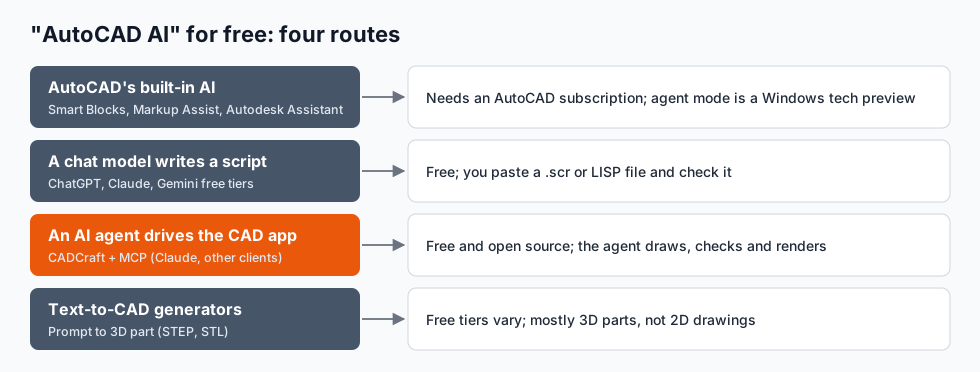
Short answer: AutoCAD's AI isn't free. Smart Blocks, Markup Assist and Autodesk Assistant come with an AutoCAD subscription, and the new agent version of Autodesk Assistant in AutoCAD 2027 is a tech preview that only runs in the Windows desktop app and, by Autodesk's description, can't yet create or edit drawing content. If you want AI to help with CAD without paying, there are four free routes:
- A chat model writes a script. ChatGPT, Claude or Gemini write an AutoCAD script (
.scr) or AutoLISP; you run it. - An AI agent drives a CAD program. Connect Claude (or another MCP client) to CADCraft, a free, open-source AutoCAD-style program, and the agent draws, checks and renders by itself.
- Text-to-CAD generators for 3D parts.
- AI for the paperwork around CAD: reading specs, writing title-block text, checking schedules.
cadcraft.org is an independent guide, not affiliated with Autodesk. CADCraft is the ArtCraft team's open-source CAD program (getartcraft.com/apps/cadcraft). AutoCAD details are as of AutoCAD 2027 (October 2026); Autodesk changes plans and features often, so check its site.
What AI is actually in AutoCAD
| Feature | What it does | Status |
|---|---|---|
| Smart Blocks: Placement | Suggests where to put a block, based on how you placed it before | Released (AutoCAD and LT) |
| Smart Blocks: Search and Convert | Finds repeated geometry and turns it into blocks | Released |
| Smart Blocks: Detect and Convert | Recognises objects in a drawing and replaces them with blocks | Released in an AutoCAD 2026 update |
| Markup Import and Markup Assist | Reads markups from a PDF or photo and helps apply them | Released |
| Autodesk Assistant (2027 agent) | Answers questions, compares styles, checks standards, selects by a description | Tech preview, Windows desktop app only |
The 2027 Assistant is the interesting one. It understands plain-language requests, breaks them into steps, and carries them out through a local MCP server that the AutoCAD installer adds. In Autodesk's examples it compares two dimension styles, checks the drawing against a .dws standards file, selects "all block references on layer X whose name contains Y", and highlights zero-length objects. What it can't do yet, by Autodesk's own description, is draw or change geometry, or export PDFs.
All of it needs a paid AutoCAD (or AutoCAD LT, for the features LT has). There's no free AutoCAD with AI. The free education licence is for students and teachers only, and "AutoCAD AI free download" sites offering more than that are cracked copies.
Route 1: a chat model writes the script
This is the simplest free route, and it works in AutoCAD, AutoCAD LT (which has run AutoLISP since LT 2024) and AutoCAD-compatible programs like CADCraft. Describe the drawing, ask for a .scr file, run it with the SCRIPT command.
We tried it for this article. Prompt:
Write an AutoCAD script, metric (mm), for a parking row: 20 stalls 2.5 m × 5 m in two rows of ten, a 6 m drive aisle between them, stall numbers P01–P20, a "DRIVE AISLE 6.0 m" label, and dimensions for one stall width, one stall depth and the aisle. Put stalls, text and dimensions on separate layers.
The answer (written by Claude, abridged; the stall lines repeat for each of the ten stall divisions):
-layer m STALLS c 4 STALLS

-layer m TEXT c 7 TEXT

-layer m DIMS c 1 DIMS

-layer s STALLS

rectang 0,0 25000,16000
line 0,5000 25000,5000

line 0,11000 25000,11000

line 2500,0 2500,5000

line 2500,11000 2500,16000

-layer s TEXT

text j mc 1250,2500 600 0 P01

text j mc 12500,8000 800 0 DRIVE AISLE 6.0 m

-layer s DIMS

dimscale 200
dimlinear 0,16000 2500,16000 1250,17500
dimlinear 25000,11000 25000,16000 26500,13500
dimlinear 25000,5000 25000,11000 26500,8000
zoom e
The blank lines matter: in a script a blank line is Enter, which ends LINE and LAYER. We ran it headless in CADCraft's command-line tool, which renders the result to a PNG:
cadcraft-cli run --metric --script-file parking.scr --save parking.dxf --export parking.png
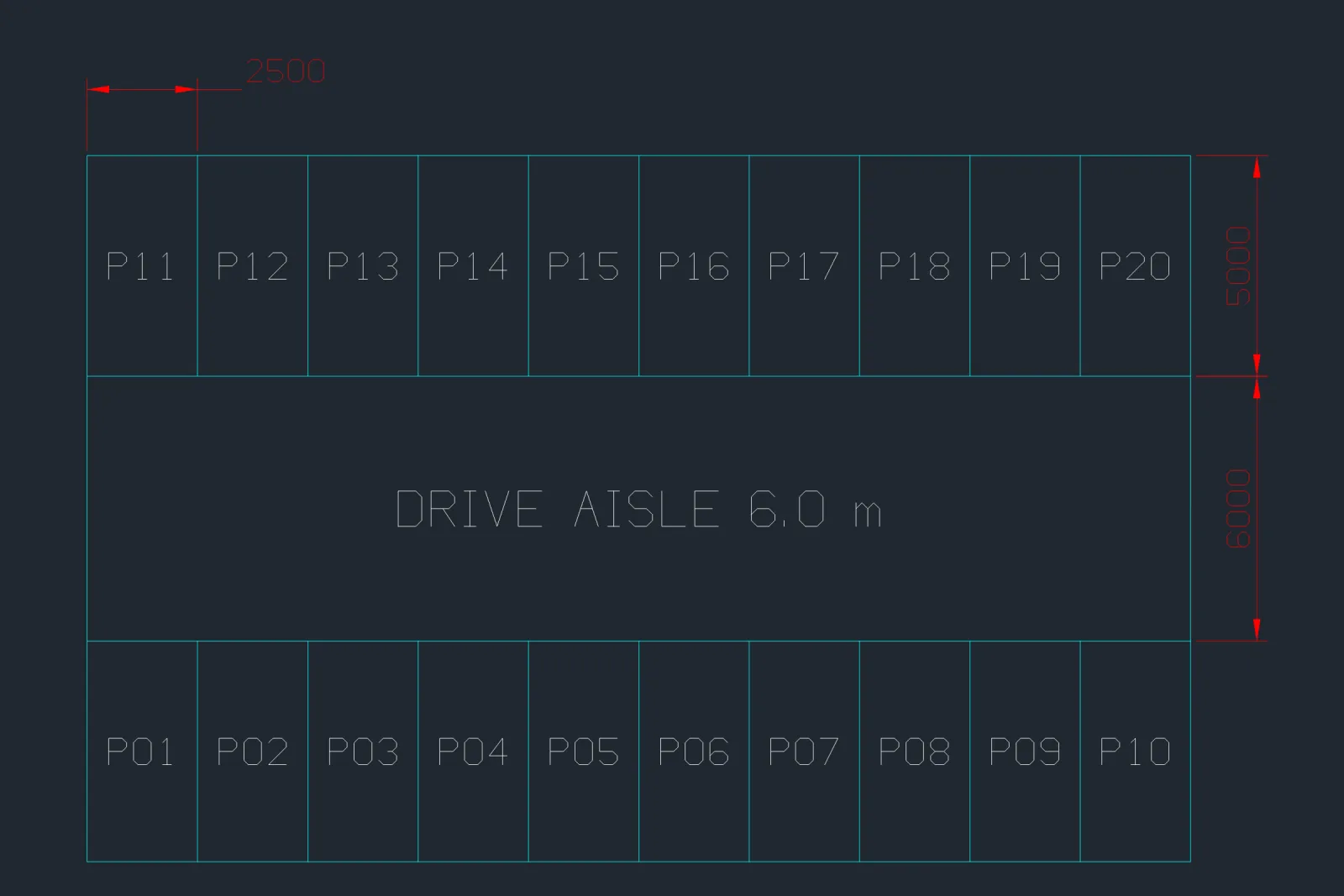
That's the third version. The first two ran without a single error message and were still wrong:
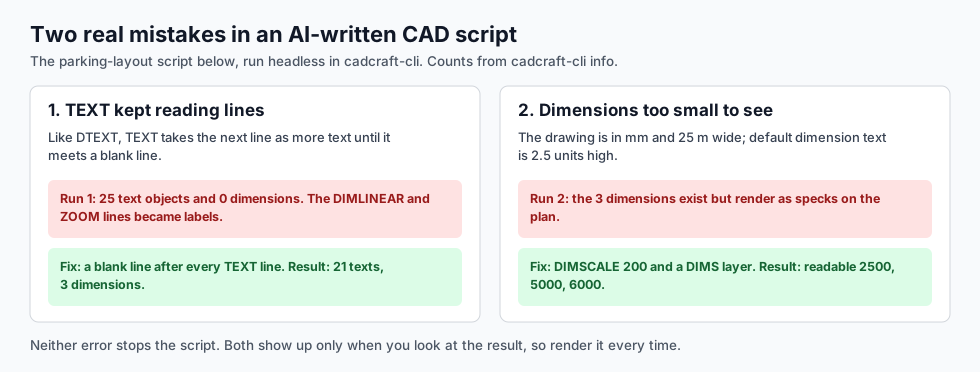
- TEXT swallowed the rest of the script. The first version had no blank line after each
textline. Like AutoCAD's DTEXT, TEXT keeps asking for another line of text until it gets an empty one, so every following line, including the three DIMLINEARs andzoom e, became a label. Result: 25 text objects and no dimensions. - The dimensions were invisible. The second version drew the dimensions, but at the default dimension text height of 2.5 units, which is 2.5 mm in a 25-metre drawing. Setting
DIMSCALEto 200 fixed it.
The lesson isn't that AI scripts are bad. It wrote more than 50 correct lines in seconds. The lesson is that a script that "runs" isn't a drawing that's right. Count the objects or look at a render before you trust it. In CADCraft, cadcraft-cli info parking.dxf prints the counts (21 Text, 3 Dimension, 20 Line, 1 Polyline for the final version).
Route 2: an AI agent drives the CAD program
A script is one-shot: the model never sees what it drew. An agent connected over MCP (Model Context Protocol) can type a command, query the drawing, render it, look at the picture and correct itself, which is exactly the loop that would have caught both mistakes above.
This is the same idea as the 2027 Autodesk Assistant, with two differences: CADCraft's MCP server can create and edit geometry, and it's free. CADCraft ships it in its command-line tool (cadcraft-cli mcp), with 12 tools for running commands, reading objects and rendering. Setup and a full worked session, including where the agent went wrong, are in AutoCAD AI agent with MCP.
What you need:
- CADCraft (free; Windows, macOS, Linux)
- An MCP client: Claude Desktop, Claude Code, or another client that supports MCP. The free tiers of these clients have usage limits.
The catch: CADCraft is pre-alpha, rated about 38% ready for real work by its own roadmap, and the AI is only as good as the drawing it's checking. Keep a human on anything that goes to a client or a fabricator.
Route 3: text-to-CAD for 3D parts
"AI CAD" sites that turn a prompt into a 3D part are a different job: they make solids (STEP, STL) for 3D printing or mechanical design, not 2D drawings with dimensions and layers. A chat model writing OpenSCAD code is the free, inspectable version of the same thing. Text to CAD compares the routes and shows what models get wrong.
Route 4: AI around the drawing
Some of the most useful AI help never touches the DWG:
- Summarising a spec or a code clause before you draw.
- Writing repetitive text: room schedules, door tags, title-block fields, revision notes.
- Explaining a command or an error, which is what the original Autodesk Assistant chatbot did. Any chat model can explain
DIMSCALEor a failedTRIM, and the AutoCAD commands cheat sheet covers the basics. - Writing AutoLISP for a repetitive job, in AutoCAD or AutoCAD LT 2024 and later.
Which route to pick
- You have AutoCAD and a subscription: try Autodesk Assistant on Windows for checking and selecting, and use a chat model for scripts and LISP.
- You don't have AutoCAD: CADCraft plus an MCP client for 2D; scripts work in it too.
- You need a 3D part, not a drawing: text-to-CAD or OpenSCAD.
- Whatever you pick: look at the result, count what's there, and measure one dimension by hand.
FAQ
Is AutoCAD AI free?
No. AutoCAD’s AI features (Smart Blocks, Markup Import and Markup Assist, and Autodesk Assistant) come with an AutoCAD subscription, and the agent version of Autodesk Assistant in AutoCAD 2027 is a tech preview that isn’t available on Mac, web or mobile. Free alternatives are chat models that write scripts and AI agents that drive open-source CAD such as CADCraft.
What AI features does AutoCAD 2027 have?
Autodesk Assistant, which in 2027 became an agent (tech preview) that runs through a local MCP server: it answers questions, compares dimension styles, checks a drawing against a standards file and selects objects by description. Autodesk says it can’t yet create or edit drawing content. Smart Blocks and Markup Import/Assist carry over from earlier releases.
Can ChatGPT or Claude make AutoCAD drawings?
Indirectly. They can write AutoCAD scripts (.scr) and AutoLISP that you run in AutoCAD or a compatible program, and an agent connected over MCP can draw directly in CADCraft. Always check the result: in our test the script ran without an error but produced wrong output twice.
What is the best free AI CAD software?
For 2D drawings, CADCraft with an MCP-capable AI client: it’s free, open source, and the agent can draw, query and render. For simple 3D parts, a text-to-CAD generator or a chat model writing OpenSCAD code. None of them replaces checking the drawing yourself.
Related
- AutoCAD AI agent with MCP: connect Claude to CADCraft, step by step
- Text to CAD: what actually works today
- AutoCAD shortcuts: the aliases AI scripts use