How Much Does AutoCAD Cost? Every Way to Get It, Priced
AutoCAD pricing explained: subscription only since 2016, what the full subscription includes (specialized toolsets, web and mobile), AutoCAD LT at roughly a quarter of the price, Flex tokens for occasional use, the free education plan, and the alternatives that cost nothing — CADCraft, LibreCAD, QCAD — or sell licences you keep.
 CADCraft AI Editorial
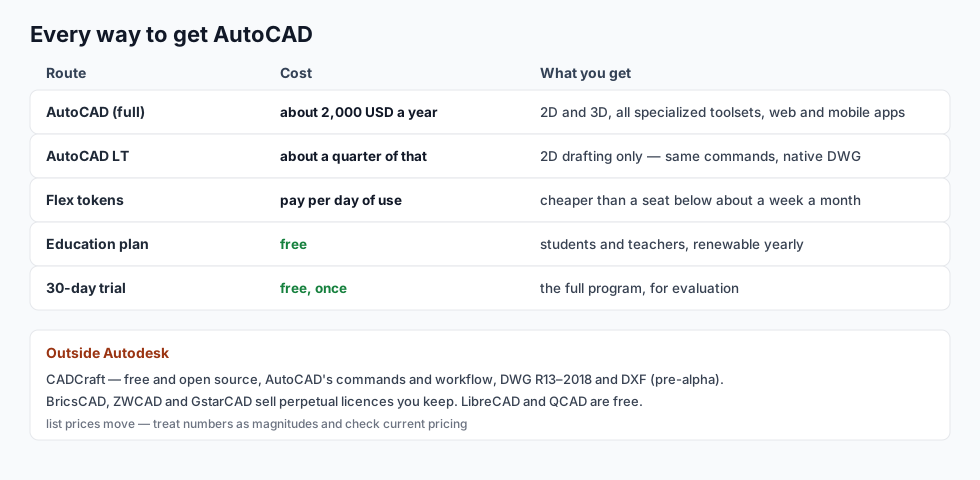
Short answer: AutoCAD is subscription only — new perpetual licences ended in 2016. The full program lists at roughly two thousand US dollars a year; AutoCAD LT, the 2D edition, at about a quarter of that. Students and teachers get it free (education plan), Flex tokens bill per day for occasional use, and there's a 30-day trial. Or step outside Autodesk: CADCraft is free and open source with AutoCAD's commands and DWG support, and some alternatives sell licences you keep.
List prices move and vary by region — treat the numbers here as magnitudes and check Autodesk's site for today's figure. The structure around them changes much more slowly, and that's what this page is about.
cadcraft.org is an independent guide, not affiliated with Autodesk. CADCraft is the ArtCraft team's open-source, AutoCAD-style CAD program (getartcraft.com/apps/cadcraft).
Subscription only, since 2016
Autodesk stopped selling new perpetual licences for AutoCAD in 2016. Since then the only way to run it is a subscription — monthly, yearly or multi-year — which includes every update released while it's active. Cancel and the software stops opening drawings; your files stay yours (DWG is just a file), but the editor stops.
That change is why the alternatives market woke up, and why questions like is there a portable AutoCAD mostly lead to cracked downloads — not a route to recommend.
What the full subscription includes
The headline price buys more than the desktop program:
- All the specialized toolsets. One AutoCAD subscription includes Architecture, Electrical, MEP, Map 3D, Mechanical, Plant 3D, Raster Design — the toolsets that used to be separate products. For an office that needs two of them, this quietly halves the bill.
- AutoCAD Web and the mobile app. Full editing in a browser and on a phone or tablet — genuinely useful for site visits and quick markups, not just a viewer.
- Updates, continuously, plus cloud storage and the Autodesk account machinery.
AutoCAD LT: the 2D edition
For pure 2D drafting, LT is the same program with the 3D modelling removed — and at roughly a quarter of the price, it's the value pick of the official lineup:
| AutoCAD | AutoCAD LT | |
|---|---|---|
| 2D drafting, full DWG | ✓ | ✓ |
| 3D solids and surfaces | ✓ | — |
| Specialized toolsets | ✓ all of them | — |
| LISP and customization | ✓ | ✓ back in recent LT |
| Web and mobile apps | ✓ | ✓ |
| Price | about 2,000 USD/year | about a quarter of it |
The catch is one-directional: if your work later needs 3D or a toolset, you upgrade to the full subscription; there's no discount for having had LT.
The cheaper official doors
- Education plan — free. Students and teachers get the full AutoCAD free, renewable yearly, with an education watermark on plots. If you're learning, this plus a study roadmap is the whole toolkit.
- Flex — pay per day. Autodesk's token system: buy tokens in packs, spend one per day you actually open the program. Below roughly a week of use per month, Flex costs less than a subscription. Above that, subscribe.
- 30-day trial. Full program, free, once. Good for a project evaluation, not a lifestyle.
Outside Autodesk
| Program | Cost | Notes |
|---|---|---|
| CADCraft | free, open source | AutoCAD's commands and workflow, DWG R13–2018, DXF; pre-alpha |
| LibreCAD | free | mature 2D, its own workflow |
| QCAD | free CE / paid Pro | 2D, DXF-native |
| BricsCAD | one-time licence available | very close to AutoCAD, includes 3D |
| ZWCAD, GstarCAD | perpetual licences sold | AutoCAD-like 2D, popular in Asia |
| DraftSight | subscription | Dassault's AutoCAD-like 2D CAD |
The full comparison, including what each costs you in workflow differences, is free AutoCAD alternatives and Autodesk alternatives across products.
Which one fits you
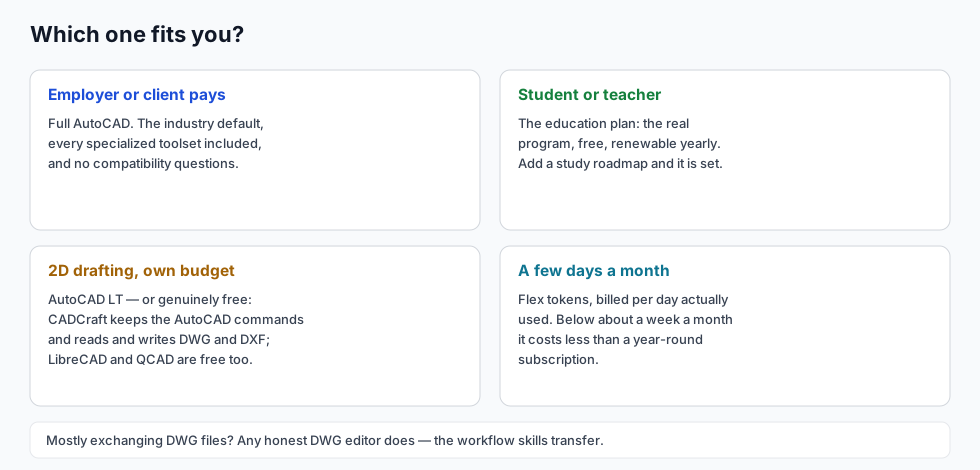
- An employer or client is paying: full AutoCAD. It's the industry default, the toolsets are included, and compatibility questions disappear.
- You're a student or teacher: the education plan. Free, renewable, the real program.
- 2D drafting on your own budget: LT — or genuinely free software. CADCraft copies the AutoCAD command workflow and reads and writes DWG and DXF; try it in the browser before installing anything.
- A few days a month: Flex tokens. Do the arithmetic against the subscription once a year.
- You mostly need to exchange DWG files: any editor that reads and writes DWG honestly — which is a shorter list than marketing pages suggest.
The other cost: your time
Subscription money isn't the whole bill — retraining is. Moving to any alternative costs days of "where is that command", against months of subscription fees. It cuts both ways: AutoCAD skills transfer almost entirely to BricsCAD and CADCraft (same commands, aliases and prompts), and barely at all to a genuinely different paradigm. The cheapest long-term position is competence in the AutoCAD workflow itself — which free tools let you build without paying anyone. See how to learn AutoCAD.
FAQ
Is there a free version of AutoCAD?
No free full version exists. Students and teachers get AutoCAD free through Autodesk’s education plan, renewable yearly; anyone can run the 30-day free trial once. The web and mobile apps are included with a subscription, not free on their own. If you just need to view a DWG, Autodesk’s online viewer and several free desktop apps do that.
Can I still buy AutoCAD permanently?
No. Autodesk stopped selling new perpetual licences in 2016; AutoCAD is subscription only (monthly, yearly or multi-year). If you want a licence you keep, alternatives sell them: BricsCAD, ZWCAD and GstarCAD offer perpetual 2D CAD that works with DWG files. CADCraft is free and open source — nothing to buy at all.
What is the cheapest legitimate way to run AutoCAD?
If you only do 2D drafting, AutoCAD LT costs roughly a quarter of the full subscription. If you need it only a few days a month, Autodesk’s Flex tokens bill per day of use and can undercut a year-round seat. If you qualify as a student or teacher, the education plan is free.
Is AutoCAD LT enough for me?
For 2D drafting, usually yes: LT runs the full 2D command set and native DWG files. It has no 3D modelling, and a few specialist features are trimmed — check anything you depend on (recent LT releases did bring LISP back). Employers and exchange partners rarely notice which edition a 2D drawing came from.
Related
- Free AutoCAD alternatives: what each free tool costs you
- Autodesk alternatives: the whole product family, mapped
- Portable AutoCAD: why free portable downloads are a trap, and what to run instead