Autodesk Alternatives: A Free Option for Every Autodesk Product
Free and open-source alternatives to AutoCAD, Fusion, Inventor, Revit, 3ds Max, Maya, Civil 3D, AutoCAD Electrical and EAGLE, product by product, plus which file format to export before you switch and what you lose.
 CADCraft AI Editorial
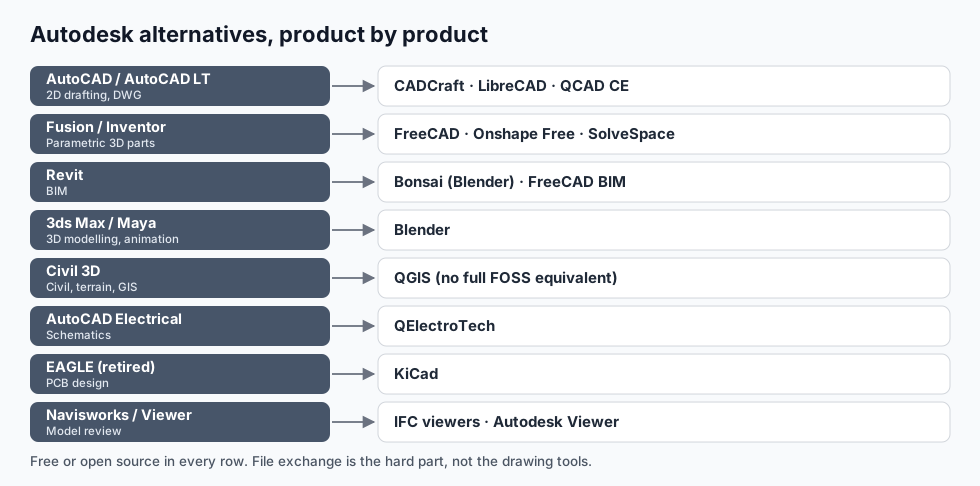
Short answer: no single program replaces Autodesk, but almost every Autodesk product has a free or open-source counterpart:
- AutoCAD / AutoCAD LT (2D drafting) → CADCraft, LibreCAD, QCAD Community Edition
- Fusion / Inventor (parametric 3D) → FreeCAD, Onshape Free, SolveSpace
- Revit (BIM) → Bonsai (the Blender add-on formerly called BlenderBIM), FreeCAD's BIM workbench
- 3ds Max / Maya (3D modelling and animation) → Blender
- Civil 3D → QGIS for GIS and terrain; no full open-source equivalent
- AutoCAD Electrical → QElectroTech
- EAGLE (PCB design, now retired) → KiCad
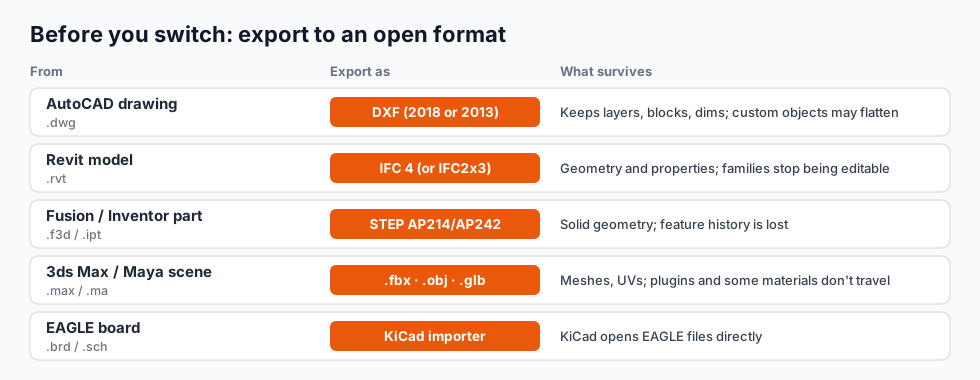
The tools are rarely the hard part. File exchange is. Export to open formats before your subscription ends; the table further down shows what to export and what you'll lose.
cadcraft.org is an independent guide, not affiliated with Autodesk. CADCraft is the ArtCraft team's open-source CAD program (getartcraft.com/apps/cadcraft). Product details are as of October 2026; licences and free plans change, so check each project's site.
First: do you actually need to leave?
Autodesk itself has free routes that are easy to miss:
- Students and teachers get AutoCAD, Revit, Fusion, Inventor, Maya and more through the Autodesk Education plan.
- Fusion for personal use is free for non-commercial hobby projects, with a reduced feature set.
- Viewers are free: DWG TrueView on Windows and Autodesk Viewer in the browser open and print DWG and many other formats.
If one of those fits, it's the least disruptive option. The rest of this page is for people who need commercial use without a subscription, run Linux, want open file formats, or simply want software they control.
Product by product
AutoCAD and AutoCAD LT → CADCraft, LibreCAD, QCAD
For 2D drafting the choice depends on how much of AutoCAD's way of working you want to keep.
- CADCraft is the closest in workflow: typed commands and aliases, the same prompts, object snaps, grips, layers, paper-space layouts and plotting. It's open source (MIT OR Apache-2.0), runs on Windows, macOS, Linux and FreeBSD, in a browser, and can be driven by AI agents over MCP. The desktop app opens DWG R13 to 2018. It's pre-alpha: its own roadmap rates it about 38% ready for real work.
- LibreCAD is mature, light and DXF-centred, good for simple 2D on modest hardware.
- QCAD Community Edition is polished 2D drafting; DWG support is in the paid Professional edition.
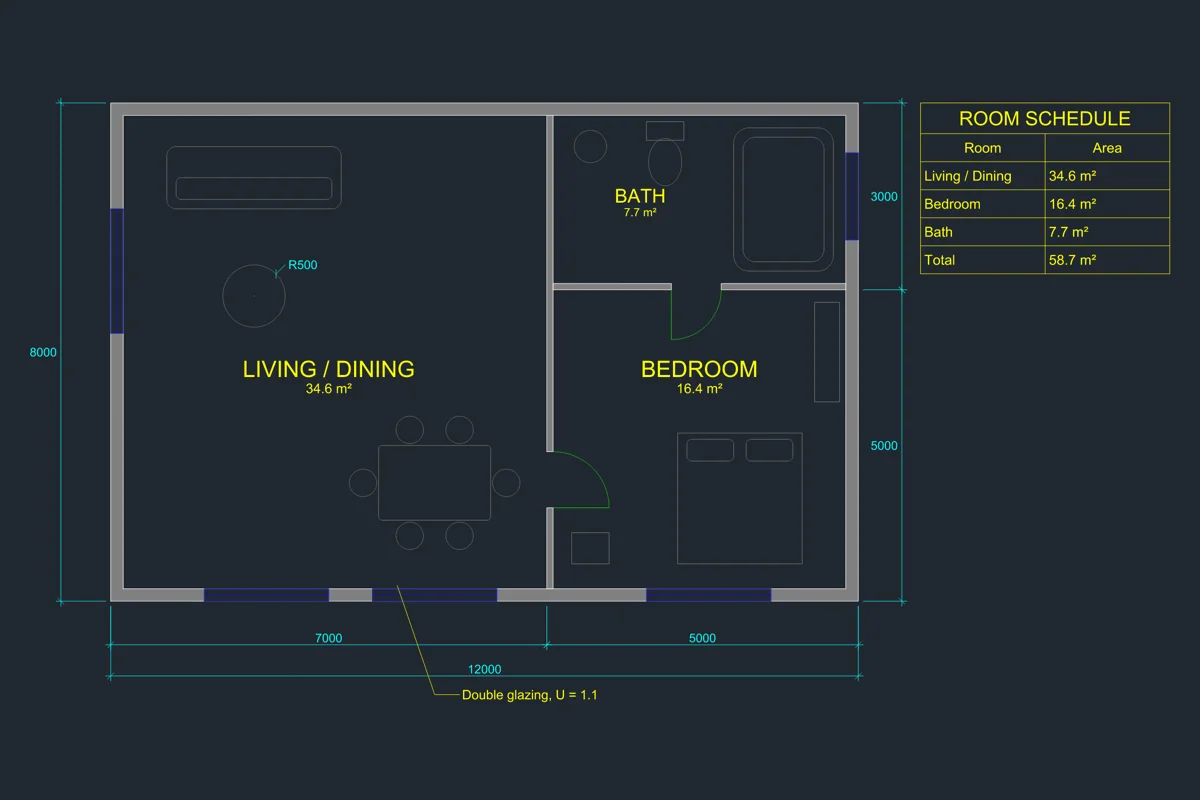
CADCraft's sample apartment plan: the kind of 2D work that moves off AutoCAD most easily.
If you need a commercial DWG-native replacement with support, BricsCAD and DraftSight are the usual paid choices. The full comparison of the free ones is in free AutoCAD alternatives.
Fusion and Inventor → FreeCAD, Onshape Free, SolveSpace
- FreeCAD (LGPL) is the most complete open-source parametric 3D modeller: sketches with constraints, Part Design features, assemblies, TechDraw drawings, FEM and Python scripting. FreeCAD 1.0 fixed much of the long-standing "topological naming" pain when you edit early features.
- Onshape Free is full professional parametric CAD in the browser, but documents on the free plan are public and use is non-commercial.
- SolveSpace is a small, fast constraint-based modeller for simple parts and mechanisms.
What you lose: Fusion's integrated CAM, simulation and rendering, and Inventor's large-assembly tools and frame/sheet-metal depth. FreeCAD has CAM and sheet-metal workbenches, but expect more friction.
Revit → Bonsai, FreeCAD BIM
Open-source BIM is built around IFC, the open BIM standard, rather than a proprietary model format.
- Bonsai (formerly BlenderBIM) runs inside Blender and edits IFC files natively: walls, slabs, openings, property sets, drawings and schedules.
- FreeCAD's BIM workbench models buildings parametrically and exports IFC.
What you lose: Revit families and their parametric behaviour, the content libraries, worksharing, and the consultants who all send Revit files. For a small practice or a design-only workflow, IFC-based BIM is workable. For a team inside a Revit-based supply chain, it's hard.
3ds Max and Maya → Blender
This is the easiest swap on the page. Blender (GPL) covers modelling, sculpting, UVs, rigging, animation, simulation, Cycles and EEVEE rendering, compositing and video editing, and it has a huge community and add-on ecosystem. Studios that depend on specific Maya pipelines or 3ds Max plug-ins (V-Ray scenes, architectural plug-ins) have more to migrate than individuals do.
Civil 3D → QGIS (and an honest gap)
QGIS is excellent for GIS: survey data, terrain models, contours, coordinate systems and map output. Pair it with a 2D CAD tool for the drawings. What's missing in open source is the core of Civil 3D: corridor modelling, grading, alignments and profiles, pipe networks. There's no mature free replacement for that, so civil teams leaving Autodesk usually move to another commercial civil package.
AutoCAD Electrical → QElectroTech
QElectroTech (GPL) draws electrical, hydraulic and pneumatic schematics with element libraries, cross-references, terminal strips and bills of materials. It's not as automated as AutoCAD Electrical (no PLC I/O tools, simpler wire numbering), but it's a real schematic tool, not a general CAD program with symbols.
EAGLE → KiCad
Autodesk retired EAGLE in June 2026 and pointed users to Fusion's electronics workspace. KiCad (GPL) is the open-source standard for PCB design: schematic capture, layout with a push-and-shove router, 3D board view and Gerber output. It imports EAGLE schematics and boards directly, so it's also the simplest migration of any on this page.
Navisworks and model review → IFC viewers
For coordination and review, export IFC and use a free IFC viewer, or keep using the free Autodesk Viewer for Autodesk formats. There's no open-source equivalent to Navisworks' clash detection at scale.
Export before you switch
Do this while you still have the Autodesk software, and keep the original files as well.
Practical notes:
- DWG → DXF. Save as DXF 2018 or 2013 so most tools can read it. Custom objects (AutoCAD Architecture walls, Civil 3D surfaces) arrive as dumb geometry or proxies. DWG to DXF covers the details, and DXF vs DWG explains the differences.
- Revit → IFC. Use IFC 4 where the receiving tool supports it; check the export settings for property sets you care about.
- Fusion / Inventor → STEP. You get exact solids that any 3D CAD program reads, but no feature tree. Keep a PDF drawing of each part for the design intent.
- Batch it. If you have hundreds of drawings, script the export now. After the subscription ends you'll need a viewer or a converter for every file.
How to plan the switch
- List what you actually use. Most people pay for a suite and use one or two programs in it.
- Check who you exchange files with. If clients require DWG or RVT back, the free tools carry real risk. If they accept PDF, DXF, IFC or STEP, you have more freedom.
- Run one real project in parallel in the new tool before cancelling anything.
- Expect a learning cost in the 3D and BIM tools. 2D drafting and Blender are the quickest moves.
FAQ
What is the best free alternative to Autodesk software?
There is no single replacement for the whole suite. Pick per product: CADCraft, LibreCAD or QCAD for AutoCAD 2D; FreeCAD or Onshape Free for Fusion and Inventor; Bonsai (Blender) or FreeCAD BIM for Revit; Blender for 3ds Max and Maya; KiCad for EAGLE; QElectroTech for AutoCAD Electrical.
Is there an open source alternative to Autodesk?
Yes, for most products: Blender (3ds Max, Maya), FreeCAD (Fusion, Inventor, some Revit work), Bonsai (Revit, via IFC), KiCad (EAGLE), QElectroTech (AutoCAD Electrical), QGIS (parts of Civil 3D) and CADCraft, LibreCAD or QCAD Community Edition (AutoCAD 2D).
Is there an open source alternative to Civil 3D?
Not a complete one. QGIS covers GIS, terrain and survey data, and a 2D CAD tool covers the drawings, but corridor modelling, grading and pipe networks have no mature open-source equivalent. Teams leaving Civil 3D usually move to another commercial civil package.
Can I keep my Autodesk files if I switch?
Export them to open formats first: DWG to DXF, Revit to IFC, Fusion and Inventor parts to STEP, 3ds Max and Maya scenes to FBX, OBJ or glTF. Geometry survives; editable history, families and plug-in data usually don’t. Keep the originals too.
Related
- Free AutoCAD alternatives: the 2D options compared in depth
- Open source CAD compared: FreeCAD, LibreCAD, QCAD, OpenSCAD, SolveSpace and CADCraft
- CAD file formats: which formats each tool reads and writes